We independently review everything we recommend. When you buy through our links, we may earn a commission. As an Amazon Associate we earn from qualifying purchases.
Best Budget OBD2 Scanners: 5 Code Readers That Help
Compare five budget OBD2 scanners and code readers with live data, I/M readiness checks and ABS coverage, from basic wired readers to a Bluetooth tool.
Compare five budget OBD2 scanners and code readers with live data, I/M readiness checks and ABS coverage, from basic wired readers to a Bluetooth tool.
⭐ Key Takeaways
Quick answer: Our top pick is BlueDriver Bluetooth Pro OBDII Scan Tool for iPhone and Android, with Ancel AD310 Classic Enhanced OBD II Scanner Code Reader as a strong alternative.
The check engine light is deliberately vague: it can mean a loose gas cap or a failing catalytic converter, and the difference is worth real money. A budget OBD2 scanner reads the code behind the light in about a minute, turning a blind trip to the shop into an informed conversation, and it costs less than a single diagnostic fee at most garages. Every car and light truck sold in the United States since 1996 has the same OBD2 port under the dash, so one reader serves the whole household fleet. The five tools below range from a wired reader that costs pocket money to a Bluetooth scanner with repair guidance, and the guide is plain about what each level can and cannot diagnose.
As an Amazon Associate, we earn from qualifying purchases.
Quick answer
For most owners, the BlueDriver Pro is the scanner worth buying once: it reads engine, ABS, airbag and TPMS codes on many makes, with likely fixes in its app and no subscription fee. Choose the Ancel AD310 for the cheapest wired reader, the Foxwell NT301 for live data graphing on a color screen, the Autel AL319 for one-click emissions checks, and the Motopower MP69033 for the lowest price.
BlueDriver Bluetooth Pro OBDII Scan Tool for iPhone and Android
Top Pick
BlueDriver Bluetooth Pro OBDII Scan Tool for iPhone and Android
BlueDriver is a small Bluetooth dongle that plugs into the OBD2 port and turns your phone into the scanner, and its depth is what separates it from generic dongles. Beyond standard engine codes, it reads enhanced systems on many popular makes, including ABS, airbag (SRS), TPMS and transmission codes that basic readers cannot see. Each code comes back with a report that lists the most commonly reported fixes for that code on that vehicle, drawn from a large repair database, which is exactly the information a first-time troubleshooter needs before ordering parts.
There is no subscription fee; the app and its features are included, which matters in a category where some rivals charge yearly for full access. Live data streaming, freeze frame capture, smog check readiness and the ability to save and share reports round it out, and the dongle is compact enough to leave plugged in, though removing it between drives is the cautious habit for battery drain on older cars. The limits are the format’s limits: you need a phone or tablet, there is no screen on the tool itself, and enhanced coverage varies by make and year, so check your vehicle on the maker’s compatibility list before buying. For one scanner to own for a decade of cars, this is the pick.
Ancel AD310 Classic Enhanced OBD II Scanner Code Reader
Runner-Up
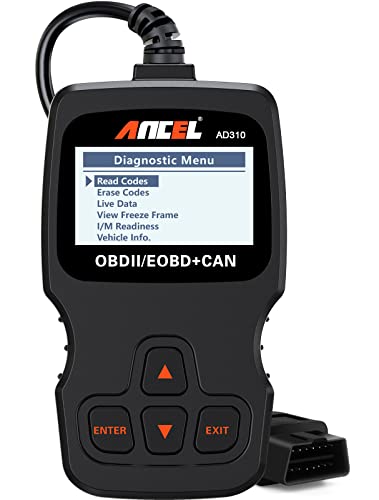
Ancel AD310 Classic Enhanced OBD II Scanner Code Reader
The AD310 is the scanner that lives in thousands of glove boxes, and its appeal is radical simplicity. It is a wired handheld reader powered by the car itself, so there are no batteries to charge and no apps to install: plug it in, turn the key, and it reads and clears engine trouble codes, shows freeze frame data from the moment a fault set, and reports I/M readiness status for emissions inspections. A clear monochrome display and big buttons make it usable in a dark driveway with gloves on.
Its scope is deliberately narrow. It reads generic engine and emissions codes on OBD2 vehicles, which covers the great majority of check engine lights, but it does not read ABS, airbag or transmission systems, and its live data is basic compared with the Foxwell below. Definitions are shown as code numbers with short descriptions, so a quick phone search often fills in the detail. None of that undermines its role: as a first check before calling a mechanic, a pre-inspection readiness check, or a cheap second reader for a teen’s first car, it does the essential job for very little money and asks nothing in return.
The NT301 is the wired reader for owners who want to see what the car is doing, not just what code it set. Its 2.8-inch color screen graphs live sensor data, so you can watch oxygen sensor voltages sweep, coolant temperature climb and fuel trims respond in real time, and it records and plays back data streams for review after a drive. Code definitions appear on screen in full sentences, and a one-press I/M readiness key with red, yellow and green indicator lights gives an instant answer on emissions test readiness, complete with an audible beep for the all-clear.
It covers the full set of OBD2 modes, including freeze frame, oxygen sensor tests and EVAP system tests, and it updates over USB from a computer, which keeps an inexpensive tool current. Like the Ancel, it is an engine-focused reader: ABS and airbag systems are outside its scope, so a dashboard lit with those warnings needs the BlueDriver or a shop-level tool. Within engine diagnostics, though, the combination of graphing, on-device definitions and readiness hotkey makes it the most capable standalone budget reader here, and the one a budding home mechanic will outgrow last.
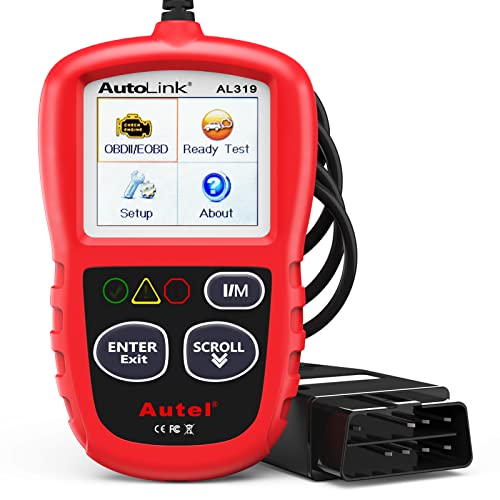
Autel builds professional shop tools, and the AL319 is its budget code reader distilled from that line. Its signature feature is a one-click I/M readiness key that runs the emissions monitor check and reports status through a color screen plus LED and audible indicators, a workflow aimed squarely at owners facing a state inspection. It reads and clears generic and manufacturer-specific engine codes, retrieves freeze frame data, shows live data, and includes a built-in code definition library so results make sense on the device itself.
The color TFT display is bright and the menu structure is the simplest here, which suits owners who will use the tool twice a year and do not want to relearn it each time. Autel offers free lifetime updates for this model through its update software, unusual at this price and valuable as vehicle coverage lists evolve. The boundaries match its class: engine and emissions only, no ABS or airbag access, and live data is view-and-scroll rather than the Foxwell’s graphing. If your scanner’s main jobs are decoding the occasional check engine light and confirming the car is ready to pass inspection, the AL319 does both with the least friction in this guide.
The MP69033 is the floor of the category: a wired reader that handles the core OBD2 jobs for less than a tank of fuel costs. It reads and clears engine trouble codes, displays freeze frame data, checks I/M readiness monitor status, shows vehicle information, and can display battery voltage, a handy extra when a no-start might be electrical rather than a sensor fault. It draws power from the car, needs no app, no Bluetooth pairing and no updates to do its job, and its multi-language menus and simple four-button layout keep it approachable.
Expect the compromises the price implies. The small monochrome screen shows codes with brief descriptions, live data is minimal, and there is no ABS, airbag or transmission coverage. The housing is basic plastic that shrugs off glove box duty fine. Judged on what it is, a dependable code reader for confirming whether a check engine light is a loose cap or a real fault, and for verifying readiness before an inspection, it delivers the essential information at the lowest cost here. It is also a sensible choice for a second vehicle, a work truck, or a parent equipping a new driver’s first car.
How to choose
Match the tool to the lights you actually see. Engine-only readers like the Ancel, Foxwell, Autel and Motopower handle check engine codes, which are the most common; if you also want ABS, airbag or TPMS codes, the BlueDriver is the budget route, with coverage that varies by make. Decide between wired and app-based: wired readers are self-contained, need no phone and never need charging, while the Bluetooth tool offers deeper data and repair reports through its app. Live data matters if you plan to diagnose rather than just decode; graphing, as on the NT301, is the step that separates the two. Check the update policy, since free updates keep a cheap tool useful for years. Finally, confirm compatibility: all OBD2 readers work with 1996 and newer US gasoline cars, while diesel and hybrid coverage starts later and varies, and pure EVs have limited OBD2 support.
Who should skip
Skip a budget scanner if your car is under a full warranty; the dealer diagnosis is already paid for, and clearing codes can erase evidence the technician needs. Skip engine-only readers if your actual problem is an ABS, airbag or transmission warning, since they will report nothing and leave you guessing. Owners of pre-1996 vehicles need the older OBD1 tools instead, and EV owners will find only a small subset of data exposed. Also skip the scanner-as-mechanic mindset: a code names a circuit or a reading out of range, not a guilty part, and anyone unwilling to do a little follow-up diagnosis may turn a code reader into a parts cannon.
Frequently asked questions
Will an OBD2 scanner work on my car?
If your car is a gasoline model sold in the United States from 1996 onward, yes; the port and protocol are standardized. Diesel trucks gained full OBD2 coverage a few years later, and hybrids work for engine codes. Electric vehicles expose only limited data. The port sits under the dashboard on the driver’s side, usually within reach of the steering column.
Can I clear a code to pass an emissions inspection?
Clearing the code turns off the light but also resets the readiness monitors, and inspection stations fail cars whose monitors have not completed. The monitors only reset after specific driving conditions, the drive cycle, and if the underlying fault is still present the light and code return. Fix the problem first, then drive until the scanner shows monitors ready.
What is the difference between generic and enhanced codes?
Generic codes are the standardized set every OBD2 reader can read, covering common engine and emissions faults. Enhanced codes are manufacturer-specific and reach deeper systems like ABS, airbags and transmissions on particular makes. Basic readers show generic codes only; tools like the BlueDriver add enhanced coverage for many popular brands, which is why it costs more.
Do Bluetooth OBD2 dongles drain the car battery?
A plugged-in dongle draws a small standby current. In a daily-driven car that draw is negligible, but in a car that sits for weeks it can contribute to a flat battery, and some dongles keep the vehicle network awake. The safe habit is to unplug the dongle when you are done diagnosing, whatever the brand.
Final verdict
Buy the BlueDriver Pro if you want one scanner that goes beyond engine codes into ABS, airbag and repair guidance without a subscription. Buy the Foxwell NT301 if you prefer a standalone tool with a color screen and live data graphing, the Autel AL319 for the smoothest emissions readiness checks, and the Ancel AD310 or Motopower MP69033 when the job is simply reading and clearing engine codes for the least money. Any of them pays for itself the first time it turns a mystery light into a known code.
E
Emubox Editorial Team
We compare specs, materials and verified owner reviews before a product earns a spot. Rankings are never paid.
Affiliate disclosure. As an Amazon Associate we earn from qualifying purchases at no extra cost to you. Prices accurate as of the date shown.
Best 2mm 70 cm portable antennas compared: telescopic radio antennas near 70 cm, with connectors, bands and collapsed sizes explained before you buy today.
Find the best thermostat setting for winter and summer, with energy-saving setbacks, humidity tips, and smart schedules for a comfortable home year-round.
The best affordable business computer monitors balance sharp text, eye comfort and lasting value. Compare four reliable office displays built for long workdays.
Looking for the best inexpensive HD TVs non smart? Compare five genuinely non-smart HD televisions with tuners, HDMI inputs and simple setup for any small room.

 BlueDriver Bluetooth Pro OBDII Scan Tool for iPhone and Android
 Ancel AD310 Classic Enhanced OBD II Scanner Code Reader
 Foxwell NT301 OBD2 Scanner with Live Data
 Autel AL319 Professional OBD2 Scanner Code Reader
 Motopower MP69033 Car OBD2 Scanner Code Reader









