We independently review everything we recommend. When you buy through our links, we may earn a commission. As an Amazon Associate we earn from qualifying purchases.
Best Budget Curved Monitor: 5 Picks for Every Desk
Looking for the best budget curved monitor? Compare five 27-inch curved displays for gaming, work, and movies, with refresh rates and panels explained.
Looking for the best budget curved monitor? Compare five 27-inch curved displays for gaming, work, and movies, with refresh rates and panels explained.
⭐ Key Takeaways
Quick answer: Our top pick is Samsung CF398 27-Inch Curved Monitor, with Sceptre C275B-144R 27-Inch Curved Gaming Monitor as a strong alternative.
The best budget curved monitor for most people is the Sceptre C275B-144R. It pairs a 27-inch curved screen with a 144Hz refresh rate and AMD FreeSync at a budget tier, which covers everyday work, streaming, and casual gaming in one display. The Samsung CF398 is the simpler 60Hz option for office work and video. Gamers who want faster motion should look at the AOC C27G2Z with its 240Hz refresh rate, while the Dell S2722DGM and the Gigabyte GS27QCA step up to sharp QHD resolution for crisper text and more detailed game worlds. Every monitor in this roundup is a 27-inch curved display with a standard 16:9 aspect ratio, so none of them is an ultrawide or a flat panel.
How to Choose a Budget Curved Monitor
A curved monitor wraps the edges of the screen slightly toward you, which keeps the left and right sides at a more even viewing distance. The curve is measured as a radius, such as 1800R or 1500R, and a smaller number means a tighter curve.
Screen size and resolution work together. A 27-inch display with Full HD resolution, 1920 by 1080 pixels, looks fine for games and video, though text can look slightly soft when you sit close. A 27-inch display with QHD resolution, 2560 by 1440 pixels, shows sharper text and finer detail, which helps with documents, photo editing, and games that reward visual clarity.
Refresh rate decides how smooth motion looks. A 60Hz screen refreshes the image 60 times per second and suits office work, browsing, and streaming. A 144Hz or 165Hz screen refreshes far more often, which makes scrolling smoother and fast games easier to follow. A 240Hz screen goes further still and suits competitive players who value every frame. A lower response time, such as 1ms, means less blur behind fast-moving objects.
Panel type shapes color and contrast. Most budget curved monitors use VA panels, which deliver deep blacks and strong contrast, making them a good fit for movies and games played in a dim room. Viewing angles are narrower than on IPS panels, so colors can shift when you look at the screen from a sharp side angle.
Adaptive sync technology, such as AMD FreeSync, matches the refresh rate of the monitor to the frame rate of the graphics card, which reduces tearing and stuttering in games. Check the ports before you buy: DisplayPort is the best connection for high refresh rates, while HDMI is the standard connection for consoles and laptops.
The Samsung CF398 is the simplest curved monitor in this roundup, and that is exactly its appeal. It is a 27-inch Full HD display with a gentle 1800R curve, a 60Hz refresh rate, and a 4ms response time. The slim design looks tidy on a desk, and AMD FreeSync support helps keep video playback smooth.
This monitor suits people who want the curved experience without paying for gaming speed they will never use. It handles word processing, spreadsheets, video calls, and streaming with ease. HDMI and DisplayPort connections cover desktops, laptop docks, and mini PCs.
The trade-offs are clear. A 60Hz refresh rate will not satisfy competitive gamers, and Full HD resolution at 27 inches is less sharp than QHD. For a bedroom desk, a student setup, or a second screen beside a laptop, though, the CF398 covers the basics well at a budget tier.
The Sceptre C275B-144R is our top pick because it balances the three things budget shoppers care about most: a curved screen, a fast refresh rate, and a budget tier. The 27-inch Full HD display runs at 144Hz with a 3ms response time, which is more than double the refresh rate of a standard office monitor. Fast games look smoother and scrolling feels fluid.
AMD FreeSync keeps frames and refreshes in step, reducing tearing during quick camera movements. The monitor also includes dedicated FPS and RTS game modes, which adjust the picture settings for first-person shooters and real-time strategy games. A tilt-adjustable stand lets you set the viewing angle to suit your chair and desk height.
Connectivity covers DisplayPort, HDMI, and DVI, so the monitor works with older and newer graphics cards alike. The screen finish is glossy, which makes colors look vivid but can catch reflections from a bright window behind you.
Specs
Screen size: 27 inches
Panel: LED, curved, 1800R
Resolution: 1920 x 1080 Full HD
Refresh rate: 144Hz
Response time: 3ms
Sync: AMD FreeSync
Ports: DisplayPort, HDMI, DVI
Features: FPS and RTS game modes, anti-flicker, blue light filter
The AOC C27G2Z is built for speed. Its 27-inch curved VA panel runs at 240Hz with a 0.5ms response time, which puts it in a different league from the 60Hz and 144Hz monitors in this roundup. Fast-paced shooters and racing games look exceptionally fluid, and AMD FreeSync support keeps the picture free of tearing while the frame rate varies.
The height-adjustable stand lets you set the screen at eye level. Two HDMI 2.0 ports and one DisplayPort give you room for a PC and a console side by side, and the monitor is ready for Xbox, PlayStation, and Switch connections. AOC backs the display with a three-year zero-bright-dot warranty, which covers bright pixel defects.
The main compromise is resolution: Full HD at 27 inches is less sharp than QHD, so text and fine detail will not look as crisp as on the Dell or Gigabyte picks below.
The Dell S2722DGM steps up to QHD resolution, and the difference is easy to see. Text looks sharper, spreadsheets show more detail, and game worlds gain finer textures on the 2560 by 1440 panel. The 27-inch curved VA display runs at 165Hz through DisplayPort with a 1ms response time, so motion stays smooth and responsive.
AMD FreeSync Premium support smooths out frame rate changes, and the monitor includes two HDMI ports plus one DisplayPort for a PC and a console. The stand adjusts for height and tilt, which helps you set the screen at eye level and reduce neck strain during long sessions.
The S2722DGM sits at a premium tier in this roundup, and it earns that position with the QHD panel and the 165Hz refresh rate combined. It is a strong fit for someone who games and works on the same desk and wants one display to handle both well.
The Gigabyte GS27QCA combines the sharpest traits of this roundup: QHD resolution and a 180Hz refresh rate. The 27-inch curved display shows 2560 by 1440 pixels, so text stays crisp and game detail stays fine, while the 180Hz refresh rate and 1ms response time keep motion smooth.
AMD FreeSync support reduces tearing, and HDR Ready support lets the monitor accept high dynamic range signals for brighter highlights in supported games and video. The connections include HDMI 2.0 and DisplayPort 1.4, so a modern graphics card can drive the full refresh rate.
The GS27QCA lands at a mid-range tier while offering the highest refresh rate of any QHD monitor here, which makes it a strong value for gamers who want both resolution and speed. It doubles as a capable everyday display for browsing, streaming, and office work.
Specs
Screen size: 27 inches
Panel: VA, curved, 1500R
Resolution: 2560 x 1440 QHD
Refresh rate: 180Hz
Response time: 1ms
Sync: AMD FreeSync
HDR: HDR Ready
Ports: HDMI 2.0, DisplayPort 1.4
Brightness: 250 candelas per square meter
Tier: Mid-range
Frequently Asked Questions
Is a curved monitor better than a flat monitor for everyday use?
A curved monitor can feel more immersive because the edges sit closer to your eyes, which suits games and movies. For spreadsheets and word processing, the difference is small, and a flat monitor works just as well. The curve matters most at 27 inches and above, where the edges of a flat screen sit noticeably farther away.
What size curved monitor is best on a budget?
A 27-inch curved monitor is the best balance of size, resolution, and desk space for most budget shoppers. It is large enough for the curve to feel natural, fits on a standard desk, and works well at both Full HD and QHD resolutions. A 24-inch curved screen can feel cramped, while a 32-inch model needs a deeper desk.
Do I need a high refresh rate if I do not play games?
No, a 60Hz curved monitor is enough for office work, browsing, and streaming video. A higher refresh rate still makes scrolling and moving windows feel smoother, so a 144Hz screen is a pleasant upgrade even outside games. If you only watch videos and write documents, spend the difference on a sharper QHD panel instead of a faster refresh rate.
Does a curved monitor work well with a laptop?
Yes, a curved monitor works with a laptop through HDMI or DisplayPort. Check that your laptop can output the resolution and refresh rate you want: most modern laptops handle Full HD at 144Hz over HDMI, while QHD at 165Hz or 180Hz usually needs DisplayPort or a recent HDMI version. A height-adjustable stand or a VESA arm helps line the external screen up with the laptop display.
Conclusion
The best budget curved monitor is the one that matches how you actually use your desk. The Sceptre C275B-144R leads this roundup because it offers a 144Hz curved screen with FreeSync at a budget tier, covering work, streaming, and casual gaming in a single display. The Samsung CF398 is the right call for a simple home office setup, while the AOC C27G2Z gives competitive players a 240Hz panel at a mid-range tier. Shoppers who want sharper text and finer detail should pick the Dell S2722DGM or the Gigabyte GS27QCA, both of which pair QHD resolution with fast refresh rates. Before buying, confirm the ports on your computer and measure your desk depth.
E
Emubox Editorial Team
We compare specs, materials and verified owner reviews before a product earns a spot. Rankings are never paid.
Affiliate disclosure. As an Amazon Associate we earn from qualifying purchases at no extra cost to you. Prices accurate as of the date shown.
Best 2mm 70 cm portable antennas compared: telescopic radio antennas near 70 cm, with connectors, bands and collapsed sizes explained before you buy today.
Find the best thermostat setting for winter and summer, with energy-saving setbacks, humidity tips, and smart schedules for a comfortable home year-round.
The best affordable business computer monitors balance sharp text, eye comfort and lasting value. Compare four reliable office displays built for long workdays.
Looking for the best inexpensive HD TVs non smart? Compare five genuinely non-smart HD televisions with tuners, HDMI inputs and simple setup for any small room.

 Samsung CF398 27-Inch Curved Monitor
 Sceptre C275B-144R 27-Inch Curved Gaming Monitor
 AOC C27G2Z 27-Inch Curved Gaming Monitor
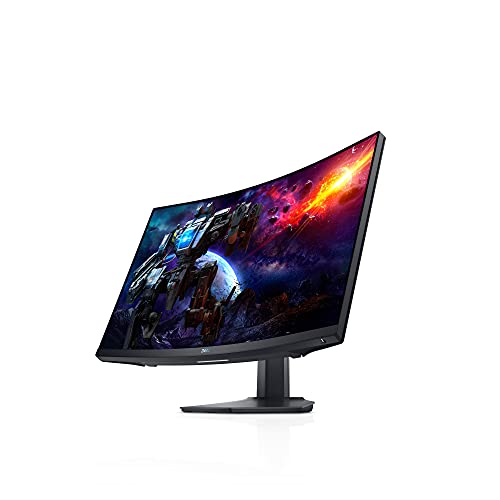 Dell S2722DGM 27-Inch Curved Gaming Monitor
 Gigabyte GS27QCA 27-Inch Curved Gaming Monitor









