We independently review everything we recommend. When you buy through our links, we may earn a commission. As an Amazon Associate we earn from qualifying purchases.
Best Budget DDR4 RAM Kits for Desktop PC Builds 2026
Compare the best budget DDR4 RAM kits for desktop builds and upgrades, with speed, latency, capacity and cooler clearance explained for buyers.
Compare the best budget DDR4 RAM kits for desktop builds and upgrades, with speed, latency, capacity and cooler clearance explained for buyers.
⭐ Key Takeaways
Quick answer: Our top pick is Corsair Vengeance LPX 16GB (2 x 8GB) DDR4 3200 CL16, with G.Skill Ripjaws V 16GB (2 x 8GB) DDR4 3200 CL16 as a strong alternative.
DDR4 remains the memory standard for a huge installed base of Intel and AMD desktops, and it is also the cheapest way to give an aging system a second life. A matched 16GB kit at 3200 MT/s removes the stutter that a single slow stick causes, while 32GB of headroom suits heavier multitasking. The five kits below cover matched pairs for new builds and single sticks for upgrades, all at the sweet-spot speed grade that older platforms handle without drama. Each pick lists its capacity layout, latency and heat spreader height so the kit can be matched to the motherboard and cooler already on the desk.
As an Amazon Associate, we earn from qualifying purchases.
Quick answer
Most buyers should pick a matched 16GB kit running at DDR4 3200 with CL16 latency, which suits the majority of Intel and AMD DDR4 boards. The Corsair Vengeance LPX and G.Skill Ripjaws V kits fit that brief, while the single Crucial and Kingston sticks suit one-slot upgrades, and the TeamGroup Vulcan Z kit adds a taller heat spreader design.
Corsair Vengeance LPX 16GB (2 x 8GB) DDR4 3200 CL16
Top Pick
Corsair Vengeance LPX 16GB (2 x 8GB) DDR4 3200 CL16
The Vengeance LPX kit is the default recommendation for builders who need memory that stays out of the way. Its low-profile aluminum heat spreader stands about 34mm tall, which clears most large tower air coolers that overhang the memory slots on compact boards. The two matched 8GB sticks run at DDR4 3200 with CL16-18-18-36 timings at 1.35 volts once the XMP 2.0 profile is enabled in the BIOS, and they fall back to a safe JEDEC speed on boards without profile support. Corsair screens the memory chips used in the LPX line for overclocking headroom, although budget buyers will simply appreciate the stability at rated settings. The plain black spreader has no lighting, which suits office machines and understated builds. Compatibility spans Intel 100 through 500 series chipsets and AMD AM4 boards, covering most DDR4 systems still in service. Because the kit is a matched pair, dual-channel operation is guaranteed when the sticks sit in the correct slots. Buyers planning a later jump to 32GB should note that filling all four slots later means matching this kit again, so a single 16GB stick below may be the smarter first step for upgrade paths.
The Ripjaws V kit targets builders who want rated CL16 performance and do not mind a taller heat spreader. At roughly 42mm high, the angular aluminum spreader needs a clearance check against wide air coolers, but it fits easily under most all-in-one liquid coolers and stock-style heatsinks. The matched pair runs DDR4 3200 at CL16-18-18-38 timings and 1.35 volts through an XMP 2.0 profile, and G.Skill publishes an extensive motherboard compatibility list that covers Intel and AMD DDR4 platforms going back several generations. In practice this kit is a frequent pick for Ryzen builds, where 3200 MT/s with tight latency keeps the Infinity Fabric running at a one-to-one ratio on supported chips. The spreader design uses aggressive fins rather than lighting, so it suits windowed cases with a performance look. Two sticks give dual-channel bandwidth for integrated graphics and memory-sensitive games alike. Buyers with a micro-ATX board and a bulky cooler should measure first; everyone else gets a proven kit that has been a staple of budget build lists for years because it pairs low latency with broad board support and a restrained, lighting-free design.
This single Crucial module is the upgrade pick rather than a build pick. It follows the JEDEC standard exactly, running DDR4 3200 at CL22 timings and 1.2 volts with no XMP profile required, so it starts at full speed the moment it is installed. That plug-and-play behavior makes it ideal for prebuilt desktops from the big office brands, where BIOS menus often hide memory settings entirely. There is no heat spreader, just a bare green or black board depending on the production run, which keeps the height low for cramped small-form-factor cases. The trade-off is latency: CL22 responds a little slower than the CL16 kits here, a difference that matters in competitive gaming but is invisible in office work, browsing and media playback. Sold as one 16GB stick, it can replace a failed module, double the memory in a system that shipped with a single stick, or pair with an identical stick later for dual-channel operation. Buyers should confirm the existing module is also DDR4 3200 so the pair runs at the faster common speed instead of dropping to the slower stick’s settings.
Kingston Fury Beast 16GB DDR4 3200 CL16 Single Stick
Kingston Fury Beast 16GB DDR4 3200 CL16 Single Stick
The Fury Beast single stick bridges the gap between upgrade and build. It carries performance timings, DDR4 3200 at CL16 with 1.35 volts, behind a low-profile heat spreader about 34mm tall that clears the same bulky coolers as the Corsair kit. Intel XMP profiles are onboard, and Kingston also certifies the module for AMD platforms, so enabling full speed takes one BIOS setting on most boards. Buying one 16GB stick now suits two common situations: a system that shipped with a single 8GB or 16GB module and needs a partner, or a fresh build on a two-slot board where the owner wants 16GB today and an identical stick later. The spreader styling is subtle, with a grooved top edge and no lighting, keeping it appropriate for workstations. One caution applies to all single-stick purchases: memory runs in single-channel mode until a second stick arrives, which trims bandwidth for integrated graphics and some games. Matching the exact part number when buying the second stick avoids timing mismatches. For buyers who want CL16 speed without committing to a full kit on day one, this is the flexible option.
TeamGroup T-Force Vulcan Z 16GB (2 x 8GB) DDR4 3200 CL16 Gray
TeamGroup T-Force Vulcan Z 16GB (2 x 8GB) DDR4 3200 CL16 Gray
The Vulcan Z kit rounds out the list with a matched pair wrapped in a one-piece aluminum heat spreader finished in gray. The spreader uses a raised central bar and full-coverage design that TeamGroup shapes to move heat away from the memory chips, and the styling leans toward stealth builds rather than lighting showcases. Rated speed is DDR4 3200 with CL16-18-18-38 timings at 1.35 volts, enabled through XMP 2.0 on Intel boards and the equivalent profile setting on AMD boards. The modules stand taller than the low-profile picks here, so the same cooler clearance check applies, particularly on micro-ATX boards with closely spaced slots. TeamGroup backs the Vulcan Z line with a lifetime warranty, which matters for a component that often outlives two or three platform upgrades. Performance at rated settings matches the other CL16 kits in this roundup, so the choice comes down to looks, height and which brand a buyer already trusts. The gray finish pairs well with the many gray and gunmetal motherboards sold for budget builds. For a straightforward two-stick kit with a distinctive finish and standard sweet-spot specifications, the Vulcan Z earns its place.
How to choose
Start with capacity. Sixteen gigabytes is the sensible baseline for gaming and general use, while 32GB suits photo editing, virtual machines and heavy browser workloads. Next, decide between a matched kit and a single stick: kits guarantee the two modules share timings, while single sticks suit upgrades where one slot is already filled or budget arrives in stages. Speed and latency come as a pair, and DDR4 3200 CL16 is the sweet spot for most DDR4 platforms; higher speeds often need manual tuning on older boards. Check that the motherboard supports XMP or an equivalent profile, since performance kits drop to a slower default without it. Measure heat spreader height against the CPU cooler, especially with large air coolers over the slots. Finally, confirm the board actually uses DDR4, because DDR4 and DDR5 slots are physically different and the modules are not interchangeable.
Who should skip
Owners of DDR5-only motherboards should skip this entire category, since none of these modules fit their boards. Laptop owners should also look elsewhere, because these are full-size desktop modules rather than the shorter laptop format. Anyone already running 32GB of DDR4 at 3200 MT/s gains nothing here. Buyers chasing extreme overclocks should shop enthusiast lines with hand-binned chips instead of budget kits.
Frequently asked questions
Is 16GB of DDR4 still enough for gaming and everyday work?
For most players and home users, yes. Sixteen gigabytes in dual channel handles current games, streaming and office work comfortably, especially when paired with a dedicated graphics card. Systems that edit large video projects, run virtual machines or keep dozens of heavy browser tabs open benefit from 32GB, which is why planning an upgrade path matters when choosing between a kit and a single stick.
Can a new DDR4 stick be mixed with memory already installed?
It usually works, provided the existing memory is also DDR4 for the desktop. The system runs both sticks at the slower module’s speed and timings, so pairing a CL22 stick with a CL16 stick gives CL22 behavior. Matched kits remove the guesswork, and mixing brands is less risky when capacity, speed and voltage all line up on paper first.
What does CL16 mean, and is it faster than CL22?
CL, or CAS latency, counts the delay in clock cycles before the memory delivers requested data. At the same 3200 MT/s speed, CL16 answers sooner than CL22, which helps gaming and other latency-sensitive work by a small but real margin. CL22 modules follow the JEDEC standard exactly, which is why they suit prebuilt systems that lack profile settings.
Will DDR4 memory work in a DDR5 motherboard?
No. DDR4 and DDR5 modules use different notch positions, pin layouts and voltages, so a DDR4 stick physically cannot seat in a DDR5 slot, and forcing it would damage both parts. Every motherboard supports one standard only, printed on its specification page and box. Check that standard before ordering, because the two types look deceptively similar in photos.
Final verdict
For a fresh DDR4 build, the Corsair Vengeance LPX kit is the safest default thanks to its low-profile spreader and broad compatibility, with the G.Skill Ripjaws V and TeamGroup Vulcan Z kits as equal-speed alternatives. For upgrades, the Crucial stick offers effortless plug-and-play installation in prebuilt systems, while the Kingston Fury Beast adds CL16 timings and a clear path to a matched pair later.
E
Emubox Editorial Team
We compare specs, materials and verified owner reviews before a product earns a spot. Rankings are never paid.
Affiliate disclosure. As an Amazon Associate we earn from qualifying purchases at no extra cost to you. Prices accurate as of the date shown.
Best 2mm 70 cm portable antennas compared: telescopic radio antennas near 70 cm, with connectors, bands and collapsed sizes explained before you buy today.
Find the best thermostat setting for winter and summer, with energy-saving setbacks, humidity tips, and smart schedules for a comfortable home year-round.
The best affordable business computer monitors balance sharp text, eye comfort and lasting value. Compare four reliable office displays built for long workdays.
Looking for the best inexpensive HD TVs non smart? Compare five genuinely non-smart HD televisions with tuners, HDMI inputs and simple setup for any small room.

 Corsair Vengeance LPX 16GB (2 x 8GB) DDR4 3200 CL16
 G.Skill Ripjaws V 16GB (2 x 8GB) DDR4 3200 CL16
 Crucial 16GB DDR4 3200 CL22 Single Stick
 Kingston Fury Beast 16GB DDR4 3200 CL16 Single Stick
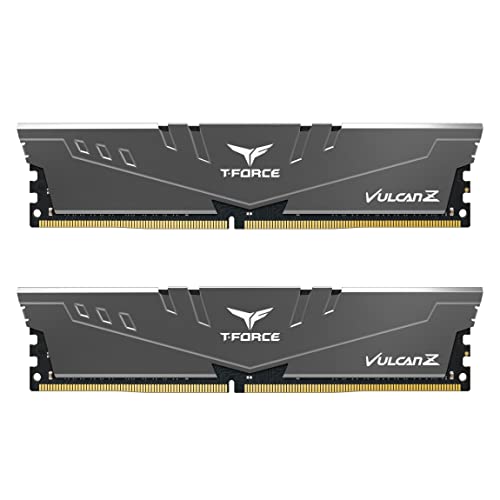 TeamGroup T-Force Vulcan Z 16GB (2 x 8GB) DDR4 3200 CL16 Gray









