We independently review everything we recommend. When you buy through our links, we may earn a commission. As an Amazon Associate we earn from qualifying purchases.
Best Budget Mouse Bungees: 5 Picks for Drag-Free Gaming
Keep a wired mouse cable off the desk with a budget mouse bungee. Compare five bungees by base weight, arm style, cable grip and extra features.
A wired gaming mouse has one flaw: the wire. It drags on the desk edge, catches on the monitor stand and pulls against your aim exactly when a flick needs to be clean. A mouse bungee fixes this with a simple trick, holding the cable up in a spring arm so only a controlled loop of slack reaches the mouse. The result feels close to wireless, with none of the charging or battery weight. Bungees are also one of the cheapest upgrades in gaming, but they are not all equal: base weight, arm height and cable grip decide whether one stays planted or skates around your desk. This guide compares five budget bungees by how they anchor, how they hold different cable types, and what extras they add.
As an Amazon Associate, we earn from qualifying purchases.
Quick answer
For most players, the Razer Mouse Bungee V3 is the safe default, with a heavy base and a spring arm that handles rubber, braided and paracord cables. The Cougar Bunker suits glass and slick desks with its suction base, the Glorious is the simple value pick, the Enhance adds lights and USB ports, and the Hotline Games 3.0 packs down best for travel.
The Razer V3 is the reference design most other bungees are measured against. Its base carries real weight, around 240 grams with anti-slip feet, so it stays where you put it through fast, wide swipes, and the clip-on spring arm flexes smoothly instead of fighting the cable. The cable catch at the top grips rubber, braided and paracord cords securely, which matters because aftermarket paracord swaps are common on gaming mice and thinner clips can let them slip. The arm height and angle give enough slack for a full mouse pad without leaving a loop that flops onto the desk. Build quality is a step above the generic options: the arm mechanism feels deliberate rather than springy in the cheap sense, and the finish matches Razer’s other desk gear for players who care about a consistent setup. There is also a Chroma version with RGB lighting for more money, but the standard V3 does the same core job, which is why it is the budget-conscious Razer to buy. It takes a modest footprint behind the mouse pad, so very shallow desks should measure first. Choose the V3 if you want the proven option and do not need lights or ports.
The Cougar Bunker takes a completely different route to stability. Instead of relying on weight, it uses a vacuum suction pad on the base: press it down on a smooth surface and it locks in place with surprising grip, then releases with a lever when you want to move it. At only about 85 grams it is by far the lightest pick here, which makes it a smart choice for glass desks, glossy finishes and other slick surfaces where a merely heavy base can still creep during a long session. The flexible arm bends to set your preferred cable height and holds the cord clear of the desk. The trade-offs follow from the design. Suction needs a smooth, clean surface, so textured wood, desk mats and dusty finishes weaken the hold, and the pad should be reseated now and then on long setups. The arm is simpler than Razer’s spring mechanism, with less fine control over slack. For LAN events and shared desks, though, the quick attach and release is a genuine advantage, and the tiny footprint suits cramped battle stations. Pick the Bunker if your desk surface defeats weighted bases or you move your setup often.
The Glorious bungee is the straightforward value option: a weighted base of about 265 grams, a flexible spring arm and a rubber clip that adjusts to different cable sizes. That is the whole formula, executed without frills, and for most wired mice it is all you need. The base weight is competitive with the Razer, so it stays planted during ordinary play, and the rubber feet keep it from sliding on hard desks. The arm can be raised or lowered to tune how much slack hangs over the pad, which helps players who switch between a large desk mat and a smaller pad. This white version suits light-colored setups that the mostly black competition ignores, and a black version exists if your desk runs the other way. Where it gives ground to the Razer is refinement: the clip and arm feel more utilitarian, and very thick braided cables are a snugger fit. It also has no answer for glass desks, where the Cougar’s suction wins. None of that matters for a standard desk and a standard cable. Choose the Glorious if you want the classic bungee formula at a friendly price and your setup is white, or you simply do not care about extras.
Enhance LED Gaming Mouse Bungee with 4-Port USB Hub, Blue
Enhance LED Gaming Mouse Bungee with 4-Port USB Hub, Blue
The Enhance bungee is the maximalist pick: part cable holder, part desk hub. Alongside the flexible arm that keeps your mouse cord lifted, the base packs a four-port USB 2.0 hub and blue LED lighting, turning a single-purpose accessory into a small connectivity station for a headset dongle, a flash drive or a fan. For a laptop-based setup short on ports, that is a real convenience, and the lighting gives it a presence the plain bungees lack. The compromises are worth knowing. The hub runs at USB 2.0 speeds, fine for peripherals and small transfers but not for fast external drives, and the bungee needs its own USB connection to the computer to power the hub and lights, which adds a cable to a product meant to tame cables. The base relies on the hub body for its footprint rather than a dedicated heavy weight, so extremely aggressive swipes on a slick desk can nudge it. Position it once and it behaves. Choose the Enhance if your setup genuinely needs more USB ports within reach and you like the lit look; players who want pure cable control should take one of the simpler picks instead.
Hotline Games built its name on affordable esports accessories, and its 3.0 bungee is the travel-friendly entry here. The base weighs about 220 grams with silicone anti-slip feet, enough to stay put on hotel and tournament desks, and the spring arm is retractable: it compresses into the compact frame for packing, then extends to hold your cable at a working height. That pack-down design is the reason to buy it over the Glorious, which it otherwise resembles in spirit, a simple weighted base and a rubber clip that grips cables of different thicknesses for competitive play. The clip design holds the cord at a fixed point and keeps slack consistent, which FPS players who dial in one setup and repeat it will appreciate. The compromises are finish and feel: the plastics are more basic than Razer’s, and the arm’s movement is functional rather than silky. It is also sold in several colors, handy if you want the bungee to match a themed setup. For a home desk that never moves, the Razer and Glorious are slightly nicer objects. Choose the Hotline Games 3.0 if your bungee travels with you or you want the lowest-cost route to proper cable control.
How to choose
Start with your desk surface. Weighted bases with rubber feet work on most desks, but glass and glossy finishes favor the Cougar’s suction pad, and a desk mat changes the grip of everything, so decide where the bungee will actually sit. Base weight is the main stability number: around 220 grams and up stays planted for most players, while lighter designs need suction or a calmer play style. Check the clip against your cable, since thick braided cords, thin rubber and paracord all grip differently, and a clip that slips ruins the effect. Arm height matters for slack control; adjustable or retractable arms let you tune the loop over your pad size. Extras like USB hubs and lighting are worth it only if you will use them, since they add cables and cost. Finally, consider whether the bungee travels: retractable arms and suction bases pack and reattach far better than fixed designs.
Who should skip
Skip a bungee entirely if you already use a wireless mouse, since there is no cable to manage. Skip one if your desk is so shallow that the base would sit on the mouse pad itself, crowding your aim area. And skip the budget tier if you play at very low sensitivity with huge swipes on a slick desk and have already dragged lighter bungees around; a premium heavyweight model or a switch to wireless will serve you better than fighting a base that will not stay put.
Frequently asked questions
Does a mouse bungee really make a difference?
Yes, for wired mice it removes the two main annoyances: the cable dragging across the desk edge and catching on objects behind the pad. With the cord held up and a consistent loop of slack, swipes feel smoother and more repeatable, which is why bungees remain standard on competitive desks even as wireless mice improve. It will not change your sensor or your aim by itself, but it removes a variable.
Will a bungee fit my mouse cable?
Most bungees grip the common cable types: rubber, braided and paracord. The fit depends on the clip design and the cable’s thickness, so very thick braided cables can be tight in smaller clips and very thin cables can slip in loose ones. The Razer V3 and Hotline Games clips handle the widest range in this group. If you use an unusual cable, check the clip style before ordering.
Where should I place a mouse bungee?
Center it behind your mouse pad, roughly in line with where your aim hand rests, with the arm angled so the cable drops to the mouse with a gentle loop. Too close and the loop crowds the pad; too far and the cable pulls. Leave enough slack for your widest swipe in each direction, then set the arm height so the cord clears the desk surface without floating so high it swings.
Is a weighted or suction base better?
Neither is universally better. Weighted bases are simpler, work on almost any surface including desk mats, and never lose their grip. Suction bases like the Cougar’s lock down harder on smooth glass and glossy desks where weight alone can slide, but they need a clean, smooth surface and an occasional reseat. Match the base to your desk, not to a spec sheet.
Final verdict
Buy the Razer Mouse Bungee V3 for the most proven all-round cable control, the Cougar Bunker for glass and slick desks, and the Glorious for simple value in a clean design. The Enhance earns its place only if you will actually use its USB hub and lighting, and the Hotline Games 3.0 is the one to throw in a bag for travel and events. Any of them beats a cable dragging across the desk.
E
Emubox Editorial Team
We compare specs, materials and verified owner reviews before a product earns a spot. Rankings are never paid.
Affiliate disclosure. As an Amazon Associate we earn from qualifying purchases at no extra cost to you. Prices accurate as of the date shown.
Best 2mm 70 cm portable antennas compared: telescopic radio antennas near 70 cm, with connectors, bands and collapsed sizes explained before you buy today.
Find the best thermostat setting for winter and summer, with energy-saving setbacks, humidity tips, and smart schedules for a comfortable home year-round.
The best affordable business computer monitors balance sharp text, eye comfort and lasting value. Compare four reliable office displays built for long workdays.
Looking for the best inexpensive HD TVs non smart? Compare five genuinely non-smart HD televisions with tuners, HDMI inputs and simple setup for any small room.

 Razer Mouse Bungee V3
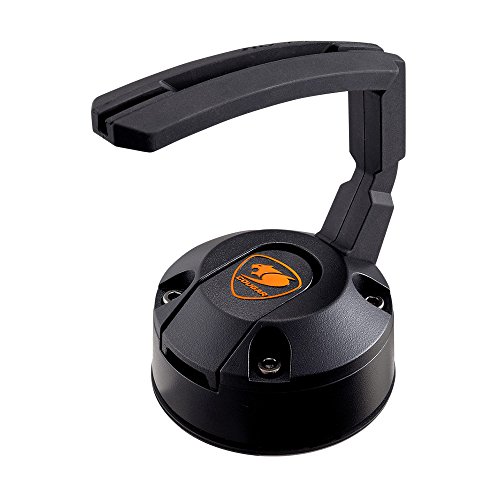 Cougar Bunker Mouse Bungee
 Glorious Gaming Mouse Bungee, White
 Enhance LED Gaming Mouse Bungee with 4-Port USB Hub, Blue
 Hotline Games Mouse Bungee 3.0, Black









