We independently review everything we recommend. When you buy through our links, we may earn a commission. As an Amazon Associate we earn from qualifying purchases.
Best Budget USB Sound Cards for Better PC Audio Quality
Five budget USB sound cards compared for laptops and desktops, covering separate mic jacks, USB-C models, driverless setup and call-friendly extras.
Five budget USB sound cards compared for laptops and desktops, covering separate mic jacks, USB-C models, driverless setup and call-friendly extras.
⭐ Key Takeaways
Quick answer: Our top pick is Sabrent USB External Stereo Sound Adapter (AU-MMSA), with Sabrent Aluminum USB External Stereo Sound Adapter (AU-EMAC) as a strong alternative.
A broken headphone jack, a laptop with no microphone input, or onboard audio that hisses every time the graphics card spins up are all problems a small USB sound card solves for very little money. These adapters move audio conversion outside the computer case, add proper headphone and microphone jacks, and work the moment they are plugged in. The five models below cover the main shapes the category takes: separate dual-jack adapters for headsets with split cables, an aluminum step-up version, a support-friendly option for mixed operating systems, a USB-C model with call-processing features, and a cabled adapter that keeps strain off the port.
As an Amazon Associate, we earn from qualifying purchases.
Quick answer
The Sabrent AU-MMSA is the default pick: separate headphone and microphone jacks, no drivers, and it works on Windows, Mac and Linux. The aluminum AU-EMAC is the sturdier twin, Plugable’s adapter is the safe choice for mixed systems, Creative’s Play! 4 adds USB-C and call features, and the UGREEN adapter’s short cable suits tight laptop ports.
Sabrent USB External Stereo Sound Adapter (AU-MMSA)
Top Pick
Sabrent USB External Stereo Sound Adapter (AU-MMSA)
The AU-MMSA is the adapter most people picture when they think of a USB sound card. It is a compact USB-A dongle with two 3.5mm jacks: a green stereo headphone output and a pink mono microphone input, the classic pairing for headsets with separate plugs. It is fully plug and play, presenting itself as a standard USB audio device, so Windows, macOS and Linux all use it without driver downloads. That makes it a reliable rescue for a laptop with a failed audio jack, a desktop front panel that crackles, or a single-jack ultrabook that cannot take a two-plug headset. Moving the conversion outside the case also sidesteps a good deal of the electrical noise that onboard audio picks up from fans and graphics cards. It will not drive demanding audiophile headphones or record a studio microphone, and it makes no such claims. Treat it as a utility part: inexpensive, predictable and easy to keep in a drawer or laptop bag so a dead jack never stops a call, a class or a workday again.
Sabrent Aluminum USB External Stereo Sound Adapter (AU-EMAC)
Runner-Up
Sabrent Aluminum USB External Stereo Sound Adapter (AU-EMAC)
The AU-EMAC takes the same dual-jack formula as the AU-MMSA and puts it in an aluminum enclosure. The metal shell is the main reason to choose it: adapters live a hard life hanging off laptop ports, getting knocked in bags and yanked by headphone cables, and the aluminum body shrugs off treatment that cracks plastic shells. Functionally it offers the same stereo headphone output and microphone input, the same driverless operation across Windows and Mac, and the same standard USB audio device behavior, so software sees nothing unusual. It is a sensible pick for a shared family computer, a classroom machine or a workbench PC where the adapter stays plugged in permanently and gets handled by many people. The slightly larger body can crowd neighboring USB ports on tightly spaced laptops, which is worth checking before you buy for an ultraportable. If your previous plastic adapter died from physical abuse rather than electronic failure, this is the version designed to outlast it, and the price difference between the two Sabrent models is small enough that durability is a reasonable thing to pay for.
Plugable’s USB Audio Adapter follows the same stereo-out plus microphone-in layout, with separate 3.5mm jacks and driverless operation on Windows, Mac and Linux, and it explicitly supports platforms many adapters ignore, including Chrome OS and Raspberry Pi OS. That breadth is its selling point for mixed households, schools and hobbyist setups where one adapter might serve a Windows desktop one week and a Raspberry Pi project the next. Plugable also documents the adapter thoroughly and backs it with responsive support, which matters more than usual in a category full of anonymous listings that vanish. The company is candid about limits: cars and TVs are not compatible, and on some systems the adapter adds output only. That honesty is useful, because cheap USB audio devices are often bought for jobs they cannot do. Output quality is clean basic stereo, positioned for calls, videos and everyday listening rather than critical music work. If you want the dual-jack adapter concept with the least risk of a dead-end purchase and clear compatibility notes, this is the one to get.
The Play! 4 is the feature model in this roundup. It connects over USB-C, converts at up to 24-bit and 96kHz for playback, and takes a headset through a single 4-pole CTIA jack, which suits modern headsets with one combined plug. What separates it from the basic adapters is Creative’s software for Windows, built around communication. VoiceDetect automatically mutes and unmutes the microphone based on your voice, two-way noise cancellation cleans both what you say and what you hear, and there are bass boost and dynamic EQ modes for media. For people whose day is back-to-back video calls on a laptop with poor onboard audio, those features do real work that a bare adapter cannot. The trade-offs are equally clear: the processing lives in the companion app, so the full feature set is a Windows story, and a single combined jack means split-plug headsets need an adapter cable. Choose the Play! 4 when calls are the priority and your headset uses one plug; choose a dual-jack model when simplicity matters more. It also doubles as a compact travel adapter for a phone or tablet that has a USB-C port.
UGREEN USB External Stereo Sound Card Audio Adapter
UGREEN USB External Stereo Sound Card Audio Adapter
UGREEN’s adapter, model 30521, puts the electronics on a short integrated cable rather than in a rigid dongle. That small design choice solves a common annoyance: a stiff adapter body acts as a lever on the USB port every time the headphone cable moves, while the short flexible lead absorbs the strain and lets the jacks rest on the desk. It provides separate headphone and microphone 3.5mm jacks, uses a C-Media chipset, and works as a standard USB audio device on Windows, Mac and Linux without drivers, with console support for headset use as well. The cable also moves the jacks a few inches from a crowded port cluster, which helps on laptops where USB ports sit shoulder to shoulder. Sound quality is honest stereo suitable for calls, streaming and everyday listening. It is the version to pick when the adapter will travel with a laptop and be plugged and unplugged daily, or when neighboring ports are too close for a wide dongle. UGREEN’s accessory track record and clear model numbering make it easy to buy the same unit again later.
How to choose a budget USB sound card
Start with your headset plug. Two separate plugs need a dual-jack adapter; a single combined plug needs a 4-pole TRRS jack like the Play! 4 offers, or a splitter cable. Next, check the connector on your computer: most basic adapters are USB-A, so USB-C-only laptops need either a USB-C model or a small port adapter, which adds a failure point. Decide whether features matter. Driverless adapters behave identically everywhere and are the right call for Linux, Chrome OS and consoles, while app-driven models add noise cancellation and EQ at the cost of platform lock-in. Consider the physical form as well. Rigid dongles are compact but strain ports and block neighbors; cabled adapters and aluminum shells survive daily travel better. Finally, set expectations for sound. These devices clean up noise and restore missing jacks; they are not high-end DACs, and demanding headphones or studio microphones belong with a proper audio interface instead.
Who should skip a budget USB sound card
Skip these adapters if your computer’s audio already works and your only complaint is that music lacks detail; a dedicated DAC or better headphones will change more than a basic sound card. Musicians and streamers who need XLR inputs, phantom power or low-latency monitoring should buy an audio interface instead. Gamers chasing virtual surround should look at gaming-specific USB cards with that processing built in. And if your headset is Bluetooth, a wired adapter solves a problem you do not have. These products shine as repairs and adapters for wired headsets, not as upgrades for already healthy, demanding setups.
Frequently asked questions
Do USB sound cards need drivers?
Most basic models do not. They use the standard USB audio device class built into Windows, macOS and Linux, so the system recognizes them as soon as they are plugged in. Feature models such as the Creative Play! 4 work without drivers too, but their extra processing, like noise cancellation, requires the manufacturer’s app.
Will a USB sound card fix buzzing or static from my laptop?
Often, yes. Onboard audio sits inside the case near power circuitry and graphics hardware, which is where much of that interference comes from. Moving conversion outside the machine on USB usually removes the buzz. If the noise comes from the headphones or the recording itself, an adapter will not change it.
Can I use a USB sound card with a gaming console?
Many driverless adapters work with consoles for headset audio, and Plugable and UGREEN list console support for theirs. Compatibility varies by console generation and chat features, so check the listing against your exact system before buying, and expect game audio to work more reliably than every chat function.
What is the difference between a USB sound card and a DAC?
Every USB sound card contains a DAC, but the label usually signals scope. A sound card adds inputs as well as outputs, typically a microphone jack, in a small adapter. A product sold as a DAC focuses on playback quality for headphones or speakers and may offer higher resolution conversion without any recording input at all.
Final verdict
For a straightforward repair or a missing microphone jack, buy the Sabrent AU-MMSA and be done. Pick the aluminum AU-EMAC if the adapter will be handled roughly, Plugable’s adapter for the widest platform support, the Creative Play! 4 for call-heavy Windows work, and the UGREEN if a short flexible cable fits your laptop better than a rigid dongle.
E
Emubox Editorial Team
We compare specs, materials and verified owner reviews before a product earns a spot. Rankings are never paid.
Affiliate disclosure. As an Amazon Associate we earn from qualifying purchases at no extra cost to you. Prices accurate as of the date shown.
Best 2mm 70 cm portable antennas compared: telescopic radio antennas near 70 cm, with connectors, bands and collapsed sizes explained before you buy today.
Find the best thermostat setting for winter and summer, with energy-saving setbacks, humidity tips, and smart schedules for a comfortable home year-round.
The best affordable business computer monitors balance sharp text, eye comfort and lasting value. Compare four reliable office displays built for long workdays.
Looking for the best inexpensive HD TVs non smart? Compare five genuinely non-smart HD televisions with tuners, HDMI inputs and simple setup for any small room.

 Sabrent USB External Stereo Sound Adapter (AU-MMSA)
 Sabrent Aluminum USB External Stereo Sound Adapter (AU-EMAC)
 Plugable USB Audio Adapter
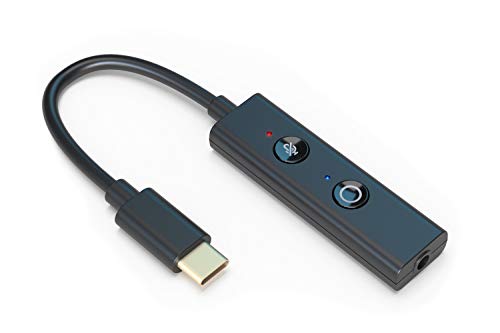 Creative Sound Blaster Play! 4
 UGREEN USB External Stereo Sound Card Audio Adapter









