We independently review everything we recommend. When you buy through our links, we may earn a commission. As an Amazon Associate we earn from qualifying purchases.
Best Budget HDMI Audio Extractors for Older AV Gear
Five budget HDMI audio extractors compared, covering optical and RCA outputs, ARC and eARC models, EDID modes and support for older AV receivers.
Five budget HDMI audio extractors compared, covering optical and RCA outputs, ARC and eARC models, EDID modes and support for older AV receivers.
⭐ Key Takeaways
Quick answer: Our top pick is J-Tech Digital 4K 60Hz HDMI Audio Extractor (JTD18G-H5CH), with Amazon Basics 4K HDMI to HDMI and Audio Extractor Converter as a strong alternative.
An HDMI audio extractor sits between a source and your screen and pulls the sound out to a separate output, so a streaming stick, console or Blu-ray player can feed a receiver, soundbar or powered speakers that lack the right HDMI input. It is the part that keeps a good older AV receiver in service after every source goes HDMI-only. Extractors divide into two families: inline models that split audio from a source device, and ARC or eARC models that take sound back from the TV itself. The five below cover both families, from a simple legacy-friendly converter to a current eARC unit for modern soundbars.
As an Amazon Associate, we earn from qualifying purchases.
Quick answer
The J-Tech Digital JTD18G-H5CH is the best all-round inline extractor, with 4K 60Hz passthrough, optical and 3.5mm outputs and EDID audio modes. The Amazon Basics unit covers the same job more simply, the older J-Tech JTDAT5CH suits 1080P systems with RCA inputs, and the OREI and Neoteck models serve TVs and soundbars over ARC and eARC.
J-Tech Digital 4K 60Hz HDMI Audio Extractor (JTD18G-H5CH)
Top Pick
J-Tech Digital 4K 60Hz HDMI Audio Extractor (JTD18G-H5CH)
This is the extractor to buy for a modern source chain. It passes video up to 4K at 60Hz with HDR10, supports the full 18Gbps HDMI 2.0 bandwidth and HDCP 2.2, and splits the audio out to optical SPDIF and a 3.5mm stereo jack at the same time. Dolby Digital and DTS pass through to the optical output, and CEC support keeps basic control working between devices. The feature that makes it flexible is the audio EDID switch, which lets you tell the source to send stereo, 5.1 surround or the full passthrough signal, solving the common problem of a source refusing to output surround because it only sees the TV’s stereo speakers. It also handles high-refresh 1080P signals, which matters for gaming monitors. Power comes from USB, and the metal enclosure is compact enough to hide behind a TV. If you are connecting a console, streaming box or PC to a receiver or soundbar with an optical input and want one extractor that will not become the weak link in a 4K setup, this is the balanced, current choice.
Amazon Basics 4K HDMI to HDMI and Audio Extractor Converter
Runner-Up
Amazon Basics 4K HDMI to HDMI and Audio Extractor Converter
Amazon’s house-brand extractor covers the core job with the least fuss. It takes an HDMI source, passes 4K video through to the display, and provides SPDIF optical plus stereo audio outputs for a receiver, soundbar or powered speakers. The intended sources are exactly the ones most people own: streaming sticks and boxes, Apple TV, Blu-ray players and similar devices feeding an audio system that predates HDMI inputs. There is less to configure than on the J-Tech, which is both the appeal and the limit: buyers who need EDID mode switching to coax surround out of a stubborn source should step up, while buyers who simply need sound out of a streaming stick and into an optical input get everything required here. The compact black box runs from USB power and disappears behind a television. As with most house-brand electronics, the long-term support story is a large retailer rather than a specialist AV company, but for a fixed, set-and-forget connection that rarely matters. This is the sensible default for a simple living-room fix.
The JTDAT5CH is the long-running older design from J-Tech, and it still earns its place in systems built around 1080P. It extracts audio to optical SPDIF and, distinctively, to analog RCA stereo outputs, which makes it the natural partner for older stereo receivers, amplifiers and powered speakers that have no digital input at all. Video passthrough tops out at 1080P rather than 4K, so it belongs with an HD television or projector, not a modern 4K chain. In return you get a proven, simple converter that has been solving the streaming-stick-to-old-amplifier problem for years. The RCA outputs are the deciding feature: most current extractors dropped analog stereo or reduced it to a headphone-level 3.5mm jack, while this unit feeds line-level RCA inputs directly. If your audio gear is a cherished older receiver and your screen is 1080P, this is the correct tool and there is no reason to pay for 4K capability you will never pass through it. Just do not buy it as a future-proofing step for a 4K upgrade.
The BK-931 solves the opposite problem from the inline extractors: getting high-quality sound out of the TV and into a soundbar or receiver. It works with ARC and eARC, supports video signals up to 4K at 120Hz with HDCP 2.3, and passes Dolby Atmos, Dolby Vision and HDR10+ through to compatible equipment. Outputs include optical and 3.5mm for feeding speakers such as Sonos and Bose soundbars that rely on those connections. This is the unit for a modern television whose apps and HDMI inputs all live in the panel, where the TV is the hub and the audio system needs a clean feed from the TV’s eARC port. It also suits setups where a soundbar lacks enough HDMI inputs of its own. Because eARC behavior varies between TV brands, expect a short setup session in the television’s audio menus rather than instant results. For older source-based systems it is the wrong shape of device, but for a current TV-centered room it is the most capable option in this guide and the one that keeps Atmos intact.
Neoteck’s extractor is a focused tool for one stubborn situation: a TV with ARC or eARC on one side and a legacy audio system with only an optical input on the other. It takes the audio returning from the TV over HDMI and converts it to an optical output, supporting PCM 2.0, Dolby 5.1 and DTS 5.1, with digital audio up to 24-bit and 192kHz. That makes it a bridge for home cinema receivers and older soundbars that predate ARC entirely, letting the TV’s built-in apps and tuner play through the good speakers instead of the panel’s own. It is plug and play in the sense that there is nothing to configure on the unit itself; the work happens in the TV’s sound settings, where ARC output and PCM or bitstream format must be selected correctly. It does not extract audio from a source device, and it will not pass video anywhere, so it complements rather than replaces an inline extractor. Buy it when the receiver you love is exactly one optical input away from working with a new TV.
How to choose a budget HDMI audio extractor
First decide which direction the audio travels. If a source device needs to feed older audio gear, buy an inline extractor. If the TV is the hub and sound must come back from it, buy an ARC or eARC model. Match the video specification to your screen: 1080P systems can use the older converters, 4K HDR systems need HDMI 2.0 bandwidth and HDCP 2.2, and 4K 120Hz gaming or eARC Atmos setups need the newest class. Check the audio outputs against your gear: optical carries Dolby Digital and DTS surround, RCA and 3.5mm carry stereo only, and no extractor in this price class decodes surround to analog. Look for an EDID audio mode switch if a source must be persuaded to send surround sound. Finally, plan power: most units run from a USB port on the TV or a spare adapter, and a switched TV USB port conveniently powers the extractor down with the screen.
Who should skip a budget HDMI audio extractor
Skip the extractor if your receiver or soundbar already has enough working HDMI inputs with ARC or eARC; adding a converter only adds a failure point. Gamers who need variable refresh rate at 4K 120Hz from a source should also be cautious, since most inline extractors cap at 4K 60Hz and can break the features they sit in front of. If your audio system has only Bluetooth input, an extractor does not help; you need a transmitter instead. And if the real problem is lip-sync delay or a TV that will not enable ARC at all, fix the settings or the television first, because no adapter corrects a source that refuses to send audio.
Frequently asked questions
What is the difference between an extractor and a splitter?
A splitter duplicates one HDMI signal to two displays, carrying audio and video together on both. An extractor passes video onward to one display while separating the audio out to optical, RCA or 3.5mm connections for a receiver or speakers. If your goal is sound on older audio gear, you want the extractor.
Can an HDMI audio extractor output surround sound?
Yes, over the optical output, which carries Dolby Digital and DTS bitstreams to a receiver that decodes them. The analog outputs are stereo only, so a setup using RCA or 3.5mm will play in stereo even from a surround source. An EDID mode switch on the extractor helps the source send the surround signal in the first place.
Will an extractor work with a streaming stick?
Streaming sticks are the classic use case. The stick plugs into the extractor’s input, the extractor passes video to the TV and sends audio to your receiver or powered speakers, and USB power can come from the TV or a small adapter. Just confirm the extractor’s video specification matches your TV’s resolution and HDR format.
Do I need ARC or eARC for my soundbar setup?
ARC is enough for streaming apps and broadcast TV with standard Dolby Digital. eARC is needed when the TV must pass high-bandwidth formats such as Dolby Atmos from a connected player or console through to the soundbar. Check what your TV and soundbar both support, then buy the extractor class that matches the weaker of the two.
Final verdict
Buy the J-Tech Digital JTD18G-H5CH for a modern 4K source chain, the Amazon Basics converter for the simplest streaming-stick fix, and the JTDAT5CH when an older 1080P system needs true RCA outputs. For TV-centered rooms, the OREI BK-931 keeps eARC and Atmos intact, while the Neoteck bridges a new TV to a legacy optical-only receiver.
E
Emubox Editorial Team
We compare specs, materials and verified owner reviews before a product earns a spot. Rankings are never paid.
Affiliate disclosure. As an Amazon Associate we earn from qualifying purchases at no extra cost to you. Prices accurate as of the date shown.
Best 2mm 70 cm portable antennas compared: telescopic radio antennas near 70 cm, with connectors, bands and collapsed sizes explained before you buy today.
Find the best thermostat setting for winter and summer, with energy-saving setbacks, humidity tips, and smart schedules for a comfortable home year-round.
The best affordable business computer monitors balance sharp text, eye comfort and lasting value. Compare four reliable office displays built for long workdays.
Looking for the best inexpensive HD TVs non smart? Compare five genuinely non-smart HD televisions with tuners, HDMI inputs and simple setup for any small room.

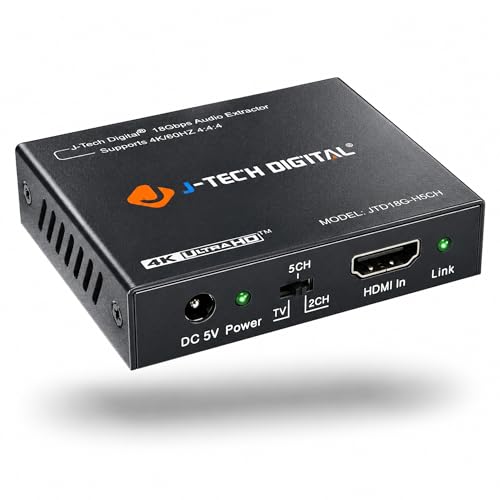 J-Tech Digital 4K 60Hz HDMI Audio Extractor (JTD18G-H5CH)
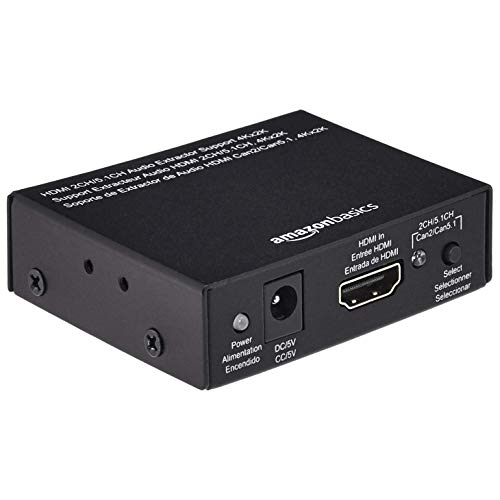 Amazon Basics 4K HDMI to HDMI and Audio Extractor Converter
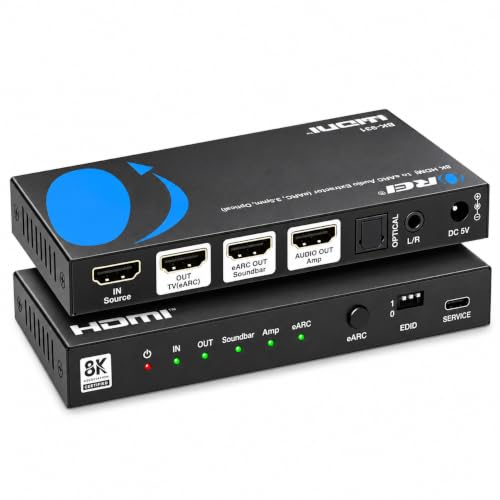 OREI eARC 4K 120Hz Audio Extractor (BK-931)
 Neoteck ARC/eARC Audio Extractor









