We independently review everything we recommend. When you buy through our links, we may earn a commission. As an Amazon Associate we earn from qualifying purchases.
Best Budget Color Checker Charts for Photo and Video
Five budget color checker charts compared, from pocket passports to full patch cards, with guidance on camera profiling, video scopes and fading checks.
Five budget color checker charts compared, from pocket passports to full patch cards, with guidance on camera profiling, video scopes and fading checks.
⭐ Key Takeaways
Quick answer: Our top pick is Calibrite ColorChecker Passport Photo 2, with Calibrite ColorChecker Passport Video as a strong alternative.
A color checker chart is the cheapest way to stop guessing about color. Photograph or film the chart once under your lighting, and software can build a camera profile, set white balance and correct exposure from patches with known values. The two names that dominate this niche are Calibrite, which inherited the original ColorChecker line from X-Rite, and Datacolor, whose Spyder Checkr family takes a slightly different approach to patch layout and software. This guide compares five charts that cover pocket-sized field kits, video-focused targets and full-size studio cards, and explains which format fits the way you shoot.
As an Amazon Associate, we earn from qualifying purchases.
Quick answer
The Calibrite ColorChecker Passport Photo 2 is the best all-round pick: four targets in a pocket case, with software for custom camera profiles. Video shooters should look at the Passport Video, Datacolor’s Spyder Checkr Photo suits portrait work with extra skin-tone patches, and the SpyderCheckr 24 is the low-cost card for quick corrections.
The Passport Photo 2 packs four targets into a folding case that fits in a jacket pocket. Inside you get the classic 24-patch color target, a white balance target, a creative enhancement target with warming and cooling patches for fine-tuning portraits, and a gray balance target for exposure and neutral checks. The case is rigid, includes a lanyard, and positions the targets so you can photograph them at the start of a session in seconds. The real value is the bundled Camera Calibration software, which builds DNG and ICC camera profiles from a shot of the chart and works with Lightroom through a plug-in, so colors from different camera bodies can be matched in a shared catalog. Because the patches are small, this format rewards careful framing: fill the frame with the target and keep it lit by the same light falling on your subject. For photographers who move between locations and camera bodies, this is the most complete budget kit, and it is the chart most third-party tutorials assume you own. When the patches eventually fade after a few years of use, replacing the unit is straightforward because the same model has been sold continuously for years.
The Passport Video applies the same pocket format to motion work. Its targets are chosen for video workflows: color chips and skin-tone patches for checking saturation on camera scopes, grayscale steps for setting exposure, and a white balance target for consistent neutrals when lighting changes between setups. Filmmakers typically hold the chart in frame at the start of a take or after a lighting change, then use the recorded reference in the edit to balance shots quickly with waveform and vectorscope readings rather than by eye. The folding case protects the surfaces on set and the lanyard keeps it from disappearing into a gear bag. It pairs naturally with the Passport Photo 2 if you shoot hybrid work, since the handling is identical. Choose this version when your deliverable is video first: the patch selection and layout are optimized for scope-based correction in editing software rather than stills camera profiling, and it does not include the camera profiling software workflow that makes the Photo version attractive to photographers. In a pinch it also serves as a white balance and exposure reference for stills work, though that is not what its targets were designed for.
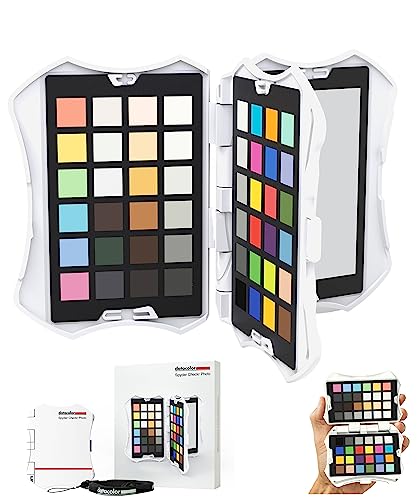
Datacolor’s Spyder Checkr Photo, model SCK310, is a case-based chart with 62 color targets, the largest patch count in this guide. The extra patches go toward skin tones and near-neutral steps, which is why Datacolor aims it at portrait and wedding photographers who need consistent skin rendering across camera bodies and lighting setups. The ergonomic case opens flat for a reference shot and protects the cards between sessions, and the included software builds correction presets that apply in Lightroom, Photoshop ACR and other supported editors. Like the other case formats, the working area is compact, so it suits controlled lighting better than distant subjects. The workflow differs slightly from Calibrite’s: instead of a full camera profile, the software generates an HSL-style correction you apply to a series shot under the same light. Both approaches work; the deciding factors are patch depth and which software behavior you prefer. If portraits are your main subject and you shoot with more than one camera, the Checkr Photo’s skin-tone emphasis makes a genuine case for choosing it over the default Passport.
The SpyderCheckr 24, model SCK200, strips the idea down to a single thin card. One face carries 24 spectrally designed color patches, and the reverse is a gray card for white balance and exposure. There is no case and no hinge, which makes it the easiest chart to slide into a laptop sleeve or tape near a product photography setup. Datacolor’s software reads a shot of the card and produces corrections usable in Lightroom, Photoshop ACR, Hasselblad Phocus and DaVinci Resolve, so the same inexpensive card serves both stills and video editors. The patches are full size rather than miniature, which makes them easier to sample accurately than pocket targets when the chart sits a little farther from the camera. The trade-off is protection: an unprotected card scratches and fades faster, and Datacolor builds in a FadeCheckr patch that warns when the card should be replaced. For a first color checker, or a second one that lives at a desk for product shots, this is the sensible low-cost entry point in the category. Keep it in a sleeve or drawer between shoots, because the exposed surface is the one real compromise of the format.
Datacolor Spyder Checkr
The original Spyder Checkr, model SCK100, is the larger studio-oriented member of Datacolor’s family. It holds 48 color patches in a sturdy hinged case, including saturated colors, skin tones, gray ramp steps and near-white and near-black tones, and the reverse side provides a gray chart for scene light data. A practical advantage for working studios is that the target cards are replaceable: when patches eventually fade from repeated use, you swap the card instead of buying a whole new unit. The software follows the same correction workflow as the smaller Checkr models, exporting presets for the major raw editors. The case format is bigger than the pocket passports, so it travels less casually, but on a tripod-mounted product set or in a portrait studio it is easier to position and keep flat. Pick this version if you want Datacolor’s system in a durable, serviceable format and the chart will live in one place rather than in a camera bag. It remains a sound budget choice for studios that value the replaceable cards. A FadeCheckr strip on the gray side warns you when the current card has faded enough to justify fitting a fresh one.
How to choose a budget color checker
Decide what the chart must produce. If you want true camera profiles for Lightroom, the Calibrite Passport workflow is the established route; if a per-scene correction preset is enough, Datacolor’s approach is faster. Match the format to your shooting: pocket cases protect patches on location, thin cards are cheap and easy to place, and larger studio charts are simpler to sample at a distance. Check software compatibility with your editor before buying, since the value of any chart is mostly in the correction it generates. Consider patch count honestly. Extra skin-tone and gray steps help portrait and product work, while a standard 24-patch layout is enough for general white balance and exposure discipline. Finally, remember that charts are consumables. Pigments fade with light exposure and handling, so a model with replaceable cards or an affordable replacement cycle keeps the system accurate over years, and storing any chart closed and away from light slows the fade.
Who should skip a budget color checker
Skip the chart if you shoot purely for fun and already like the colors your camera produces; a checker only pays off when consistent, repeatable color matters. Product photographers on tight deadlines sometimes do better with a simple gray card for white balance alone. If your work is entirely screen-based and never involves a camera, a monitor calibrator is the relevant tool instead. Also skip premium patch counts if you shoot in one fixed studio light: a basic 24-patch card captures everything that workflow needs. And if your charts would live in a bright, dusty environment without a case, budget for replacements rather than a single expensive target.
Frequently asked questions
How do I use a color checker chart in practice?
Place the chart where your subject will be, lit by the same light, and take one shot or a few seconds of footage at the start of the session and whenever lighting changes. Later, sample that reference in your editing software to build a profile or correction, then apply it to the whole series shot under the same conditions.
How long does a color checker chart last?
Pigment patches fade gradually with light exposure and handling. Manufacturers suggest replacing charts every couple of years in regular use, sooner if the chart lives under studio lights. Some Datacolor cards include a fade indicator patch. Storing the chart closed, clean and out of direct light extends its useful life considerably.
Can one chart match two different camera bodies?
Yes, that is one of its main uses. Photograph the chart with each body under identical light, build a profile or correction for each, and the two cameras will render the same scene far more closely. This is standard practice for wedding and event teams shooting with mixed camera brands.
Is a color checker useful for video as well as photos?
Yes. Video-focused charts such as the Passport Video and SpyderCheckr 24 give editors known color and gray references to read on waveform monitors and vectorscopes, which speeds up shot matching between cameras and lighting setups. The reference frames are usually recorded at the head of a take and trimmed in the edit.
Final verdict
For most photographers, the ColorChecker Passport Photo 2 is the complete package: protected targets, profiling software and a format that travels anywhere. Video shooters should pick the Passport Video, portrait specialists the Spyder Checkr Photo, and anyone watching costs the SpyderCheckr 24. The original Spyder Checkr remains the durable studio option with replaceable cards.
E
Emubox Editorial Team
We compare specs, materials and verified owner reviews before a product earns a spot. Rankings are never paid.
Affiliate disclosure. As an Amazon Associate we earn from qualifying purchases at no extra cost to you. Prices accurate as of the date shown.
Best 2mm 70 cm portable antennas compared: telescopic radio antennas near 70 cm, with connectors, bands and collapsed sizes explained before you buy today.
Find the best thermostat setting for winter and summer, with energy-saving setbacks, humidity tips, and smart schedules for a comfortable home year-round.
The best affordable business computer monitors balance sharp text, eye comfort and lasting value. Compare four reliable office displays built for long workdays.
Looking for the best inexpensive HD TVs non smart? Compare five genuinely non-smart HD televisions with tuners, HDMI inputs and simple setup for any small room.

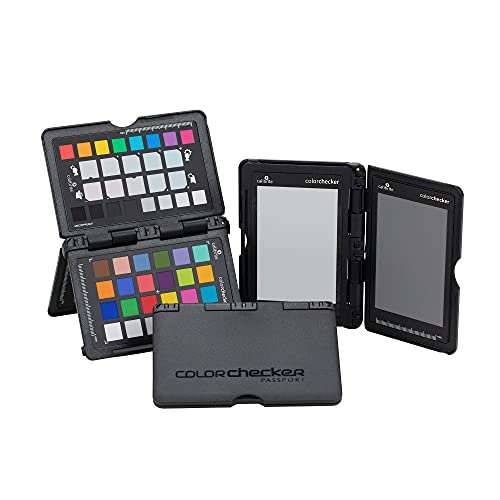 Calibrite ColorChecker Passport Photo 2
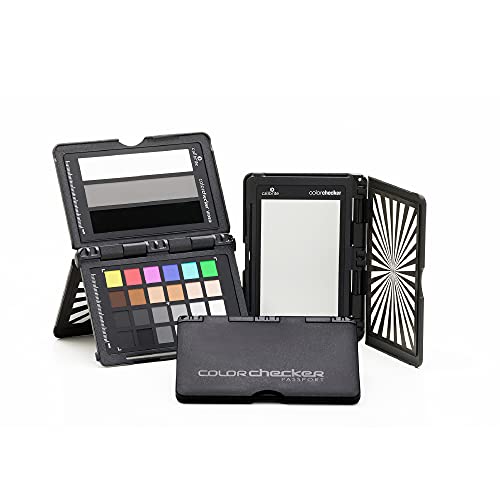 Calibrite ColorChecker Passport Video
 Datacolor Spyder Checkr Photo
 Datacolor SpyderCheckr 24