We independently review everything we recommend. When you buy through our links, we may earn a commission. As an Amazon Associate we earn from qualifying purchases.
Best Budget USB-C Cable: 5 Picks for Charging 2026
Compare the best budget USB-C cable for phones, tablets, and laptops. Five affordable picks ranked by charging power, data speed, length, and durability.
Compare the best budget USB-C cable for phones, tablets, and laptops. Five affordable picks ranked by charging power, data speed, length, and durability.
⭐ Key Takeaways
Quick answer: Our top pick is Anker Nano USB-C Cable, 240W, 6 ft, with Cable Matters USB-IF Certified 240W USB-C Cable, 6.6 ft as a strong alternative.
As an Amazon Associate, we earn from qualifying purchases.
The best budget USB-C cable for most people is the Anker Nano USB-C Cable, 240W, 6 ft, because it charges laptops at up to 240W, carries data at 480 Mbps, and uses a soft braided jacket that coils neatly for travel. The Cable Matters USB-IF Certified 240W cable is the better pick for the lowest-cost option, while the UGREEN USB-C 3.2 Gen 2 cable is the one to choose for fast file transfers and 4K video output over the same cable.
A budget USB-C cable is not a single thing. Some cables are built only for charging, some add fast data transfer, and a few carry video to a monitor. The right choice depends on what you plug in, how far the charger sits from your desk, and whether the cable also needs to move files or drive a display.
Start with charging power. A cable rated for 15W or 60W is enough for phones, earbuds, and small tablets, but a laptop needs more. A 100W cable covers most thin laptops, while a 240W cable covers large laptops that draw high power. The wattage on the cable is a ceiling, not a promise: the charger and the device decide how much power actually flows.
Next, check the data speed. Most budget charging cables use USB 2.0, which moves data at 480 Mbps. That is fine for syncing photos, music, and documents. If you move large video files or back up a drive, a USB 3.2 Gen 2 cable at 10 Gbps finishes the job far faster. Look for the data rate in the specifications rather than assuming a thick cable is a fast one.
Then decide whether you need video. Only some USB-C cables carry a display signal, and the ones that do say so in their specifications, usually as DisplayPort Alt Mode or 4K video output. A charging-only cable will not drive a monitor, no matter how much power it carries.
Length matters more than most buyers expect. A 3.3 ft cable suits a charger on the desk beside a laptop, while a 6 ft or 6.6 ft cable reaches a wall outlet behind a desk or a charger on the floor. Longer cables are heavier and tangle more easily, so a shorter cable is the better choice when the charger sits close by.
Finally, check certification. USB-IF certification means the cable passed the USB Implementers Forum compliance program for the standard it claims, and an E-Marker chip inside the cable tells the charger and device what power level is safe.
The Anker Nano USB-C cable is the best all-round pick in this roundup because it combines the highest charging ceiling with a practical length and a jacket that is easy to live with. It charges at up to 240W, so it covers everything from a phone to a large laptop, and it transfers data at 480 Mbps, which handles everyday syncing. The braided jacket uses recycled nylon, and the cable comes with a silicone organizer that keeps the coil tidy in a bag.
Anker rates this cable for 30,000 bends, a useful sign of durability at the connector, the point where most cables fail first. It comes in five colors, including black, so matching a desk setup or telling cables apart is simple. One limit to know before buying: this cable does not support screen mirroring, so it will not carry video to a monitor. For charging and syncing, that limit does not matter, and the 6 ft length is the sweet spot between reach and portability.
Specs
Connectors: USB-C to USB-C, male-to-male
Max charging power: 240W
Data transfer speed: 480 Mbps
Video output: No, does not support screen mirroring
Length: 6 ft
Jacket: Upcycled braided nylon
Bend lifespan: 30,000 bends
Model number: A82E2
Tier: Mid-range
Cable Matters USB-IF Certified 240W USB-C Cable, 6.6 ft
Runner-Up
Cable Matters USB-IF Certified 240W USB-C Cable, 6.6 ft
The Cable Matters 240W cable is the budget pick, and it is remarkable for how much it offers at its tier. It charges at up to 240W, it is USB-IF certified, and it stretches 6.6 ft, which is longer than most cables in this roundup. That extra length reaches a wall outlet behind a desk without pulling the laptop toward the edge, and the white finish stands out against a dark desk so the cable is easy to spot.
Like most charging-focused cables, it moves data at 480 Mbps and does not support video. That is a fair trade at this tier: the cable is built for power delivery, and it does that job to the full USB Power Delivery 3.1 Extended Power Range. The connectors are standard USB-C on both ends, so the cable works with MacBook, iPad Pro, XPS laptops, Surface Pro, and modern phones without any adapter.
The UGREEN USB-C 3.2 Gen 2 cable is the premium pick, and it earns that spot by being the only cable here that does three jobs at once: fast charging, fast data, and video. It charges at up to 240W, transfers data at 10 Gbps, and outputs 4K video at 60 Hz to a compatible monitor. That combination makes it the right cable for a desk dock, a portable monitor, or a fast external drive, where one cable replaces two or three.
An E-Marker smart chip inside the cable negotiates the safe power level with the charger and the device. The nylon braided jacket and aluminum connector housings give it a solid feel.
The trade-off is length. At 3.3 ft, this cable suits a charger or dock sitting next to the laptop, not a wall outlet across the room. If your setup is compact, that is not a problem, and the speed and video support more than make up for it.
Specs
Connectors: USB-C to USB-C, male-to-male
Max charging power: 240W
Data transfer speed: 10 Gbps, USB 3.2 Gen 2
Video output: 4K at 60 Hz, DisplayPort Alt Mode
Length: 3.3 ft
Jacket: Nylon braid with aluminum connector housings
The Anker PowerLine III Flow is the softest and most flexible cable in this roundup, and that is its main selling point. Its silicone finish and interior graphene coating make it bend easily without kinking, and Anker rates it for 25,000 bends with a tensile strength that resists pulling. It comes in seven colors, from Midnight Black to Mint Green, so it is easy to pick a finish that matches a laptop or a bag.
Charging tops out at 100W, which covers phones, tablets, and most thin laptops, though it falls short of the 240W ceiling on the other cables here. Data moves at 480 Mbps, which is standard for a charging cable, and the cable does not support media display, so it will not drive a monitor. A silicone strap is included for coiling the cable.
Specs
Connectors: USB-C to USB-C, male-to-male
Max charging power: 100W
Data transfer speed: 480 Mbps
Video output: No, does not support media display
Length: 6 ft
Jacket: Silicone with graphene coating
Bend lifespan: 25,000 bends
Model number: A8553
Tier: Mid-range
UGREEN 240W USB-C Cable with Digital Display, 6.6 ft
UGREEN 240W USB-C Cable with Digital Display, 6.6 ft
The UGREEN 240W cable with a digital display is the most informative cable in this roundup. A small LED display built into the connector shows the real-time charging power flowing through the cable, so you can see at a glance whether a charger is delivering full power. That display is genuinely useful when troubleshooting a slow charge, since it separates a weak charger from a cable problem.
Beyond the display, the cable is a capable charger in its own right. It carries up to 240W, moves data at 480 Mbps, and stretches 6.6 ft, which reaches a floor-level outlet or a charger on the far side of a desk. The braided jacket resists tangling, and the cable works with MacBook Pro and Air, iPad Pro, Dell XPS, and gaming laptops, as well as phones and tablets.
Specs
Connectors: USB-C to USB-C, male-to-male
Max charging power: 240W
Data transfer speed: 480 Mbps
Display: LED digital display showing real-time charging power
Length: 6.6 ft
Jacket: Braided
Color: Black
Model number: L530
Tier: Mid-range
Frequently Asked Questions
Is a 240W USB-C cable worth it for a phone?
Yes, for future-proofing, but a phone will not charge faster because of the cable alone. A phone draws only the power its battery and charger agree on. The advantage of a 240W cable is that the same cable also charges a laptop at full speed.
Do budget USB-C cables charge as fast as expensive ones?
They can, when the wattage rating matches. A budget 240W cable charges a laptop at the same speed as a premium cable with the same rating, because the charger and the device set the pace. The difference shows up in data speed, video support, jacket material, and bend durability.
What is the difference between USB 2.0 and USB 3.2 Gen 2 in a cable?
USB 2.0 moves data at 480 Mbps, which is enough for syncing photos, music, and documents. USB 3.2 Gen 2 moves data at 10 Gbps, and it matters when you transfer large video files or use an external drive. Both types use the same USB-C connector, so check the data rate in the specifications before buying.
Can a USB-C cable carry video to a monitor?
Only some USB-C cables can. A cable must support DisplayPort Alt Mode or list video output in its specifications to drive a display, and the device and the monitor must support it too. Charging-only cables will not carry a video signal, so pick a cable that explicitly lists 4K video output when you need it.
Conclusion
The best budget USB-C cable depends on the job, but the Anker Nano 240W cable is the safest all-round choice, with 240W charging and a 6 ft braided build. Buyers on a tight budget should pick the Cable Matters USB-IF Certified 240W cable, which offers the same charging ceiling and a longer 6.6 ft reach. For a desk with a monitor or a fast drive, the UGREEN USB-C 3.2 Gen 2 cable is the only pick here with 10 Gbps data and 4K video, while the Anker PowerLine III Flow suits daily carry and the UGREEN display cable suits anyone who wants to see charging power in real time.
E
Emubox Editorial Team
We compare specs, materials and verified owner reviews before a product earns a spot. Rankings are never paid.
Affiliate disclosure. As an Amazon Associate we earn from qualifying purchases at no extra cost to you. Prices accurate as of the date shown.
Best 2mm 70 cm portable antennas compared: telescopic radio antennas near 70 cm, with connectors, bands and collapsed sizes explained before you buy today.
Find the best thermostat setting for winter and summer, with energy-saving setbacks, humidity tips, and smart schedules for a comfortable home year-round.
The best affordable business computer monitors balance sharp text, eye comfort and lasting value. Compare four reliable office displays built for long workdays.
Looking for the best inexpensive HD TVs non smart? Compare five genuinely non-smart HD televisions with tuners, HDMI inputs and simple setup for any small room.

 Anker Nano USB-C Cable, 240W, 6 ft
 Cable Matters USB-IF Certified 240W USB-C Cable, 6.6 ft
 UGREEN USB-C 3.2 Gen 2 Cable, 240W, 3.3 ft
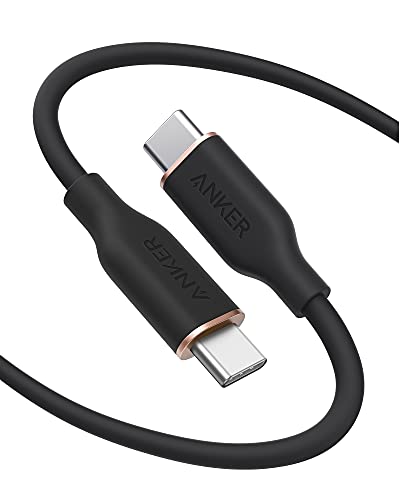 Anker PowerLine III Flow USB-C Cable, 6 ft
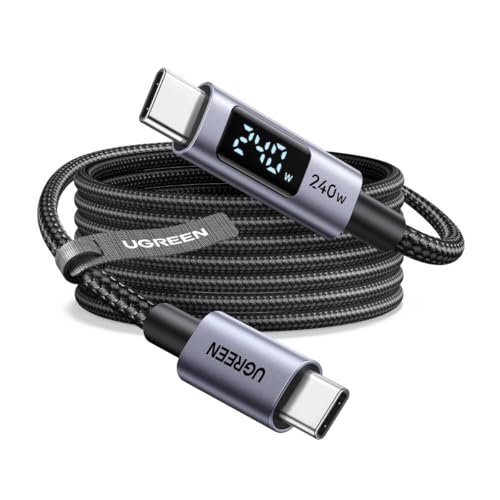 UGREEN 240W USB-C Cable with Digital Display, 6.6 ft









