We independently review everything we recommend. When you buy through our links, we may earn a commission. As an Amazon Associate we earn from qualifying purchases.
Best USB-C Cables for Charging, Data and Video in 2026
Compare the best USB-C cables for fast charging, 40Gbps data and video, with braided, silicone and Thunderbolt 4 picks for laptops and phones.
Compare the best USB-C cables for fast charging, 40Gbps data and video, with braided, silicone and Thunderbolt 4 picks for laptops and phones.
⭐ Key Takeaways
Quick answer: Our top pick is Anker 2-in-1 USB-C to USB-C Cable, 4 ft, 140W, Braided, with Ugreen 100W USB-C to USB-C Cable, 3.3 ft as a strong alternative.
USB-C cables look identical but behave very differently. Some carry a full 240 watts of charging power yet move data at slow USB 2.0 speeds, while others move files at 40Gbps and drive a monitor but come only in short lengths. Matching the cable to the job, charging, data or video, is what this shortlist is for.
As an Amazon Associate, we earn from qualifying purchases.
Quick answer
For everyday charging, the Ugreen 100W cable is the dependable default, and the Anker PowerLine III Flow is the pick if cables live in a bag because its silicone jacket resists tangles. For a dock or fast external drive, step up to the Cable Matters Thunderbolt 4 cable, which adds 40Gbps data and video support.
Anker 2-in-1 USB-C to USB-C Cable, 4 ft, 140W, Braided
Top Pick
Anker 2-in-1 USB-C to USB-C Cable, 4 ft, 140W, Braided
Anker’s 2-in-1 cable solves a desk problem rather than a speed problem: one cable splits to charge two USB-C devices at once, with up to 140 watts available to a single device when only one is connected. That suits a laptop-and-phone charging spot where wall outlets and charger ports are limited, and it removes one cable from the desk entirely.
The braided nylon jacket handles daily coiling and bag duty well, and the 4 ft length is a sensible middle ground for a nightstand or desk edge. Data transfer is capped at USB 2.0 speeds, so this is a charging cable first; large file transfers to an external drive will crawl compared with a proper data cable. Power splits when both ends are in use, so a power-hungry laptop should get the cable to itself during heavy charging.
Choose this cable if one charger feeds both your laptop and your phone or tablet. If you mostly charge a single device, the simpler single cables below give you fewer compromises for the same job, but for shared charging points the 2-in-1 design is genuinely convenient.
The Ugreen 100W cable is the straightforward recommendation for fast charging a laptop, tablet or phone from a USB-C charger. It supports up to 100 watts of USB-C Power Delivery, which covers the great majority of ultraportable laptops and every mainstream phone and tablet, and an e-marker chip handles the negotiation that high-wattage charging requires.
Nylon braiding over the jacket and aluminium connector housings give it a sturdier feel than the cables bundled with most chargers, and the 3.3 ft length keeps a desk or car setup tidy without excess cable looping everywhere. Like most charging-focused cables, data transfer runs at USB 2.0 rates, which is fine for syncing and small files but slow for big photo or video libraries.
This is the cable to buy in multiples: one for the desk, one for the car, one for a travel kit. Anyone who needs a single cable that also drives a monitor or a fast SSD should skip ahead to the Thunderbolt 4 option, but for pure charging duty the Ugreen is hard to fault at this size and rating.
Belkin BoostCharge Braided USB-C to USB-C Cable, 6.6 ft, 100W
Belkin BoostCharge Braided USB-C to USB-C Cable, 6.6 ft, 100W
Belkin’s BoostCharge cable is the long-reach option in this list. At 6.6 ft it stretches from a wall outlet behind furniture to a sofa, bed or desk chair without forcing you to sit next to the charger, and it still delivers up to 100 watts, enough for most laptops as well as phones and tablets.
The braided jacket is rated for repeated bending and keeps the cable from kinking at the connector ends, which is where long cables usually fail. Belkin sells this line with USB-IF certification, which is worth having on a cable that will spend its life attached to expensive hardware. Data transfer is again USB 2.0 speed, so treat it as a charging and light-sync cable rather than a drive cable.
Pick the BoostCharge when distance is the whole point: hotel rooms, couches and desks where the only outlet is in the wrong place. If your charging spot sits within a metre of your devices, the shorter Ugreen cable is tidier, cheaper to replace and less likely to trail across the floor.
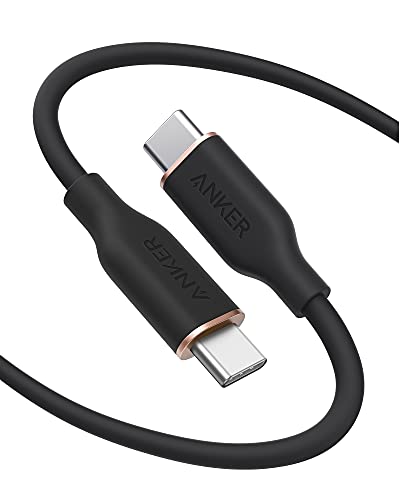
Anker PowerLine III Flow USB-C to USB-C Cable, 6 ft
Anker PowerLine III Flow USB-C to USB-C Cable, 6 ft
The PowerLine III Flow is built around feel. Its silicone jacket is soft, smooth and unusually resistant to tangling, so it coils into a bag or drawer without turning into a knot, and it wipes clean more easily than braided nylon. For a cable that travels daily, that handling difference is the entire appeal.
Charging support runs up to 100 watts in the standard version, covering laptops, tablets and phones, and Anker rates the silicone construction for a long bend life despite the soft finish. The trade-off is data speed: this is a USB 2.0 cable, so it belongs on chargers, not on external drives or docks. The 6 ft length works well for travel and bedside charging where outlets sit low or far away.
Choose the Flow if you are tired of stiff, tangled cables and your main job is charging. Creators who shuttle large files should pair it with a proper high-speed cable for the desk and keep the Flow in the travel kit, where its tangle-free behaviour earns its place every single trip.
Cable Matters Active Thunderbolt 4 Cable, 6.6 ft, 40Gbps
Cable Matters Active Thunderbolt 4 Cable, 6.6 ft, 40Gbps
This Cable Matters cable is the one to buy when a USB-C cable has to do everything. It is Intel certified for Thunderbolt 4, moves data at up to 40Gbps, carries up to 240 watts of charging power, and supports video output up to 8K, so a single cable can run a dock, a fast external SSD or a USB-C monitor at full capability.
Most Thunderbolt cables stop at around 2.6 ft because of signal limits; this active design stretches to 6.6 ft while keeping the full data rate, which makes tidy desk routing far easier. It also works as a USB4 cable and falls back gracefully with ordinary USB-C devices, so it can serve as the one good cable on a desk. Charging-only cables in this list cost less, but none of them can move a drive backup at full speed.
Pick this cable for a docking station, a Thunderbolt monitor or an external SSD enclosure, and for any desk where one cable is expected to handle power, data and display together. It is the premium option here, and the only one that never forces a compromise.
How to choose
Match the cable to its main job first. Charging cables should be rated at or above your charger’s wattage; 100 watts covers most laptops, while gaming laptops and large workstations may need 240-watt rated cables with an e-marker chip. For data, look at the speed rating honestly: USB 2.0 cables transfer at a fraction of the rate of USB4 or Thunderbolt 4 cables, whatever the charging wattage says.
Length matters more than it appears. High-speed cables get shorter as speeds rise, so buy the shortest length that reaches comfortably. Finally, pick a jacket for the environment: braided nylon for durability at a fixed desk, silicone for travel, and certified cables from known brands for anything attached to a dock or monitor.
Who should skip
Skip premium Thunderbolt 4 cables if all you do is charge a phone overnight; a basic 100-watt charging cable does that job identically. Skip long charging cables for a docking station, because most are USB 2.0 only and will bottleneck drives and displays. And skip replacing cables that already work: USB-C charging is mature, so a new cable only helps when the old one is damaged, too short or too slow.
FAQ
Why is my USB-C cable charging fast but transferring files slowly?
Most charging cables are wired for USB 2.0 data, which is far slower than USB4 or Thunderbolt 4. The connector is the same, but the internal wiring differs. If you move large files to an external drive, choose a cable with an explicit 40Gbps rating, and keep it short, because top speeds are only available at shorter lengths.
What does the wattage rating on a USB-C cable mean?
It is the maximum charging power the cable can safely carry. A 100-watt cable covers most laptops, tablets and phones, while 240-watt cables suit the fastest chargers and largest laptops. Cables rated above 60 watts contain an e-marker chip that tells the charger it is safe to deliver higher power.
Can one USB-C cable run my monitor, dock and charger?
Yes, if it is a Thunderbolt 4 or USB4 cable with video support. Those cables carry data, display signals and charging power together, which is exactly how single-cable docking stations work. Plain charging cables cannot send video, so check for a Thunderbolt or USB4 rating and a stated video resolution before relying on one cable.
Final verdict
For pure charging, the Ugreen 100W is the default buy, the Belkin BoostCharge adds reach, and the Anker PowerLine III Flow is the travel-friendly option. The Anker 2-in-1 earns its place on shared charging points. When one cable must handle charging, fast data and video together, the Cable Matters Thunderbolt 4 cable is the clear pick.
E
Emubox Editorial Team
We compare specs, materials and verified owner reviews before a product earns a spot. Rankings are never paid.
Affiliate disclosure. As an Amazon Associate we earn from qualifying purchases at no extra cost to you. Prices accurate as of the date shown.
Best 2mm 70 cm portable antennas compared: telescopic radio antennas near 70 cm, with connectors, bands and collapsed sizes explained before you buy today.
Find the best thermostat setting for winter and summer, with energy-saving setbacks, humidity tips, and smart schedules for a comfortable home year-round.
The best affordable business computer monitors balance sharp text, eye comfort and lasting value. Compare four reliable office displays built for long workdays.
Looking for the best inexpensive HD TVs non smart? Compare five genuinely non-smart HD televisions with tuners, HDMI inputs and simple setup for any small room.

 Anker 2-in-1 USB-C to USB-C Cable, 4 ft, 140W, Braided
 Ugreen 100W USB-C to USB-C Cable, 3.3 ft
 Belkin BoostCharge Braided USB-C to USB-C Cable, 6.6 ft, 100W
 Anker PowerLine III Flow USB-C to USB-C Cable, 6 ft
 Cable Matters Active Thunderbolt 4 Cable, 6.6 ft, 40Gbps









