We independently review everything we recommend. When you buy through our links, we may earn a commission. As an Amazon Associate we earn from qualifying purchases.
Best Computer Speakers for Any Desk: 5 Budget Picks
Upgrade from tinny laptop sound with the best computer speakers for your desk. Compare compact USB-powered picks and Bluetooth models for work and play.
Upgrade from tinny laptop sound with the best computer speakers for your desk. Compare compact USB-powered picks and Bluetooth models for work and play.
⭐ Key Takeaways
Quick answer: Our top pick is Creative Pebble V2, with Creative Pebble V3 as a strong alternative.
Built-in laptop speakers are fine for the occasional notification ping, but they make music, videos, and calls sound thin and distant. A small set of desktop speakers fixes that for good, and the current budget crop is far better than the tinny boxes of a decade ago. These five picks cover USB-powered simplicity, single-cable USB audio, and Bluetooth flexibility for desks of every size.
As an Amazon Associate, we earn from qualifying purchases.
Quick answer
The Creative Pebble V2 is the best all-round pick, with USB-C power, angled drivers, and clear sound for calls and music. Choose the Pebble V3 for single-cable USB audio plus Bluetooth, the Logitech S150 for the simplest plug-and-play setup, the Logitech Z207 for Bluetooth with wired backup, and the Amazon Basics pair for the lowest-cost tidy desk upgrade.
The Pebble V2 is the speaker set that made budget desktop audio respectable again. Each spherical speaker angles its driver up at 45 degrees toward your ears, which matters more than raw power at desk distances. Passive radiators at the back give the sound a fullness that the small enclosures have no right to produce, and voices in calls and podcasts come through clearly.
Power comes from a USB-C cable, with a USB-A adapter in the box for older machines, while audio arrives through a standard 3.5 mm cable. Output reaches up to 8W RMS, comfortably louder than laptop speakers and enough for a bedroom or home office. A single knob on the right speaker handles power and volume, keeping controls where your hand expects them.
The two speakers are joined by a fixed cable, so extremely wide monitor setups can feel a stretch, and there is no Bluetooth for phone playback. Bass is present but modest, as physics demands at this size. For nearfield listening at a normal desk, the Pebble V2 remains the easiest recommendation in budget audio. It also comes in a white finish for lighter desk setups, and the wide color availability makes matching a themed workspace easy.
The Pebble V3 refines the formula with a cleaner connection story. A single USB-C cable carries both power and digital audio, so one plug replaces the usual pair of cables snaking across the desk. When the computer is off, Bluetooth 5.0 takes over for phone and tablet playback, which makes the set double as a small room speaker.
Creative adds a Clear Dialog enhancement aimed at voices, and it genuinely helps with video calls, online courses, and dialogue-heavy shows at low volume. Output matches the V2 at up to 8W RMS with 16W peak, and the same 45-degree angled drivers and passive radiators keep the soundstage focused at your chair. A USB-A converter is included for older ports.
The V3 costs a little more than the V2, and buyers who will never use Bluetooth or USB audio may not need the upgrade. The gain knob on the back also takes a moment to find by feel. If your desk routine mixes laptop work with phone streaming, the V3 is the most versatile compact set here. It is a particularly good match for modern ultrabooks that have dropped the headphone jack, since the USB connection sidesteps dongles entirely.
The S150 is the definition of plug and play. One USB cable supplies both power and digital audio, so setup is literally a single plug and a few seconds of waiting. There are no batteries, no wall adapter, and no Bluetooth pairing rituals, which is exactly why these speakers thrive in offices, classrooms, and shared workstations.
Controls sit on the front of the right speaker: volume buttons and a mute button with a small LED to show the speakers are live. Sound output is modest at 1.2W RMS, tuned for speech clarity rather than musical punch. Video calls, training videos, and system sounds all come through cleanly, and the slim cabinets fit beside a monitor without crowding the desk.
Music lovers will want more low end than these can give, and the fixed cable limits how far apart the pair can spread. But as a permanent, zero-maintenance upgrade over laptop speakers for work machines, the S150 has quietly earned its place on countless desks. It is the set you buy once and forget about, in the best way. IT departments have deployed these by the hundreds for exactly that reason: they survive daily use and never generate a support ticket.
The Z207 is built for desks where more than one device wants a turn. Bluetooth connects a phone or tablet wirelessly, a 3.5 mm cable handles the computer, and Logitech’s Easy-Switch feature hops between the two sources with a pause and play rather than a cable swap. That makes it painless to take a call playlist break from your phone and return to the PC.
Each speaker carries an active driver plus a passive radiator, producing 5W RMS and 10W peak in total, a step up in body from the smallest USB sets. The right speaker hosts the volume knob, a headphone jack for private listening, and the Bluetooth pairing button, all within easy reach. Unlike the USB-powered picks here, the Z207 plugs into the wall, which frees it from USB power limits.
The taller cabinets take more desk space, and the connecting cable between speakers still sets a maximum spread. Bluetooth adds a hint of delay that competitive gamers may notice, though wired mode removes it. For mixed work-and-play desks, the flexibility is the whole point. The off-white color option is a thoughtful touch for brighter rooms where black electronics tend to look heavy against pale furniture.
The Amazon Basics speakers are the no-fuss budget entry, and they cover the fundamentals properly. USB powers the pair while a 3.5 mm plug carries audio, and a volume knob on the front of the right speaker keeps adjustments simple. The metal-finished cabinets look tidier than most speakers at this level, with a blue LED accent along the base for a bit of desk character.
Output is rated at 2.4W in total, which places them firmly in nearfield territory: clear speech, comfortable video volume, and background music at your desk rather than room-filling sound. The compact footprint suits small desks, dorm rooms, and second monitors where space is spoken for.
There is no Bluetooth and no USB audio, so phones need the aux cable and a free USB port must be nearby for power. Sound quality is honest rather than exciting, with limited bass as expected. When the goal is simply to escape laptop speakers for the least money and effort, this pair does the job without drama. A black version is also sold if the silver finish clashes with your setup, and both share the same simple hardware.
How to choose
Connection type is the first filter. USB-powered speakers with a 3.5 mm audio cable work with almost anything, single-cable USB audio models like the Pebble V3 keep desks cleaner, and Bluetooth sets add phone playback at the cost of an occasional pairing step. Wall-powered speakers generally play louder because they are not limited by USB power.
Think about where the speakers will sit. Angled drivers aim sound at your ears from beside a monitor, which improves clarity more than extra wattage at close range. Check the cable length between the two speakers against your monitor width, and confirm you have desk depth for taller models like the Z207.
Controls deserve a glance too: a front volume knob beats reaching behind a speaker or relying on software sliders, and a headphone jack on the speaker is genuinely handy for calls. Finally, set expectations by size. Compact 2.0 sets excel at voices and casual music; if deep bass for movies and games is the priority, plan on a 2.1 system with a subwoofer instead.
Who should skip
Skip compact 2.0 speakers if you want cinematic bass or you are furnishing a living-room TV setup; a soundbar or a 2.1 system with a subwoofer will make you happier. Music producers and critical listeners should also look at studio monitors, which aim for accuracy these fun little sets do not chase.
You can skip the upgrade entirely if your laptop already has unusually good speakers and you mostly use headphones. And competitive gamers who play with speakers rather than a headset may find Bluetooth latency distracting, so wired-only models or a direct headphone setup suit them better.
FAQ
Are USB-powered speakers loud enough?
For nearfield desk listening, yes. USB power limits total output, but at arm’s length a set like the Pebble V2 or S150 is clearly louder and fuller than laptop speakers. They are made for one listener at a desk, not for filling a large room or hosting a party. Wall-powered sets play louder still.
Do computer speakers need a subwoofer?
Not for calls, videos, and casual music, where clarity matters more than depth. A subwoofer adds the low-frequency weight that movies and electronic music rely on, and compact 2.0 speakers cannot reproduce it fully. If your listening is mostly speech and background music, a good 2.0 set is enough and saves considerable desk space.
Can I use computer speakers with my phone?
Bluetooth models like the Pebble V3 and Z207 connect to phones wirelessly. Wired-only sets can usually play from a phone through the 3.5 mm cable if the phone has a headphone jack or an adapter, though they still need USB power from somewhere. Check the connection list before assuming a set will work with your phone.
Where should I place desktop speakers?
Place them on either side of your monitor, roughly ear height or angled up toward you, with similar distance from your seat for balanced stereo. Keep them near the front edge of the desk to avoid reflections off the wall behind the monitor. Small foam pads or stands can help if the desk surface buzzes at higher volumes.
Final verdict
The Creative Pebble V2 remains the default recommendation for most desks, with the Pebble V3 earning its premium through USB audio and Bluetooth. The Logitech S150 is the simplest work speaker set you can buy, the Z207 serves multi-device desks best, and the Amazon Basics pair covers the basics for the least money. Any of the five is a clear step up from built-in speakers you will notice every day.
E
Emubox Editorial Team
We compare specs, materials and verified owner reviews before a product earns a spot. Rankings are never paid.
Affiliate disclosure. As an Amazon Associate we earn from qualifying purchases at no extra cost to you. Prices accurate as of the date shown.
Best 2mm 70 cm portable antennas compared: telescopic radio antennas near 70 cm, with connectors, bands and collapsed sizes explained before you buy today.
Find the best thermostat setting for winter and summer, with energy-saving setbacks, humidity tips, and smart schedules for a comfortable home year-round.
The best affordable business computer monitors balance sharp text, eye comfort and lasting value. Compare four reliable office displays built for long workdays.
Looking for the best inexpensive HD TVs non smart? Compare five genuinely non-smart HD televisions with tuners, HDMI inputs and simple setup for any small room.

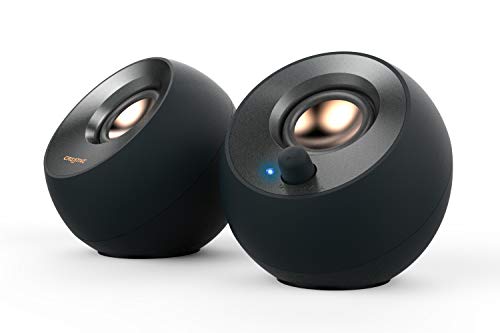 Creative Pebble V2
 Creative Pebble V3
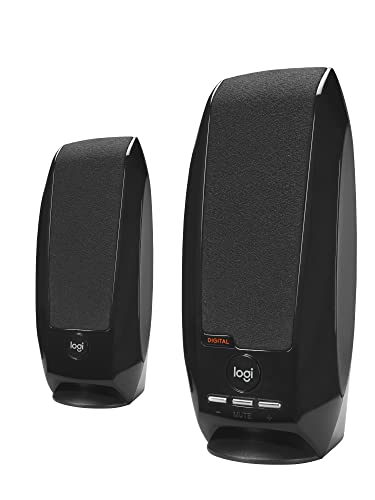 Logitech S150 USB Speakers
 Logitech Z207 Bluetooth Computer Speakers
 Amazon Basics Stereo 2.0 Computer Speakers









