We independently review everything we recommend. When you buy through our links, we may earn a commission. As an Amazon Associate we earn from qualifying purchases.
Best Budget Hard Drive Docking Station: 5 Top Picks
Compare five budget hard drive docking stations for cloning, backups, and fast drive access. Find the best dual-bay and single-bay docks for your desk.
Compare five budget hard drive docking stations for cloning, backups, and fast drive access. Find the best dual-bay and single-bay docks for your desk.
⭐ Key Takeaways
Quick answer: Our top pick is SABRENT EC-DFLT Lay-Flat Docking Station, with SABRENT EC-HD2B Dual Bay Docking Station as a strong alternative.
As an Amazon Associate, we earn from qualifying purchases.
The best budget hard drive docking station is the SABRENT EC-HD2B, because it holds two SATA drives at once, copies one drive to the other without a computer, and connects over USB 3.0 with UASP support. If you only need to read one drive at a time, the SABRENT EC-DFLT lay-flat dock is the simplest and most affordable option, while the SABRENT DS-UC1B is the pick for a faster 10Gbps USB-C connection. Every dock in this roundup accepts standard 2.5-inch and 3.5-inch SATA hard drives and solid-state drives and works without tools.
A hard drive docking station turns a bare internal drive into an external drive in seconds, with no screws and no enclosure to assemble. That makes it ideal for recovering files from an old laptop drive, cloning a failing drive before it dies, or moving a large photo library between machines. Budget docks keep the formula simple, focusing on connecting a SATA drive over USB and skipping extras such as multi-bay RAID arrays.
Start with the number of bays. A single-bay dock suits a simple task: read one drive, copy its files, and put the drive away. It takes up less desk space and usually sits in the budget tier. A dual-bay dock is the better choice when cloning matters, because it can copy a source drive to a target drive without a computer in the loop, and it lets two drives stay connected at once.
Next, check the connection and drive support. Most budget docks use USB 3.0, which supports transfer rates up to 5Gbps and is fast enough for a spinning hard drive. A SATA solid-state drive can move faster, so a USB-C dock with a 10Gbps link makes a real difference when the drives in use are solid-state drives and the computer has a matching USB-C port. UASP support is worth looking for, because it handles queued commands more efficiently when copying many small files. Every dock here accepts 2.5-inch and 3.5-inch SATA drives, and most work on Windows, macOS, and Linux without extra drivers.
Offline cloning separates a basic dock from a genuinely useful one. In offline clone mode, the dock copies the source drive to the target drive sector by sector, with no computer involved. The target drive must have at least as much capacity as the source drive, and the computer must stay disconnected while the copy runs. Also remember power: a 3.5-inch desktop drive needs more power than a USB port can supply, so every dock here ships with an external power adapter, which keeps transfers stable during long copies.
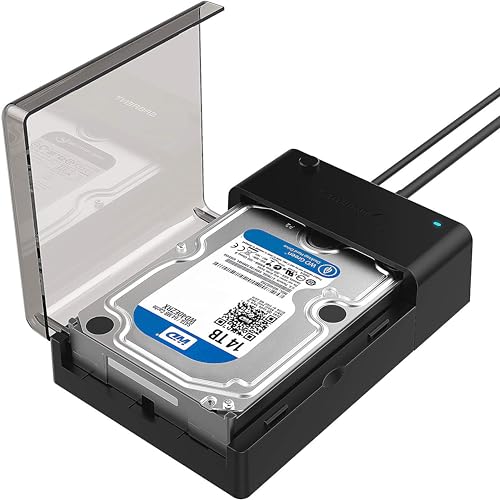
The SABRENT EC-DFLT is the simplest dock in this roundup, and that simplicity is its strength. It is a single-bay lay-flat dock for one 2.5-inch or 3.5-inch SATA hard drive or solid-state drive, with USB 3.0 and UASP support. The drive lies flat, which keeps the unit low on the desk and makes drives easy to insert and remove with one hand. It is the natural pick for reading an old drive, checking a spare drive, or moving files off a retired laptop.
Setup takes about a minute: plug in the power adapter, connect the USB cable, and slide the drive in until it seats on the SATA connector. The operating system recognizes the drive as an external volume. When the work is done, eject the drive, switch the power off, and lift the drive straight out.
Specs
Model: SABRENT EC-DFLT
Bays: 1 bay for 2.5-inch or 3.5-inch SATA HDD or SSD
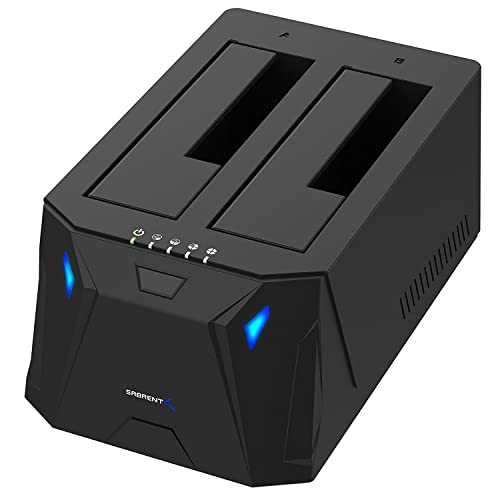
The SABRENT EC-HD2B is the best budget hard drive docking station overall, because it combines two drive bays with offline cloning in a single affordable unit. It accepts two 2.5-inch or 3.5-inch SATA drives at once, supports up to 20TB in total, and connects over USB 3.0 with UASP support. The offline clone function copies a source drive to a target drive without a computer, which makes it the right tool for drive upgrades, full backups, and rescuing data from a failing drive.
As a two-bay reader, both drives appear as separate volumes, and files can move between them or to the computer. The dual-bay layout suits sorting old drives, with one bay holding the drive being read and the other holding the receiving drive. In offline clone mode, the source drive goes in one bay and the target drive in the other, and a button press starts the copy. The target drive must hold at least as much data as the source drive.
Specs
Model: SABRENT EC-HD2B
Bays: 2 bays for 2.5-inch or 3.5-inch SATA HDD or SSD
Interface: USB 3.0 with UASP support
Drive support: SATA I, II, and III, up to 20TB total
Offline clone: Yes, drive duplicator and cloner function
Design: Upright dual bay, tool-free drive insertion
The WAVLINK WL-ST334UA is a dual-bay dock that stands out for its flexible connectivity. It connects over USB 3.0 and USB-C, so it fits computers with either type of port. It accepts two 2.5-inch or 3.5-inch SATA drives, supports up to 16TB per bay, and includes an offline clone function for copying one drive to another without a computer. UASP support keeps transfers efficient.
A desktop with USB-A ports and a laptop with only USB-C ports can share the same dock. As a cloning tool, it follows the usual dual-bay pattern: the source and target drives go in the two bays, the computer stays disconnected, and the clone runs on its own until the progress lights show it is complete. The 16TB support per bay covers the largest desktop drives most home users will own.
Specs
Model: WAVLINK WL-ST334UA
Bays: 2 bays for 2.5-inch or 3.5-inch SATA HDD or SSD
Interface: USB 3.0 and USB-C with UASP support
Drive support: SATA I, II, and III, up to 16TB per bay
Offline clone: Yes, duplicator function
Design: Upright dual bay, tool-free drive insertion
The ORICO 6629US3 is the most affordable dual-bay cloning dock in this roundup, and it covers the essentials without fuss. It holds two 2.5-inch or 3.5-inch SATA drives, supports up to 12TB per bay, and connects over USB 3.0 with UASP support. Its offline clone function copies a source drive to a target drive with no computer attached, which suits drive upgrades and full-drive backups on a tight budget.
Both drives mount as separate volumes, and the tool-free slots make swapping drives quick. It is a sensible first cloning dock, delivering the core feature of the category at a budget-tier position, without new software or a complicated setup. The 12TB support per bay covers the desktop drives found in most home computers and retired office machines.
Specs
Model: ORICO 6629US3
Bays: 2 bays for 2.5-inch or 3.5-inch SATA HDD or SSD
Interface: USB 3.0 with UASP support
Drive support: SATA I, II, and III, up to 12TB per bay
Offline clone: Yes, duplicator function
Design: Upright dual bay, tool-free drive insertion
The SABRENT DS-UC1B is the premium pick in this roundup, and it earns that position with speed. It is a single-bay dock with a 10Gbps USB-C connection, twice the link speed of the USB 3.0 docks around it. It accepts one 2.5-inch or 3.5-inch SATA drive, supports drives up to 20TB, and allows hot swapping, so a drive can be replaced while the dock stays powered on. For anyone working mainly with SATA solid-state drives, the faster link makes a noticeable difference with large files.
The dock is fully backward compatible, so it also works on slower USB ports, though transfers will run at the speed of the slowest link in the chain. The external power supply keeps 3.5-inch drives running steadily during long copies. It costs more than the single-bay USB 3.0 docks, and it has no offline cloning, so buyers who need to copy one drive to another without a computer should look at the dual-bay docks instead.
Specs
Model: SABRENT DS-UC1B
Bays: 1 bay for 2.5-inch or 3.5-inch SATA HDD or SSD
Interface: USB-C 10Gbps, USB 3.2 Gen 2, backward compatible
Drive support: SATA I, II, and III, up to 20TB
Hot swap: Yes
Design: Upright single bay, tool-free drive insertion
Power: External power adapter included
Tier: Premium
Frequently Asked Questions
Do I need a driver for a budget docking station?
No. Every dock here works without extra drivers on Windows, macOS, and Linux. The computer recognizes the docked drive as an external volume once the dock is connected and powered on.
Can a budget docking station clone a drive without a computer?
Yes, if it is a dual-bay dock with an offline clone function. The SABRENT EC-HD2B, the WAVLINK WL-ST334UA, and the ORICO 6629US3 all support it. Insert both drives, disconnect the USB cable, and start the clone from the dock itself. The target drive must have at least as much capacity as the source drive.
Will a docking station work with both SSDs and hard drives?
Yes. All five docks accept 2.5-inch and 3.5-inch SATA hard drives and SATA solid-state drives. They do not accept NVMe or older IDE drives, so check for a SATA connector first.
Is USB 3.0 fast enough for a hard drive docking station?
Yes, for spinning hard drives, because a spinning drive cannot fill a 5Gbps USB 3.0 link on its own. A SATA solid-state drive can move faster, so a 10Gbps USB-C dock such as the SABRENT DS-UC1B is the better choice when the drives are solid-state drives and the computer has a matching USB-C port.
Conclusion
A budget hard drive docking station solves many everyday storage problems, from rescuing files off a retired laptop drive to cloning a drive before an upgrade. The SABRENT EC-HD2B is the best overall choice, because it pairs two drive bays with offline cloning at a mid-range position, and it handles the two most common jobs, reading drives and copying them, without needing a computer for the copy. Buyers who only need to read one drive at a time will be well served by the SABRENT EC-DFLT, while the WAVLINK WL-ST334UA and the ORICO 6629US3 bring dual-bay cloning to mixed USB-A and USB-C households or to buyers who want the lowest cost dual-bay option. The SABRENT DS-UC1B rounds out the roundup for solid-state drive owners whose computer can use a 10Gbps USB-C link. Pick the dock that matches the main task, and it will earn its place on the desk for years.
E
Emubox Editorial Team
We compare specs, materials and verified owner reviews before a product earns a spot. Rankings are never paid.
Affiliate disclosure. As an Amazon Associate we earn from qualifying purchases at no extra cost to you. Prices accurate as of the date shown.
Best 2mm 70 cm portable antennas compared: telescopic radio antennas near 70 cm, with connectors, bands and collapsed sizes explained before you buy today.
Find the best thermostat setting for winter and summer, with energy-saving setbacks, humidity tips, and smart schedules for a comfortable home year-round.
The best affordable business computer monitors balance sharp text, eye comfort and lasting value. Compare four reliable office displays built for long workdays.
Looking for the best inexpensive HD TVs non smart? Compare five genuinely non-smart HD televisions with tuners, HDMI inputs and simple setup for any small room.

 SABRENT EC-DFLT Lay-Flat Docking Station
 SABRENT EC-HD2B Dual Bay Docking Station
 WAVLINK WL-ST334UA Dual Bay Docking Station
 ORICO 6629US3 Dual Bay Docking Station
 SABRENT DS-UC1B USB-C Docking Station









