
Our Short List of 3
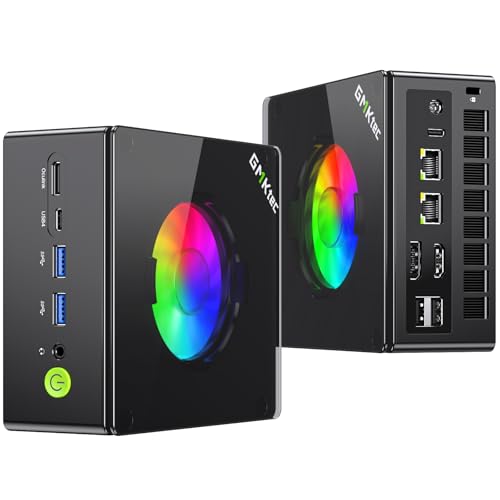
- Best for: analysts who want 64GB fitted from the factory and an OCuLink upgrade path.
- Processor: AMD Ryzen 9 8945HS, 8 cores / 16 threads, up to 5.2 GHz
- Graphics: AMD Radeon 780M integrated graphics
- Memory: 64GB DDR5-5600, dual channel
- Storage: 1TB PCIe 4.0 M.2 2280 SSD; dual SSD slots, up to 8TB
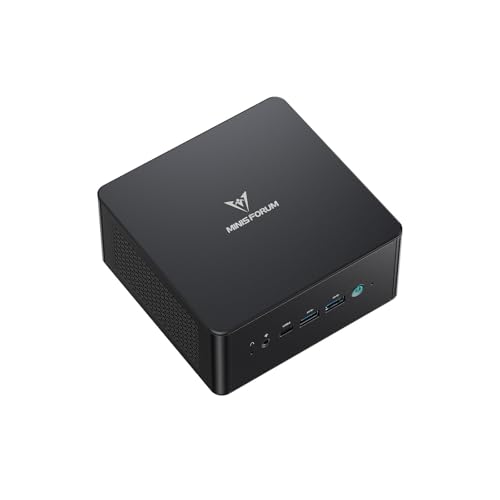
- Best for: analysts who pull large files from a NAS and want a configured machine with memory headroom.
- Processor: AMD Ryzen 9 8945HS, 8 cores / 16 threads, up to 5.2 GHz, 16MB L3 cache
- Graphics: AMD Radeon 780M, up to 2,800 MHz
- Memory: 32GB DDR5, expandable to 96GB
- Storage: 1TB PCIe 4.0 SSD; two M.2 2280 slots, up to 8TB

- Best for: analysts buying their first OCuLink machine who plan to add memory as projects grow.
- Processor: AMD Ryzen 7 8845HS, 8 cores / 16 threads, up to 5.1 GHz
- Graphics: AMD Radeon 780M integrated graphics
- Memory: 16GB DDR5 fitted; two SO-DIMM slots
- Storage: 1TB SSD fitted; PCIe 4.0 M.2 2280 dual slots, up to 8TB
All 3 Picks at a Glance
| Product | Specs | Action |
|---|---|---|
| GMKtec K11 |
| Check price on Amazon |
| Minisforum UM890 Pro |
| Check price on Amazon |
| GMKtec K8 Plus |
| Check price on Amazon |
Key takeaways
- OCuLink mini PCs compared for data analysis: CPU threads, memory headroom, NVMe slots and eGPU expansion for large local datasets and long queries.
The real decision is not the badge on the box; it is whether the machine can hold your working data in memory, feed it from fast storage, and still grow when a project outgrows integrated graphics. OCuLink matters because it gives a mini PC a direct PCIe path to a desktop graphics card, which is the upgrade that turns a compact desk box into a credible local analysis workstation without a tower case.
This guide serves analysts, researchers and data engineers who work locally in Python, R, SQL and notebooks and want that growth path in a small footprint. Every pick below is a mini PC whose Amazon listing states an OCuLink port, and the selections lean on listing facts that matter for analysis: thread counts, fitted memory, memory ceilings, M.2 slot counts and network ports for pulling data from shared storage.
Quick Picks
As an Amazon Associate we earn from qualifying purchases.
| Product | Best for | Key spec |
|---|---|---|
| GMKtec K11 | Analysts who want maximum fitted memory | 64GB DDR5, OCuLink port |
| Minisforum UM890 Pro | Pulling data from network storage | Dual 2.5G LAN, 32GB DDR5 |
| GMKtec K8 Plus | A first OCuLink analysis desk | Ryzen 7 8845HS, OCuLink port |
| Minisforum AI X1 Pro-470 | Builders with spare DDR5 and NVMe drives | Ryzen AI 9 HX 470, native OCuLink |
How to Choose
CPU Threads and Sustained Clocks
Parallel engines in tools like Polars, DuckDB and Spark local mode scale with threads, so core and thread counts decide how quickly grouped aggregations and model fits finish. The listings here span 8-core, 16-thread Ryzen chips and a 12-core, 24-thread Ryzen AI part, all with boost clocks at 5.1 or 5.2 GHz. Single-thread speed still matters for Python code that stays on one core, so a high boost figure is worth weighing beside thread count. Check the power modes in the listing too: several of these boxes list quiet, balanced and performance settings that change sustained clocks.
Memory Fitted and Memory Ceiling
In-memory work lives or dies on RAM. A dataset that fits in memory runs at full speed; one that spills to disk slows every step that follows. Listings here arrive with 16, 32 or 64GB fitted, and the socketed designs publish ceilings from 96GB to 128GB across two SO-DIMM slots. Decide which pattern suits you: buy the memory fitted and skip the screwdriver, or buy lean and add a matched pair later. The barebone pick pushes this furthest, shipping with no memory at all so the full ceiling is yours to fill.
What the OCuLink Port Actually Gives You
OCuLink carries a PCIe 4.0 x4 link out of the chassis, and the listings here quote 64Gbps for that connection. That is the path to a desktop graphics card in an external dock, which is what GPU-accelerated frames, local model work and fast visualisation need once integrated graphics run out of headroom. Two cautions appear again and again in listing text: the link is not hot-swappable, so the machine powers down before the cable moves, and on one pick the connection borrows an M.2 slot. A dock, a power supply and a card are separate purchases.
Storage Slots and Network Ports
Analysis data rarely lives on the machine itself. Dual 2.5G Ethernet ports, listed on three of these picks, let one link face your router while the second talks to a NAS at full speed, and they keep large pulls off Wi-Fi. Inside the box, count M.2 slots rather than the fitted drive alone: two slots mean a system drive plus a dedicated data drive, and the listings here quote ceilings up to 8TB. USB4 ports add a second route to fast external drives when the internal slots are spoken for.
The 4 Best Options
GMKtec K11
- Best for: analysts who want 64GB fitted from the factory and an OCuLink upgrade path.
- Processor: AMD Ryzen 9 8945HS, 8 cores / 16 threads, up to 5.2 GHz
- Graphics: AMD Radeon 780M integrated graphics
- Memory: 64GB DDR5-5600, dual channel
- Storage: 1TB PCIe 4.0 M.2 2280 SSD; dual SSD slots, up to 8TB
analysts who want 64GB fitted from the factory and an OCuLink upgrade path.
this model sells in several memory and storage combinations under similar titles, so confirm the 64GB and 1TB figures on the listing before ordering.
The K11 is the pick for analysts whose frames keep outgrowing ordinary memory sizes, because its listing arrives with 64GB of dual-channel DDR5 already fitted and a 1TB PCIe 4.0 drive in one of two SSD slots. The Ryzen 9 8945HS brings 8 cores and 16 threads for parallel query engines, while the front OCuLink port leaves the door open to a desktop graphics card when a workload turns graphical. Dual 2.5G LAN ports suit a desk that pulls data from a NAS every morning.
Minisforum UM890 Pro
- Best for: analysts who pull large files from a NAS and want a configured machine with memory headroom.
- Processor: AMD Ryzen 9 8945HS, 8 cores / 16 threads, up to 5.2 GHz, 16MB L3 cache
- Graphics: AMD Radeon 780M, up to 2,800 MHz
- Memory: 32GB DDR5, expandable to 96GB
- Storage: 1TB PCIe 4.0 SSD; two M.2 2280 slots, up to 8TB
analysts who pull large files from a NAS and want a configured machine with memory headroom.
the listing notes that OCuLink use takes one of the two M.2 2280 slots, so an eGPU setup leaves a single slot for storage; plan drive sizes around that.
The UM890 Pro suits analysts who split work between local frames and files that live on network storage. Its listing pairs the Ryzen 9 8945HS with 32GB of DDR5 that can grow to 96GB, two M.2 slots for up to 8TB, and two 2.5G Ethernet ports for fast pulls from a NAS. The OCuLink port is part of the listed interface set, and quad display support through HDMI, DisplayPort and USB4 makes room for notebooks, dashboards and a documentation screen side by side.
GMKtec K8 Plus
- Best for: analysts buying their first OCuLink machine who plan to add memory as projects grow.
- Processor: AMD Ryzen 7 8845HS, 8 cores / 16 threads, up to 5.1 GHz
- Graphics: AMD Radeon 780M integrated graphics
- Memory: 16GB DDR5 fitted; two SO-DIMM slots
- Storage: 1TB SSD fitted; PCIe 4.0 M.2 2280 dual slots, up to 8TB
analysts buying their first OCuLink machine who plan to add memory as projects grow.
16GB fitted is tight for large in-memory frames, so check the listing’s higher-memory configurations or budget for a SO-DIMM upgrade; the OCuLink link is not hot-pluggable.
The K8 Plus is the gentlest way into this category: a Ryzen 7 8845HS with 8 cores and 16 threads, a native OCuLink port, and two SO-DIMM slots that leave memory growth in your hands. The listing for this configuration fits 16GB of DDR5 and a 1TB SSD, which covers notebook work, SQL practice and mid-size frames on day one. Dual Intel 2.5G network ports and a metal chassis in a footprint near five inches square round out a tidy analysis desk that can gain a graphics card later.
Minisforum AI X1 Pro-470
The AI X1 Pro-470 is the builder’s route: a barebone listing with no memory, storage or OS in the box, wrapped around the strongest CPU here. The Ryzen AI 9 HX 470 offers 12 cores and 24 threads, and the native OCuLink port keeps every M.2 slot free for drives. Analysts who already own DDR5 SO-DIMMs and NVMe drives, or who want to choose both from day one, get a machine that can be specced around a known dataset instead of a factory guess.
Specs
- Processor: AMD Ryzen AI 9 HX 470, 12 cores / 24 threads, up to 5.2 GHz
- Graphics: AMD Radeon 890M integrated graphics
- Expansion: native OCuLink port, PCIe 4.0 x4
- Configuration: barebone listing, no RAM, SSD or OS fitted
- Memory: two DDR5 slots, up to 128GB
- Storage: three M.2 slots for NVMe drives
- Ports: 2x USB4, HDMI 2.1, DisplayPort 2.0, quad 4K output
- Networking: Wi-Fi 7 and 2.5Gb Ethernet; built-in power supply
Best for: analysts who already own DDR5 and NVMe parts and want the 12-core chip with native OCuLink.
Watch out for: nothing is fitted, so the order only makes sense beside memory, a drive and an OS license you already have or buy at the same time.
ASIN: B0GLN5TKBB — View on Amazon
Which One Fits Your Situation
Your Frames Keep Outgrowing 32GB
If a grouped join or a model fit regularly pushes past 32GB, begin with the GMKtec K11: its 64GB arrives fitted, so the machine works at full memory from the first boot. The UM890 Pro is the alternative when you prefer to buy 32GB now and add a larger matched pair later, since its listing publishes a 96GB ceiling across the same two slots.
Your Data Lives on a NAS or Shared Drive
Pick the Minisforum UM890 Pro. Two 2.5G Ethernet ports let the machine hold a fast wired path to network storage while the second port faces the rest of your network, and two M.2 slots mean incoming data can land on a dedicated drive. The K11 matches the dual-LAN layout if you also want the larger fitted memory for local work.
You Plan to Add a Graphics Card Within a Year
Choose a native OCuLink port and keep the storage layout intact. The AI X1 Pro-470 and the K8 Plus both leave their M.2 slots free when a dock connects, while the UM890 Pro trades one slot for its link. Any of the three accepts the same kind of dock later; the decision is whether your drives or your budget feel the pinch first.
You Already Own DDR5 and a Spare NVMe Drive
The AI X1 Pro-470 barebone turns spare parts into the strongest CPU in this guide: 12 cores and 24 threads, a native OCuLink port and three M.2 slots, with the power supply built into the chassis. It asks more of you at setup, since memory, storage and an OS all come from your shelf, but nothing in the box is a compromise you paid for twice.
Common Mistakes
- Buying on core count alone and ignoring fitted memory, when in-memory tools slow down the moment a frame spills to disk.
- Assuming OCuLink is hot-swappable; listing text for these machines says to power down before the cable moves.
- Forgetting that an eGPU setup also needs a dock, a power supply and a graphics card, none of which ship with a mini PC.
- Ordering a barebone listing and discovering at unboxing that memory, storage and an OS were never in the box.
- Letting one M.2 slot serve every purpose, when a second slot lets raw data and the system live apart.
Frequently Asked Questions
Does an OCuLink eGPU help with data analysis, or only with games?
Both, when the software can use it. GPU-accelerated data frames, local model training and fast visualisation all run on the card in the dock, while CPU-bound steps stay on the processor. The gain depends on your stack: tools with GPU backends benefit directly, and purely CPU tools see no change, so check your main libraries before budgeting for a dock.
How much memory does local analysis work actually need?
Match memory to your largest working frame, with headroom for the OS and the notebook server. Sixteen gigabytes handles learning and small frames; 32GB covers most daily work; 64GB and above suits wide tables and model fitting. Every pick here either ships with generous memory or publishes a ceiling of 96GB or 128GB for later growth.
Can these mini PCs run Linux for a Python or R stack?
Yes. The chips here are standard x86 parts with no lock-in, so a Linux distribution installs the ordinary way, and Windows 11 Pro systems can dual-boot or be replaced. The barebone AI X1 Pro-470 arrives with no OS at all, which suits a Linux-first analyst who would rather install a distribution directly than work around a factory image.
Is a mini PC with OCuLink enough for large datasets, or do I need a tower?
For local work on datasets that fit in 64 to 128GB of memory, yes: the thread counts here match strong laptops, storage is NVMe, and OCuLink restores the one upgrade a tower usually wins on. A tower still makes sense when you need several internal cards, very large memory beyond these ceilings, or sustained all-day rendering with desktop cooling.









