We independently review everything we recommend. When you buy through our links, we may earn a commission. As an Amazon Associate we earn from qualifying purchases.
Best Budget Trackpad Picks: 5 Options for Windows, Mac
Compare five budget trackpads for Windows and Mac, from dual-device wireless picks to the glass Apple Magic Trackpad, and find the fit for your desk.
Compare five budget trackpads for Windows and Mac, from dual-device wireless picks to the glass Apple Magic Trackpad, and find the fit for your desk.
⭐ Key Takeaways
Quick answer: Our top pick is Amazon Basics Multi-Touch Trackpad with Dual Device Control, with ProtoArc USB Trackpad for Windows 10/11 as a strong alternative.
As an Amazon Associate, we earn from qualifying purchases.
The best budget trackpad is the Amazon Basics Multi-Touch Trackpad with Dual Device Control, because it pairs a large 6.4-inch surface with Bluetooth connections to two computers, four-finger gestures, and a rechargeable battery at a budget tier. The ProtoArc USB Trackpad is the wired pick for a fixed Windows desk, the Perixx PERIPAD-706 adds Bluetooth and 2.4 GHz wireless, the Seenda Upgraded Trackpad brings a tempered glass surface for Windows and Mac, and the Apple Magic Trackpad is the premium Mac pick with Force Touch.
A standalone trackpad moves the touch surface from a laptop onto the desk, so a desktop computer gets the same swipes, pinch-to-zoom, and multi-finger gestures. It also suits buyers who find a mouse uncomfortable over long sessions, because the hand rests flat and moves in small glides instead of gripping and lifting.
Check compatibility first, because it is the sharpest dividing line in this category. Several budget trackpads are built for Windows only and list no support for macOS, Chrome OS, or Linux, so a Mac buyer who picks one gets a pad that does not work as intended. Windows buyers have the widest choice, while Mac buyers should look at the Seenda Upgraded Trackpad or the Apple Magic Trackpad, which list Mac support in their specifications.
Next, weigh the connection. Bluetooth trackpads keep the desk free of cables and let one pad pair with two computers. A 2.4 GHz USB receiver gives a simple plug-and-play link with one computer and no pairing step. Wired USB-C trackpads draw power from the cable, so there is no battery to charge and no wireless signal to drop, at the cost of a cable running to the computer.
Surface size decides how much room your gestures get. A 6.4-inch surface gives four-finger swipes room to breathe, while a smaller pad around 5.3 inches wide feels tighter for wide swipes. Physical left and right click buttons help with text selection and dragging, because a tap can be less precise than a firm click. Finally, confirm the exact model number before you buy, because makers sell similar trackpads under close model names.
1. Amazon Basics Multi-Touch Trackpad with Dual Device Control
Top Pick
1. Amazon Basics Multi-Touch Trackpad with Dual Device Control
The Amazon Basics Multi-Touch Trackpad with Dual Device Control is the best budget trackpad for most Windows desks. Its 6.4-inch surface is among the largest in this roundup, so multi-finger gestures have room to move, and Bluetooth pairing with two devices lets it switch between a work laptop and a home computer. Separate left and right click zones sit along the bottom edge for easier clicking and dragging. A rechargeable battery charges over USB-C, and colored indicator lights show which device is connected.
The listing covers Windows PCs and states that the pad is not compatible with macOS, Chrome OS, or Linux, so Mac buyers should skip it. Gestures run up to four fingers under Windows. One limit matters: the wireless link is Bluetooth only, with no 2.4 GHz receiver in the box, so a computer without Bluetooth needs an adapter.
The ProtoArc USB Trackpad for Windows 10/11 is the best budget trackpad for a fixed Windows desk. Its metal surface measures 6.4 by 4.8 inches inside a 6.4 by 6.4 inch aluminum body, giving gestures a large, stable area. The wired USB-C connection is plug-and-play with no drivers to install, and power comes through the cable, so there is no battery to charge. Physical left and right buttons sit along the front edge, which makes text selection and file dragging more reliable than tapping alone.
Gestures run up to four fingers under Windows 10 and 11. The limits are clear: this pad is Windows only, with no support for Mac, Chrome OS, or Linux, and the cable ties it to one computer, so buyers who switch between machines should look at a Bluetooth model instead.
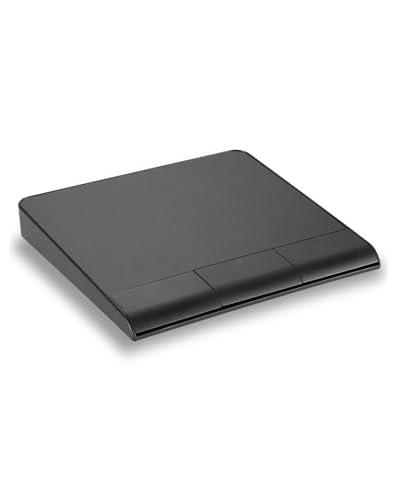
The Perixx PERIPAD-706 Wireless Slim Touchpad is the best budget trackpad for buyers who want wireless flexibility without giving up a receiver option. It connects over Bluetooth or a 2.4 GHz RF link with an included USB dongle, so it switches between a laptop and a desktop without replugging. The slim body measures 5.31 by 4.57 by 0.55 inches, which keeps it compact on a crowded desk while still giving gestures a usable surface. A rechargeable battery charges over USB-C, so there are no disposable cells to replace.
The listing describes the pad for Windows systems, with multi-touch gestures. The dual connection is the main reason to pick it over a Bluetooth-only pad: if Bluetooth pairing fails on one computer, the dongle gives a second path. The surface is smaller than the 6.4-inch pads here, so wide swipes feel tighter.
The Seenda Upgraded Trackpad is the best budget trackpad for buyers who split time between Windows and Mac. Its tempered glass surface measures 5.4 by 4 inches inside a 6.3-inch aluminum body, and it supports gestures with up to five fingers. Two physical buttons sit at the front edge for precise clicking, with anti-slip pads underneath the metallic base. The wired USB connection is plug-and-play with no drivers, and the box includes both a USB-C cable and a USB-A cable, so it connects to older and newer computers alike.
Compatibility is the standout: the listing covers Windows 10 and 11 plus Mac OS 10.11 and above, which makes it the only non-Apple pad here that works on both platforms. The thin profile, 0.15 inches at the front and 0.24 inches at the back, sits low on the desk. The tradeoff is the cable: there is no wireless mode, so the pad stays tethered to one computer, and it lacks Force Touch, so Mac buyers who want pressure-sensitive clicks should step up to the Apple Magic Trackpad.
The Apple Magic Trackpad is the premium pick and the best budget trackpad for Mac desks when the budget stretches to the top tier. Its edge-to-edge glass surface measures 6.3 by 4.52 inches and supports the full set of macOS Multi-Touch gestures, including two-finger scrolling, pinch-to-zoom, and three-finger swiping. Force Touch sensors detect how firmly you press, which adds a deeper click for previews and lookups. The rechargeable battery lasts about a month or more between charges, and the included woven USB-C cable pairs and charges the pad through the same port.
Bluetooth pairing is automatic with a Mac or iPad. The whole surface acts as one large button, so you can click anywhere instead of hunting for a defined zone. The limits are the cost and the platform: this is a Mac-first device, and Windows users get a fraction of the gesture support, so Windows buyers should pick one of the Windows pads above. Confirm the model number MXK93AM/A, because Apple sells white and black finishes under different listings.
Power: Rechargeable battery, about a month or more per charge
Cable: Woven USB-C cable included
Click: Entire surface acts as one button
Compatibility: Mac, iPad, and Apple Vision Pro
Model number: MXK93AM/A
Date first available: October 28, 2024
ASIN: B0DL6ZN6GK
Frequently Asked Questions
What is the best budget trackpad for a Windows PC?
The Amazon Basics Multi-Touch Trackpad with Dual Device Control is the best budget trackpad for most Windows PCs, because it combines a large 6.4-inch surface, Bluetooth pairing with two devices, and four-finger gestures at a budget tier. Windows buyers who want a wired connection should consider the ProtoArc USB Trackpad.
Can I use a budget trackpad with a Mac?
Yes, but only some budget trackpads list Mac support. The Seenda Upgraded Trackpad works with Windows 10 and 11 plus Mac OS 10.11 and above, and the Apple Magic Trackpad is the premium Mac option with full Multi-Touch and Force Touch. The Amazon Basics, ProtoArc, and Perixx pads here are Windows only.
Do budget trackpads need drivers or software?
Most budget trackpads here are plug-and-play with no drivers required, including the ProtoArc, Seenda, and Perixx models. Windows handles their gestures through its own touchpad settings, and macOS handles the Apple Magic Trackpad natively.
Is a wired or wireless trackpad better for a desk setup?
A wired trackpad suits a fixed desk, because it never needs charging and the connection never drops, while a wireless trackpad suits a desk shared by two computers. The Perixx PERIPAD-706 covers both paths with Bluetooth and a 2.4 GHz receiver, while the Amazon Basics pad switches between two Bluetooth devices. Pick wired for stability and wireless for flexibility.
Conclusion
The best budget trackpad depends on the computer on your desk. Windows buyers get the most for the least with the Amazon Basics Multi-Touch Trackpad, which pairs a large surface with dual-device Bluetooth at a budget tier, while the ProtoArc USB Trackpad is the wired alternative and the Perixx PERIPAD-706 is the wireless alternative with a receiver fallback. Buyers who work across Windows and Mac should pick the Seenda Upgraded Trackpad, and Mac buyers who want the full gesture set should step up to the Apple Magic Trackpad. Check the model number and compatibility line before you order, then match the surface size and connection to the way you work.
E
Emubox Editorial Team
We compare specs, materials and verified owner reviews before a product earns a spot. Rankings are never paid.
Affiliate disclosure. As an Amazon Associate we earn from qualifying purchases at no extra cost to you. Prices accurate as of the date shown.
Best 2mm 70 cm portable antennas compared: telescopic radio antennas near 70 cm, with connectors, bands and collapsed sizes explained before you buy today.
Find the best thermostat setting for winter and summer, with energy-saving setbacks, humidity tips, and smart schedules for a comfortable home year-round.
The best affordable business computer monitors balance sharp text, eye comfort and lasting value. Compare four reliable office displays built for long workdays.
Looking for the best inexpensive HD TVs non smart? Compare five genuinely non-smart HD televisions with tuners, HDMI inputs and simple setup for any small room.

 1. Amazon Basics Multi-Touch Trackpad with Dual Device Control
 2. ProtoArc USB Trackpad for Windows 10/11
 3. Perixx PERIPAD-706 Wireless Slim Touchpad
 4. Seenda Upgraded Trackpad
 5. Apple Magic Trackpad, White









