We independently review everything we recommend. When you buy through our links, we may earn a commission. As an Amazon Associate we earn from qualifying purchases.
Best Under Desk Cable Trays: 5 No-Drill Picks for Desks
Hide power strips and cords with the best under desk cable trays. Compare clamp-on, mesh and adjustable trays that install without drilling your desk.
Hide power strips and cords with the best under desk cable trays. Compare clamp-on, mesh and adjustable trays that install without drilling your desk.
⭐ Key Takeaways
Quick answer: Our top pick is Yecaye Under Desk Cable Management Tray, All-Metal Clamp-Mount, with Delamu Under Desk Cable Management Tray, Metal Mesh with F-Clamp Mount as a strong alternative.
Every desk hides the same secret: a nest of power strips, adapters, and cables dangling behind it. An under desk cable tray corrals all of it out of sight, off the floor, and away from your feet. Most modern trays clamp to the desk edge, so you can tidy up without drilling holes or voiding a rental agreement. These five picks cover compact setups through full multi-monitor workstations.
As an Amazon Associate, we earn from qualifying purchases.
Quick answer
For most desks, the Yecaye all-metal clamp tray is the set-and-forget choice, while the Delamu mesh tray suits lighter loads and easy cable access. The Aeons kit stretches to cover wide standing desks, the Vivo 17-inch tray fits compact setups, and the Cinati tray adds clips and ties in the box for a complete one-purchase tidy-up.
Yecaye Under Desk Cable Management Tray, All-Metal Clamp-Mount
Top Pick
Yecaye Under Desk Cable Management Tray, All-Metal Clamp-Mount
The Yecaye tray is the workhorse of this list. Its all-metal frame clamps to the back edge of desks between about 0.2 and 1.85 inches thick using F-clamps, so installation takes minutes with no drilling and no damage. Once mounted, it swallows a full-size power strip plus the usual tangle of adapters and spare cable length.
Metal construction matters here because power strips and laptop bricks get heavy, and a sagging tray looks worse than no tray at all. The open design lets heat escape from adapters and makes it easy to reach in and swap a plug. Cables drop in from the top and route out either end toward the wall outlet and your gear.
The clamps need a clear, flat edge to grip, so desks with thick bevels, rear crossbars, or cable grommets near the edge may fight the fit. Measure your desk thickness before ordering. For the typical rectangular desk or standing desk, though, this is a sturdy one-and-done fix that makes the floor under your desk look dramatically cleaner. The black finish also disappears visually against most desk frames and shadowed undersides, so the tray hides itself as well as the cables.
Delamu Under Desk Cable Management Tray, Metal Mesh with F-Clamp Mount
Runner-Up
Delamu Under Desk Cable Management Tray, Metal Mesh with F-Clamp Mount
Delamu’s mesh tray takes a lighter, airier approach. The metal mesh body keeps weight down while still holding a power strip and its adapters, and the F-clamp mount installs without tools or drilling. Two open holes in the design give cables clean entry and exit points, which helps when cords need to drop to a PC tower on the floor.
Mesh has a practical advantage beyond weight: you can see what is in the tray at a glance, which makes troubleshooting a dead adapter much less annoying. Airflow is excellent too, a quiet benefit for chunky laptop power bricks that run warm during long sessions.
The trade-off is capacity and tidiness. Mesh flexes more than solid steel under a heavy strip loaded with bricks, and cables stay slightly visible through the weave, so perfectionists may prefer a solid tray. This white version suits light, bright desk setups especially well. For a single-monitor desk with a modest cable count, it is an easy, affordable clean-up. The mesh also makes a decent home for smaller items like a USB hub or a spare charging brick that would otherwise wander around the desktop.
Aeons Under Desk Cable Management Tray Kit, Adjustable up to 41 Inches
Aeons Under Desk Cable Management Tray Kit, Adjustable up to 41 Inches
Wide desks and standing desks often need more tray than a single fixed-length basket provides, and that is exactly the Aeons kit’s territory. It adjusts horizontally up to about 41 inches, so one kit can span the back of a large workstation and hold multiple power strips in a row. The C-clamp mount is removable and the tray is reversible, doubling as a modesty panel that hides cables from the front view as well.
That flexibility makes it a strong pick for dual-monitor battlestations, music desks with many wall warts, and shared workbenches. The build targets larger loads than the compact trays here, and the finished look is more furniture-like than a wire basket.
The size cuts both ways: on a small desk it is overkill, and the clamps plus long span take a little more patience to level during installation. Check that your desk edge is free along the full mounting run. If your cable problem is measured in dozens of cords rather than a handful, this is the tray that finally keeps up. The adjustable design also means one kit can move with you to a bigger desk later instead of being replaced.
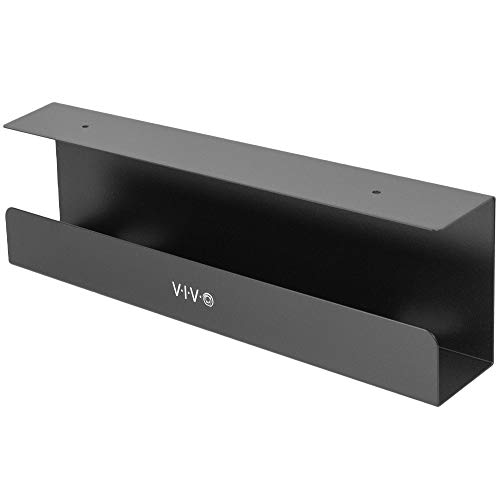
The Vivo tray keeps things simple for compact desks. At 17 inches long, it holds one power strip and the cables for a laptop or single-monitor setup without overwhelming a small workspace. The open-frame design makes it easy to drop cables in, adjust them later, and keep adapters ventilated.
Vivo is a familiar name in desk accessories, and the tray follows the same practical formula as its monitor arms: sensible steel construction, straightforward mounting, and no decorative nonsense. It mounts beneath the desk surface so the strip disappears from view and off the floor, which also makes vacuuming under the desk far less of a wrestling match.
Seventeen inches runs out quickly if you add a second strip or several large bricks, so count your gear honestly before choosing it. It also lacks the bundled clips and ties some rivals include. For a tidy single setup in a bedroom office or dorm, though, the Vivo is a neat, proven answer that installs in minutes. It pairs naturally with the brand’s monitor arms and desk accessories if you are already building a setup around them.
Cinati Under Desk Cable Management Tray with Clamp
Cinati Under Desk Cable Management Tray with Clamp
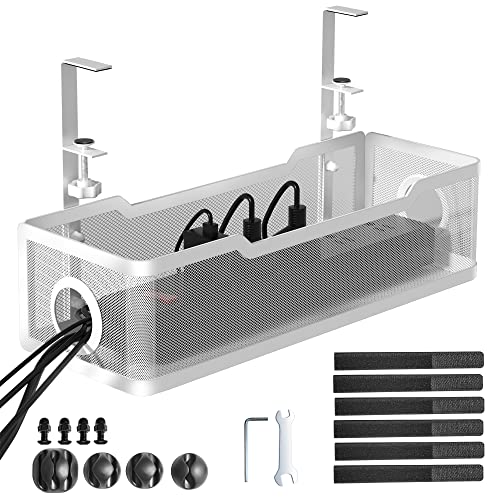
The Cinati tray wins on completeness. Alongside the tray itself, the box includes four cable clips and six cable ties, so you can route cords neatly from your devices down into the tray instead of letting them spill over the edge. The clamp mount needs no drilling and leaves the desk surface unmarked, which renters will appreciate.
The tray handles a standard power strip and everyday adapters, and the included accessories genuinely help: clips guide the monitor and USB cables along the desk edge, while ties bundle the slack that usually becomes the visible mess. It is a thoughtful kit for someone starting a tidy-up from zero.
Capacity is mid-pack, so a strip crowded with oversized bricks may call for a larger tray like the Aeons. The white finish suits lighter desks better than dark walnut setups. As a single purchase that takes a desk from chaotic to controlled in one afternoon, the Cinati kit is easy to recommend. First-time cable managers especially will appreciate not having to make a second order just for the small accessories that make the result look finished.
How to choose
Measure two things first: your desk thickness and the length of gear you need to hide. Clamp trays need a flat, unobstructed edge within their grip range, and the tray should be long enough for your power strip plus its largest adapters laid side by side. When in doubt, size up; an extra few inches of tray disappears, while an undersized one solves nothing.
Mounting style matters for renters and glass or hollow-core desks. Clamp mounts avoid holes entirely and move with you, while screw-mounted trays can feel more rigid on thick wooden tops. Solid metal trays carry heavy strips and bricks best; mesh trays are lighter, airier, and easier to inspect at a glance.
Think about access, too. If you swap cables often, an open-top tray beats an enclosed box. Leave slack in every cable run so a standing desk can rise without tugging plugs, and keep power bricks spaced apart for airflow. A tray is the foundation; a few clips and ties finish the job.
Who should skip
Skip a tray if your desk has no usable rear edge, such as some glass desks, desks with deep modesty panels, or wall-mounted folding tables. Very heavy multi-strip setups with several large power bricks may exceed compact tray ratings and deserve a rack-style solution instead.
You can also skip it if your setup is already minimal: a laptop, one charger, and a wireless keyboard simply do not generate enough cable mass to justify the hardware. And if cables must run across a walkway rather than behind a desk, floor cord covers are the right tool, not a tray.
FAQ
Will a clamp tray damage my desk?
Clamp mounts are designed to grip without drilling or permanent marks, and they are the renter-friendly option. To be safe, check that the clamp pads sit flat, avoid over-tightening on soft or veneered edges, and confirm your desk thickness falls inside the stated range. Removing the tray later should leave the edge as it was.
How much weight can an under desk tray hold?
It varies by model, but most steel trays comfortably hold a power strip plus several adapters, which is the realistic load for a home office. Problems start with multiple strips stacked with large laptop bricks. If your gear list is long, choose a longer, solid-metal tray and spread the weight evenly along its length.
Can I use a cable tray with a standing desk?
Yes, and trays are especially helpful there because cables stay contained as the desk moves. The key is slack: leave enough loose cable between the tray and the wall outlet, and between the tray and any floor-standing PC, so nothing pulls tight at full height. Route the strip’s own cord with a gentle loop.
Should I choose mesh or solid metal?
Solid metal trays hide cables completely and carry heavy loads with the least flex. Mesh trays weigh less, ventilate warm adapters better, and let you see the contents at a glance, at the cost of some visibility of the cords themselves. Pick based on whether concealment or convenience matters more at your desk.
Final verdict
The Yecaye clamp tray is the strongest all-round pick, the Delamu mesh keeps lighter setups airy and accessible, and the Aeons kit covers the widest, heaviest desks. The Vivo suits compact single setups, while the Cinati bundle finishes the job with clips and ties included. Measure your desk edge, count your adapters, and one of these five will make the underside of your desk look as tidy as the top.
E
Emubox Editorial Team
We compare specs, materials and verified owner reviews before a product earns a spot. Rankings are never paid.
Affiliate disclosure. As an Amazon Associate we earn from qualifying purchases at no extra cost to you. Prices accurate as of the date shown.
Best 2mm 70 cm portable antennas compared: telescopic radio antennas near 70 cm, with connectors, bands and collapsed sizes explained before you buy today.
Find the best thermostat setting for winter and summer, with energy-saving setbacks, humidity tips, and smart schedules for a comfortable home year-round.
The best affordable business computer monitors balance sharp text, eye comfort and lasting value. Compare four reliable office displays built for long workdays.
Looking for the best inexpensive HD TVs non smart? Compare five genuinely non-smart HD televisions with tuners, HDMI inputs and simple setup for any small room.


 Yecaye Under Desk Cable Management Tray, All-Metal Clamp-Mount
 Vivo Under Desk 17 Inch Cable Management Tray
 Cinati Under Desk Cable Management Tray with Clamp









