
Our Short List of 3
All 5 Picks at a Glance
| Product | Specs | Action |
|---|---|---|
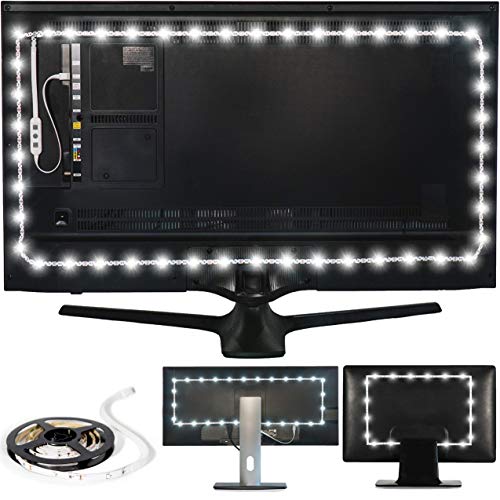 Power Practical Luminoodle LED TV Backlight, True White | Check price on Amazon | |
 Govee TV Backlight 3 Lite with Camera Sync, 55 to 65 Inch | Check price on Amazon | |
 Philips Hue Play Gradient Lightstrip, 55 Inch | Check price on Amazon | |
 Nexillumi LED Lights for TV, 13.2 Feet | Check price on Amazon | |
 Maylit TV LED Backlight, 8.2 Feet | Check price on Amazon |
Key takeaways
- Five TV backlight strips compared by color accuracy, screen sync, sizing and control, from a 6500K white bias light to camera and HDMI sync kits.
A strip of light behind the TV does two jobs at once. As a bias light, a soft white glow on the wall raises the ambient brightness around the screen, so dark scenes stop feeling like a strain and perceived black levels improve. As an ambient accent, color strips wash the wall in tones that follow the picture. The five kits below split along that line: one fixed-white bias light, two screen-sync systems, and two simple RGB strips that run off the TV’s own USB port.
As an Amazon Associate, we earn from qualifying purchases.
Quick answer
For accurate picture quality, pick a fixed 6500K white strip like the Luminoodle. For color that follows the screen, the Govee TV Backlight 3 Lite uses a camera, while the Philips Hue Gradient needs a sync box. On a budget, the Nexillumi and Maylit USB strips add simple RGB glow that turns on with the TV.
Power Practical Luminoodle LED TV Backlight, True White
The Luminoodle is the purist’s pick: a strip that does one color, and does it at the right temperature. Its LEDs are rated at 6500K, the daylight white point that video standards use as a reference, so the glow behind the screen stays neutral instead of tinting everything blue or warm. That neutrality is the whole point of bias lighting, because a colored wall glow shifts how the picture itself looks by comparison.
Power comes from any 5-volt USB port, and the TV’s own port is the obvious source, so the strip wakes and sleeps with the screen on most sets. The listing rates the kit at 5 watts, includes a remote for brightness adjustment, and backs the strip with 3M adhesive for a peel-and-stick install around the back panel. Kits are sold in sizes matched to screen size, and this listing is the version sized for 24 to 29 inch TVs, with larger sizes covering bigger screens.
The limits are real but simple. There are no colors, no app, and no sync of any kind, so anyone shopping for a light show should look further down this list. For a home theater or a desk monitor where picture accuracy matters more than effects, that restraint is exactly the appeal.
Govee TV Backlight 3 Lite with Camera Sync, 55 to 65 Inch
The Govee TV Backlight 3 Lite takes the opposite approach: instead of a fixed glow, it watches the screen and paints the wall to match. A small camera mounts at the top center of the TV and reads the picture, and the 11.8-foot RGBICW strip behind the set reproduces the colors along each edge. Govee’s fish-eye correction function is there to fix the distortion a wide camera lens sees at the corners of the screen, which is where camera-based kits usually get their colors wrong.
The strip is sized for 55 to 65 inch TVs and uses four-in-one lamp beads that combine color and white diodes, which helps it produce cleaner whites than a basic RGB strip when a scene calls for them. Control runs through the Govee app over Wi-Fi, with voice control through Alexa and Google Assistant, plus scene modes and music sync for non-video use. An adapter powers the kit, so it does not depend on the TV’s USB port.
The trade-offs are the camera itself, which some people will not want perched on the bezel, and setup time: the app asks you to calibrate the camera against the screen corners before the colors track properly.
Philips Hue Play Gradient Lightstrip, 55 Inch
The Philips Hue Play Gradient is the premium route to screen-following light, and it works differently from the Govee. Rather than a camera, it reads the video signal itself, through the Philips Hue Play HDMI Sync Box, and blends multiple colors along a single strip at the same time, so the top of the wall can glow sky blue while the bottom stays warm from a sunset scene.
This 55-inch version is made for 55 to 60 inch TVs, with 65-inch and 75-inch versions above it. The box includes the lightstrip, adhesive mounting clips and a power supply, and the strip attaches along the top and sides of the back panel. Once installed, it joins the wider Hue system, so the app and voice assistants can fold the TV glow into whole-room scenes, and the same ecosystem covers bulbs and lamps if the setup grows.
The honest caveat is the shopping list around it. The listing states plainly that the strip requires the Hue Bridge and the Play HDMI Sync Box, both sold separately, so the strip alone does nothing. Buyers also need an HDMI source that runs through the sync box, which suits console and streaming-box setups better than a TV’s built-in apps.
Nexillumi LED Lights for TV, 13.2 Feet
The Nexillumi kit is the straightforward budget option: 13.2 feet of RGB strip sized for TVs from 32 to 65 inches, powered over USB so it can run straight from the TV and switch with it. Control comes from an app over Bluetooth and from the included remote, and a built-in microphone lets the colors pulse along with music or game audio when you want movement instead of a static color.
Because it is a plain RGB strip rather than an individually addressable sync system, the whole strip shows one color at a time. There is no camera and no signal processing, so nothing here reacts to what is actually on screen; the appeal is a soft colored halo for movie nights, gaming sessions and bedroom TVs at a low cost of entry. The strip can be trimmed at marked cut points for smaller sets, and the adhesive backing plus corner-friendly flexibility make for a short install.
Buyers should go in with the right expectations. This is mood lighting, not bias lighting in the calibration sense, and the white it produces is mixed from the color diodes rather than a true 6500K source. For casual viewing rooms, that is usually a fair trade.
Maylit TV LED Backlight, 8.2 Feet
The Maylit kit covers the smaller end of the market: 8.2 feet of USB-powered RGB strip sized for 40 to 60 inch TVs, which also makes it a sensible fit for large monitors. It ships with a remote for color, brightness and mode changes, runs off the 5-volt USB port on the TV so it powers on and off with the set, and sticks to the back panel with adhesive tape.
Like the Nexillumi, this is a single-color-at-a-time strip with dynamic modes such as fading and flashing, aimed at ambience rather than accuracy. The shorter length is its defining trait: on a mid-size TV it covers the back without the leftover coils that a longer kit leaves you to hide, and on a small TV it can be trimmed at the cut marks. Music-reactive modes are not the focus here; the kit leans on simple remote-driven color selection, which keeps it easy for a guest room or a kids’ TV where an app account is overkill.
The compromises mirror the price class. Whites are approximate, the remote is the only control path, and there is no screen sync. As an inexpensive way to soften the contrast between a bright screen and a dark room, it covers the basics without fuss.
How to choose
Start with the job you want done. For picture quality, a fixed white bias light at 6500K is the technically correct choice, because that is the reference white the content was mastered against, and it will not distort color perception. For immersion, choose a sync system, then decide how it reads the picture: a camera kit like the Govee works with any source, including the TV’s built-in apps, while an HDMI kit like the Hue reads the signal directly but only sees devices routed through its sync box.
Size the strip to the screen. Kits are sold by TV size or by length, and a strip that is too short leaves dark corners while a long one bunches up behind the panel. Then check power: USB strips are limited by the TV port’s output and turn off with the set on most models, while adapter-powered kits are brighter and independent but need an outlet and a separate on-off habit. Finally, check the install: adhesive-only strips are fastest, while clips help on textured back panels.
One safety note worth making: the CPSC has recalled LED strip lights and rechargeable light bars from Good Earth Lighting, over fire hazards and over coin batteries that children could access in remotes. Those are different products from a different maker, and none of the five picks here is a Good Earth product, but the distinction points at a sensible check for any kit: prefer a remote whose battery compartment is secured, and buy strips from brands that publish real specifications.
Who should skip
Skip backlight strips entirely if your TV sits in a bright room all day, because bias lighting only earns its keep in dim viewing conditions. Skip them if the TV is mounted flush with no gap behind it, since the glow needs a wall to land on, and skip adhesive strips if the set is a rental or a panel you plan to resell, because tape can leave residue. Owners of ultra-short-throw projectors and curved gaming monitors will also find most kits sized and shaped for flat TVs, not for their gear.
Frequently asked questions
Does bias lighting really help with eye strain?
It can, because the strain usually comes from contrast, not brightness alone. A bright screen in a pitch-black room forces your eyes to keep readjusting between the picture and the darkness around it. A soft glow on the wall narrows that gap, so long movies and late-night gaming sessions feel easier, especially with dark content.
What color temperature should a TV backlight be?
For a true bias light, 6500K is the standard answer, since it matches the D65 white point used when movies and shows are mastered. Warm white strips make a room feel cozy but tint your perception of the picture, and colored strips are an ambience choice rather than an accuracy choice. If picture quality is the goal, fixed 6500K white wins.
Will a USB-powered strip turn off with the TV?
Usually, yes, because most TV USB ports cut power when the set goes into standby, which is what makes USB kits feel automatic. Some TVs keep their ports powered for charging, though, and on those sets the strip stays lit until you use the remote. Checking your TV’s USB behavior first saves a surprise.
Can I cut a backlight strip to fit a smaller TV?
Basic RGB strips like the Nexillumi and Maylit can be trimmed at their marked cut points, and the offcut is discarded. Sync kits are different: the Govee and Hue strips are built to fixed lengths for specific screen sizes, and cutting them breaks the color mapping, so buy the size that matches your TV instead.
Final verdict
Match the strip to the goal. The Luminoodle is the right buy for viewers who care about accurate picture and easy-on-the-eyes movie nights. The Govee TV Backlight 3 Lite is the flexible sync pick, since its camera works with every source, while the Philips Hue Gradient is the premium option for households already invested in Hue gear. The Nexillumi and Maylit kits round out the list as simple, inexpensive USB glow for casual rooms, with the Maylit suiting smaller TVs and monitors best.
Product and ASIN Reference
| Product | ASIN |
|---|---|
| Power Practical Luminoodle LED TV Backlight, True White | B01BKU7B7I |
| Govee TV Backlight 3 Lite with Camera Sync, 55 to 65 Inch | B0CHS2BGHY |
| Philips Hue Play Gradient Lightstrip, 55 Inch | B08HV6V49V |
| Nexillumi LED Lights for TV, 13.2 Feet | B07XBJR7GY |
| Maylit TV LED Backlight, 8.2 Feet | B074KFP426 |









