
Our Short List of 3


All 4 Picks at a Glance
| Product | Specs | Action |
|---|---|---|
 Canon PIXMA PRO-200 Wireless Professional Inkjet Photo Printer | Check price on Amazon | |
| Canon imagePROGRAF Professional 13″ PRO-310 Wireless Inkjet Photo Printer with 3.0-Inch Color LCD Monitor, 9 Color Pigment-Based Ink System, Black | Check price on Amazon | |
| Epson EcoTank Photo ET-8550 Wireless Wide-format Color All-in-One Supertank Printer with Scanner, Copier, Ethernet and 4.3-inch Color Touchscreen | Check price on Amazon | |
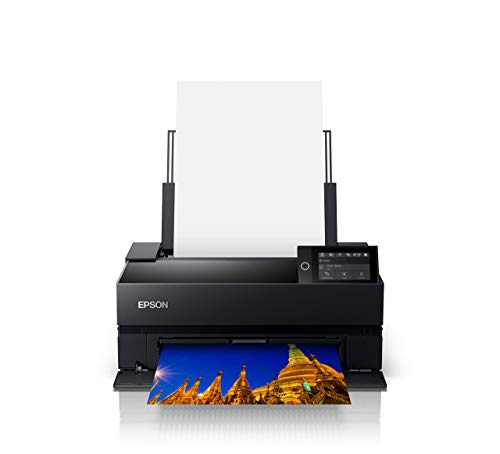 Epson SureColor P700 13-Inch Printer, Black | Check price on Amazon |
Key takeaways
- Compare the best photo printers for sharp, true-to-life prints at home, from compact models to wide-format professional machines for serious photographers.
A photo printer turns a digital file into something you can hold, frame, or give away, and the right model depends on how large you print, how often you print, and how long you want the result to last. Some photographers want gallery-ready enlargements up to 13 by 19 inches, while others only need crisp 4 by 6 prints for albums, gifts, and everyday memories. Ink type matters too, because dye inks often look vivid on glossy paper, while pigment inks usually hold up better on matte and fine art paper over time. This guide compares five printers across that full range, from a pocket-sized dye-sublimation model to wide-format professional machines, so you can match one to your photos and your space.
As an Amazon Associate, we earn from qualifying purchases.
Quick answer
For most home photographers, the Canon PIXMA PRO-200 is the balanced first choice, with vivid 8-color dye printing up to 13 by 19 inches. Choose the Canon imagePROGRAF PRO-310 or Epson SureColor P700 for long-lasting pigment prints, the Epson EcoTank Photo ET-8550 for frequent printing with lower ink costs, and the Canon Selphy CP1500 for portable 4 by 6 prints.
Canon PIXMA PRO-200 Wireless Professional Inkjet Photo Printer
The Canon PIXMA PRO-200 is a dedicated 13-inch photo printer built around an 8-color ChromaLife100+ dye-based ink system, with two monochrome inks for smoother black-and-white gradation. Dye inks soak into glossy and luster papers, producing smooth gradients and saturated color that suit portraits, landscapes, and everyday enlargements. It prints borderless up to 13 by 19 inches, handles fine art papers through a manual rear feed, and reaches a maximum resolution of 4800 by 2400 dots per inch. A 3-inch color LCD handles setup and ink status, and connectivity covers Wi-Fi, Ethernet, and USB, with support for Canon app printing.
Because the inks are dye-based, prints are best kept behind glass or in albums when longevity matters, since pigment systems generally resist fading longer. The CLI-65 cartridges are moderately sized, so high-volume work means regular cartridge changes. There is no roll feed and no scanner, because this is a single-purpose machine. For a home studio that mostly prints color work at moderate volume and wants the simplest path to a good-looking 13 by 19 print, the PRO-200 is a balanced and widely supported first choice.
Canon imagePROGRAF Professional 13″ PRO-310 Wireless Inkjet Photo Printer with 3.0-Inch Color LCD Monitor, 9 Color Pigment-Based Ink System, Black
The Canon imagePROGRAF PRO-310 is the pigment-ink step up in Canon’s 13-inch line. It uses a 9-color LUCIA PRO II pigment ink set plus a Chroma Optimizer cartridge that evens out gloss on glossy and semi-gloss papers, reducing bronzing and uneven reflections. Pigment inks sit on the paper surface rather than soaking in, which improves water resistance and archival life, making it a better fit for prints that will be sold, exhibited, or stored for a long time. It prints borderless up to 13 by 19 inches, supports panoramic lengths through the manual feed, and offers Wi-Fi, Ethernet, and USB connections. A built-in color LCD and support for Canon Professional Print and Layout software help with media setup and accurate soft proofing.
The trade-offs are speed and running cost. Pigment printing on matte fine art papers is deliberate rather than fast, and the PFI-300 cartridges are small for a professional machine, so the cost per print climbs if you print large work frequently. Matte prints can also look slightly flatter than dye output on the same paper. Photographers printing portfolios, restored family photos, or gallery pieces that must last will get the most from the PRO-310.
Epson EcoTank Photo ET-8550 Wireless Wide-format Color All-in-One Supertank Printer with Scanner, Copier, Ethernet and 4.3-inch Color Touchscreen
The Epson EcoTank Photo ET-8550 takes a different approach to ink: instead of cartridges, it uses refillable tanks filled from bottles, which lowers the cost per print for people who print often. Its 6-color Claria ET Premium ink set includes a gray ink for smoother black-and-white gradations and a pigment black for sharper text. It prints borderless up to 13 by 19 inches, scans and copies thanks to a flatbed scanner, and handles media up to 1.3 millimeters thick through the rear tray. A 4.3-inch color touchscreen, Wi-Fi, Ethernet, and voice-activated printing round out a very complete package. It also prints on CDs and DVDs with the supplied tray, a handy extra.
The compromises are ultimate print quality and speed at the largest sizes. A 6-color dye-based system cannot match the gamut or archival ratings of a dedicated 9 or 10-ink pigment printer, and borderless 13 by 19 prints take a while. Tank printers also need regular use to keep nozzles clear. For a household that prints constantly, including intake photos, proof sheets, and everyday copies, and wants low running costs with occasional big enlargements, the ET-8550 is hard to beat.
Epson SureColor P700 13-Inch Printer, Black
The Epson SureColor P700 is a compact professional 13-inch printer, built around the 10-channel UltraChrome PRO10 pigment ink set, which adds a violet ink that widens the blue and purple gamut beyond most rivals. It prints up to 13 by 19 inches on cut sheets, supports an optional roll feed for panoramas, and accepts media up to 1.5 millimeters thick through the front manual path, which suits fine art and board media. A 4.3-inch customizable touchscreen, Wi-Fi, Ethernet, and USB connectivity are standard, and a dedicated black-and-white mode with Carbon Black settings delivers deep, neutral monochrome prints. Ink cartridges install from the front, and the driver software can report estimated ink and paper consumption per job.
Owners should budget for ink: the 25 milliliter cartridges are small, and the printer keeps both photo black and matte black installed, switching automatically by media type, which is convenient but means maintaining both. The P700 is also a specialist tool with no scanning or everyday document focus. For serious portfolio and exhibition printing at 13 inches wide, especially in black and white, it is one of the strongest options in its class.
Canon Selphy CP1500 Wireless Compact Photo Printer (Black)
The Canon Selphy CP1500 occupies the opposite end of the category: a compact dye-sublimation printer that produces postcard-size 4 by 6 prints, plus smaller card and label sizes with the right cassettes. Dye-sublimation printing lays down continuous-tone color and finishes each print with a protective overcoat, so photos emerge dry, smudge-resistant, and rated to last up to 100 years in an album. It connects over Wi-Fi to phones and computers, prints from SD cards and USB drives, and works with Canon’s SELPHY Photo Layout app for collages and ID photos. An optional battery pack makes it genuinely portable, which suits event work and travel. Print packs combine ink cassette and paper in matched quantities, so one never runs out partway through a stack.
The limits are obvious and worth accepting knowingly: 4 by 6 inches is the ceiling, so there are no enlargements, and the cost per print is fixed by the combined ink-and-paper packs. Print speed is leisurely at roughly a minute per photo. For handing out physical copies of phone photos on the spot, though, the CP1500 delivers a convenience no desktop inkjet can match.
How to choose a photo printer
Start with print size, because it narrows the field fastest. If 4 by 6 prints cover your needs, a dye-sublimation compact like the SELPHY is cheaper to run and far more portable. If you want 13 by 19 enlargements, you are choosing between dye and pigment inkjets. Dye inks, as in the PIXMA PRO-200 and the EcoTank ET-8550, tend to produce punchier color on glossy paper and cost less per machine, while pigment inks, as in the PRO-310 and SureColor P700, offer better fade resistance and matte-paper performance for prints that will be displayed or archived. Next, estimate your print volume honestly. Tank systems cut ink costs for frequent printing, while cartridge-based professional printers cost more per print but deliver wider gamut and finer gradation. Then check paper handling: manual feeds matter for thick fine art media, and roll support matters for panoramas.
Who should skip a dedicated photo printer
Skip a dedicated photo printer entirely if you print only a handful of images a year; a good lab service costs less overall and spares you the maintenance. Skip the 13-inch models if your largest work is 8 by 10, since smaller printers are cheaper to buy and feed. Skip dye-sublimation compacts if you need enlargements, and skip pigment professional printers if you mostly want quick, inexpensive snapshots. Anyone who dislikes routine maintenance should also think twice, because inkjet printers of every brand reward regular use and punish long idle periods with clogged nozzles. If space is tight, measure first, because the 13-inch models are wide and heavy.
Frequently asked questions
Is dye or pigment ink better for photo printing?
Neither is universally better. Dye inks usually give more saturated color and smoother gloss on glossy and luster papers. Pigment inks resist water and fading better, perform more consistently on matte and fine art papers, and are preferred for prints that will be sold, displayed, or archived for years. Match the ink type to the paper and the lifespan you need.
How large can a 13-inch photo printer actually print?
A 13-inch printer typically supports borderless prints up to 13 by 19 inches, often called A3+ or Super B. With a manual feed or roll adapter, many models also print long panoramas, sometimes several feet in length. Check the specifications for your exact paper, because limits vary by model and feed path.
Are refillable tank printers good enough for serious photos?
Modern photo-focused tank printers such as the EcoTank Photo ET-8550 produce genuinely good prints, especially on glossy and luster paper, and their running costs are far lower than cartridge models. Dedicated multi-ink pigment printers still hold an edge in color gamut, black-and-white neutrality, and archival ratings. For high-volume everyday printing the tank trade-off is usually worth it.
How long do inkjet photo prints last?
Longevity depends on the ink, paper, and storage conditions. Dye prints on quality photo paper commonly carry album ratings of several decades, pigment prints on archival paper can be rated beyond a century, and dye-sublimation prints with a protective overcoat are also rated for long album life. Framing behind UV-filtering glass extends the life of every print type.
Final verdict
Buy the Canon PIXMA PRO-200 for everyday proof and family prints at up to 13 by 19 inches. Step up to the Canon imagePROGRAF PRO-310 or the Epson SureColor P700 when pigment longevity and matte-paper performance matter, with the P700 the stronger black-and-white tool. Choose the Epson EcoTank Photo ET-8550 if print volume is high and running costs dominate, and keep the Canon Selphy CP1500 on the counter when the job is fast, portable 4 by 6 copies for family, friends, and events.
Product and ASIN Reference
| Product | ASIN |
|---|---|
| Canon PIXMA PRO-200 Wireless Professional Inkjet Photo Printer | B08M8VGBZ5 |
| Canon imagePROGRAF Professional 13″ PRO-310 Wireless Inkjet Photo Printer with 3.0-Inch Color LCD Monitor, 9 Color Pigment-Based Ink System, Black | B0DSQP2FX6 |
| Epson EcoTank Photo ET-8550 Wireless Wide-format Color All-in-One Supertank Printer with Scanner, Copier, Ethernet and 4.3-inch Color Touchscreen | B08R5M2HDH |
| Epson SureColor P700 13-Inch Printer, Black | B0875QSCFW |
| Canon Selphy CP1500 Wireless Compact Photo Printer (Black) | B0BF6T86WD |









