
Our Short List of 3
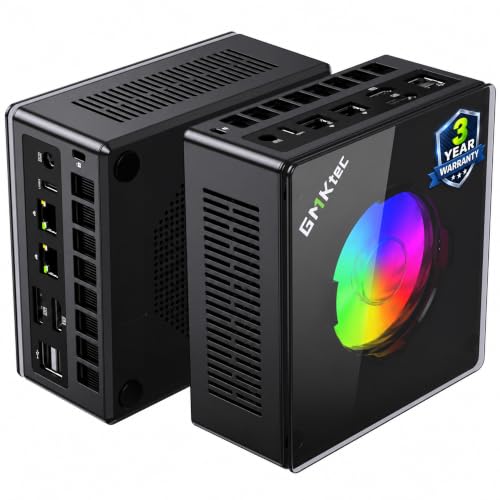
- Best for: Developers wanting the strongest listed specification with an eGPU path
- Brand: GMKtec
- Model Name: K11
- Processor: AMD Ryzen 9 8945HS (8C/16T, up to 5.2GHz)
- Memory: 32GB DDR5 RAM
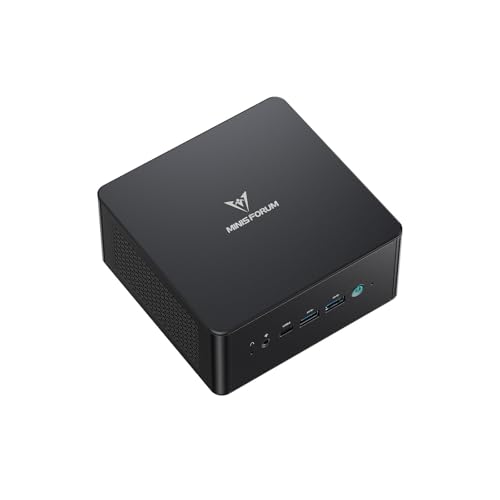
- Best for: Multi-monitor development desks that may add an external GPU later
- Brand: MINISFORUM
- Model Name: UM890 Pro
- Processor: AMD Ryzen 9 8945HS (up to 5.2GHz)
- Memory: 32GB DDR5 5600MHz RAM

- Best for: Balanced development builds with strong displays and networking
- Brand: GMKtec
- Model Name: K8 Plus
- Processor: AMD Ryzen 7 8845HS (8C/16T, up to 5.1GHz)
- Memory: 32GB DDR5 RAM
All 4 Picks at a Glance
| Product | Specs | Action |
|---|---|---|
| GMKtec Nucbox K11 |
| Check price on Amazon |
| MINISFORUM UM890 Pro |
| Check price on Amazon |
| GMKtec Nucbox K8 Plus |
| Check price on Amazon |
 GMKtec Nucbox M7 Ultra |
| Check price on Amazon |
Key takeaways
- Compare the best OCuLink mini PCs for software development, with Ryzen power, DDR5 memory, dual LAN and eGPU expansion for serious coding desks.
Choosing a mini PC for development work means balancing compile speed, memory headroom, and desk space, and the OCuLink port changes that decision because it lets a compact machine gain desktop graphics later through an external GPU dock. Without it, the integrated graphics you buy on day one are the graphics you keep for the life of the machine.
This guide is for software developers, students, and small teams who want a small primary workstation for coding, containers, and local virtual machines, with a credible upgrade path for GPU-heavy tasks. Every product below was chosen from the names and specifications printed on its Amazon product page, and every pick states an OCuLink port on that page, so the expansion promise is documented rather than assumed from the model name alone.
Quick Picks
As an Amazon Associate we earn from qualifying purchases.
| Product | Best for | Key spec from title |
|---|---|---|
| GMKtec Nucbox K11 | Developers who want the strongest all-round specification | AMD Ryzen 9 8945HS, 32GB DDR5 RAM, 1TB SSD, Oculink |
| MINISFORUM UM890 Pro | Multi-monitor coding desks needing quad display output | AMD Ryzen 9 8945HS, 32GB DDR5 RAM, 1TB PCIe 4.0 SSD |
| GMKtec Nucbox K8 Plus | Balanced builds with fast networking and display options | AMD Ryzen 7 8845HS, 32GB DDR5 RAM, 1TB SSD, Oculink |
| GMKtec Nucbox M7 Ultra | Compact desks that still want an eGPU upgrade path | AMD Ryzen 7 PRO 6850U, 16GB DDR5 RAM, 1TB SSD, Oculink |
How to Choose
Processor Cores and Compile Speed
Compilation, indexing, and test suites reward core count and sustained clock speed more than short burst figures, so compare the processor name, its core and thread count, and its stated boost speed before anything else. An eight-core, sixteen-thread Ryzen chip keeps an IDE, a browser, and a build running together without constant stalling. Single-core speed still matters for editors and language servers that work on one thread at a time. Developers running several containers or virtual machines at once should favour the newer, higher-boost processors in this guide, while lighter scripting and web work runs comfortably on the older generation listed here.
Memory and Storage Headroom
Modern development stacks consume memory quickly: an IDE, a database, a container runtime, and a browser can together exceed a small allocation before any real work begins. Look for DDR5 memory in the listing, check whether the page states the memory can be expanded, and treat the included capacity as your starting point rather than your ceiling. Storage matters just as much, because cloned repositories, package caches, and virtual machine images grow steadily. A PCIe solid-state drive with a stated capacity that covers your current projects, plus room to grow, prevents the slowdowns and forced clean-ups that interrupt focused coding sessions.
How the OCuLink Port Is Implemented
Not every OCuLink port works the same way, and the product page wording tells you which design you are getting. Some machines provide a dedicated port with its own channel, leaving both storage slots free for drives. Others route OCuLink through an M.2 slot, so enabling the port means giving up one storage bay and fitting an adapter. The pages also state that OCuLink is not hot-swappable, so the machine must be powered off before connecting or disconnecting a dock. For development, the dedicated design suits anyone planning a large local model or rendering workload later, because storage expansion stays available.
Displays, Networking, and Everyday Ports
A development desk usually runs two or more monitors, so count the display outputs named on the page: HDMI, DisplayPort, and USB4 connections decide how many screens you can drive and at what arrangement. Dual 2.5G LAN ports help developers who separate a work network from a home network, run a small server, or connect directly to network storage. USB4 ports add fast storage and single-cable display options, while ordinary USB ports still matter for keyboards, security keys, and debug hardware. Check the full interface list on the page against the peripherals already on your desk before choosing.
The 4 Best Options
GMKtec Nucbox K11
- Best for: Developers wanting the strongest listed specification with an eGPU path
- Brand: GMKtec
- Model Name: K11
- Processor: AMD Ryzen 9 8945HS (8C/16T, up to 5.2GHz)
- Memory: 32GB DDR5 RAM
Developers wanting the strongest listed specification with an eGPU path
Confirm your eGPU dock and cable match the Oculink connection before ordering
The K11 suits developers who want one compact machine to handle demanding builds now and graphics expansion later. Its Ryzen 9 processor, generous memory, and terabyte of storage cover large repositories, container stacks, and local virtual machines without immediate upgrades. The stated Oculink port gives a clear route to an external GPU for machine learning experiments or rendering, while dual networking and dual USB4 keep a busy desk connected. It fits a primary workstation role for professional developers, technical leads, and advanced students whose projects have outgrown a basic office mini PC.
MINISFORUM UM890 Pro
- Best for: Multi-monitor development desks that may add an external GPU later
- Brand: MINISFORUM
- Model Name: UM890 Pro
- Processor: AMD Ryzen 9 8945HS (up to 5.2GHz)
- Memory: 32GB DDR5 5600MHz RAM
Multi-monitor development desks that may add an external GPU later
The OCuLink connection occupies an M.2 slot, so plan storage around one bay
The UM890 Pro fits developers whose desk centres on several monitors and long, parallel workloads. The Ryzen 9 processor and Radeon 780M graphics drive the stated quad display output, so an editor, terminal, browser, and documentation can each keep their own screen. Its OCuLink support opens the door to an external GPU for compute tasks, although the page notes that this connection uses an M.2 slot. It suits full-stack developers, data-minded programmers, and anyone running local services who values display flexibility and strong integrated graphics in a small footprint.
GMKtec Nucbox K8 Plus
- Best for: Balanced development builds with strong displays and networking
- Brand: GMKtec
- Model Name: K8 Plus
- Processor: AMD Ryzen 7 8845HS (8C/16T, up to 5.1GHz)
- Memory: 32GB DDR5 RAM
Balanced development builds with strong displays and networking
Check the exact memory and storage configuration on the listing before buying
The K8 Plus is the balanced choice for developers who want modern performance without moving to the highest specification in this guide. Its Ryzen 7 8845HS processor and Radeon 780M graphics handle everyday compiling, emulation, and multi-application work, while the stated Oculink interface supports external GPU or fast storage expansion. Dual networking and four-screen output make it practical for a home office that doubles as a small lab. It fits web and application developers, computer science students, and remote workers who need room to grow but do not need the strongest processor listed here.
GMKtec Nucbox M7 Ultra
- Best for: Compact development desks planning a later memory or eGPU upgrade
- Brand: GMKtec
- Model Name: M7 Ultra
- Processor: AMD Ryzen 7 PRO 6850U (8C/16T, up to 4.7GHz)
- Memory: 16GB DDR5 RAM, dual channel
Compact development desks planning a later memory or eGPU upgrade
The included memory is the smallest here, so budget for expansion if you run many containers
The M7 Ultra suits developers with a smaller desk or a tighter hardware plan who still refuse to give up the OCuLink upgrade path. Its Ryzen 7 PRO processor and dual-channel DDR5 memory cover source control, web development, scripting, and moderate container work, and the page states that the installed memory supports expansion. The Oculink port runs at PCIe x4 for external graphics, and dual Intel networking adds flexibility for lab or router-style side projects. It fits developers starting a compact workstation who expect to add memory or a GPU dock as their projects grow.
Which One Fits Your Situation
You Build Large Projects and Run Containers All Day
Choose the GMKtec Nucbox K11. Its Ryzen 9 processor, 32GB of DDR5 memory, and 1TB drive give the most complete starting specification in this guide for parallel builds and local services. The Oculink port also keeps a desktop graphics card available later for compute work, so the machine can grow with your projects instead of being replaced when workloads change.
Your Desk Runs Three or Four Monitors
Choose the MINISFORUM UM890 Pro. Its page states quad display support through HDMI, DisplayPort, and USB4, which suits an editor, terminal, browser, and reference screen running side by side. Keep the M.2 note in mind: using its OCuLink connection takes a storage slot, so size the internal drive for your repositories, images, and virtual machines from the start.
You Want a Balanced Home Lab and Coding Machine
Choose the GMKtec Nucbox K8 Plus. The Ryzen 7 8845HS, 32GB of memory, dual 2.5G networking, and four-screen output cover development, emulation, and small server experiments without pushing into the highest tier here. Its Oculink interface also leaves a practical path to external graphics or storage when a project starts demanding more than the integrated Radeon 780M provides.
You Are Starting Small but Refuse a Dead End
Choose the GMKtec Nucbox M7 Ultra. It begins with less memory than the other picks, yet the page supports memory expansion and its Oculink port runs at PCIe x4 for an external GPU. That combination suits a first dedicated development machine for web work and scripting, with clear upgrades ready when heavier builds, containers, or graphics tasks arrive.
Common Mistakes
- Assuming every mini PC with USB4 also has OCuLink, when the two connections are different and only a page-stated OCuLink port guarantees the eGPU path in this guide.
- Forgetting that some OCuLink implementations occupy an M.2 storage slot, which reduces the drive bays available for repositories and virtual machine images.
- Connecting or disconnecting an OCuLink cable while the machine is running, even though the product pages state that OCuLink is not hot-swappable.
- Buying the smallest memory configuration for container-heavy work, then discovering that the IDE, database, browser, and runtime together leave too little headroom.
- Choosing display outputs by counting ports alone, without checking which combination of HDMI, DisplayPort, and USB4 the listing actually supports at once.
Frequently Asked Questions
Why does OCuLink matter for a development machine?
OcuLink gives a mini PC a direct PCIe connection to an external GPU dock, which integrated graphics cannot match for local model work, rendering, or GPU-accelerated tooling. For everyday coding it changes nothing, but it removes the usual mini PC dead end: when a project starts needing real graphics power, you add a dock and card instead of replacing the whole computer.
Can these mini PCs run virtual machines and containers?
Yes, provided you match the configuration to the workload. Each pick here lists an eight-core, sixteen-thread processor and DDR5 memory, which suits several lightweight containers or one or two virtual machines alongside an IDE. Heavier parallel stacks favour the 32GB configurations, while the 16GB model works best when you limit how many services run at the same time.
Does using OCuLink always cost a storage slot?
No, and the product page tells you which design you are buying. The UM890 Pro notes that its OCuLink connection requires one M.2 2280 slot, while the K11 lists a separate Oculink port in its interface list. Read that line carefully before planning storage, because giving up a bay changes how much internal capacity you should buy at the start.
How many monitors can a development mini PC drive?
It depends on the outputs named in the listing rather than on the processor alone. The UM890 Pro and K8 Plus both state support for four displays through combinations of HDMI, DisplayPort, and USB4, while other models emphasise dual USB4 and HDMI connections. List the screens already on your desk, then match them to the exact outputs printed on the page.









