
Key takeaways
- Compare five budget laptops for music production with fast processors, plenty of RAM, and quiet cooling. Find the right pick for recording and mixing.
As an Amazon Associate, we earn from qualifying purchases.
The Apple MacBook Air 13-inch with the M4 chip is the best budget laptop for music production for most producers: a silent fanless design, 16GB of unified memory, a sharp 13.6-inch Liquid Retina display, and enough processing headroom for full sessions of virtual instruments, effects, and audio tracks. Windows producers should look at the ASUS Zenbook 14 OLED for its vivid touchscreen and 1TB drive, or the Samsung Galaxy Book4 for its big screen and large storage. The Dell Inspiron 14 is the portable Windows pick, and the Acer Aspire 5 is the entry pick for beginners.
Table of Contents
- Short Answer
- How to Choose a Budget Laptop for Music Production
- Quick Comparison
- 1. Apple MacBook Air 13-inch with M4 Chip
- 2. ASUS Zenbook 14 OLED
- 3. Samsung Galaxy Book4 15.6-inch
- 4. Dell Inspiron 14 i5440
- 5. Acer Aspire 5 A515-45-R74Z
- Frequently Asked Questions
- Conclusion
- Product and ASIN Reference
Short Answer
Buy the MacBook Air with the M4 chip if you want one answer. Its fanless design stays completely silent while you record vocals or acoustic instruments, which is the single biggest advantage a music laptop can offer at this tier. The ten-core M4 chip runs dozens of tracks with virtual instruments and effects, 16GB of unified memory keeps large sample libraries loaded, and the battery lasts through long sessions away from a power outlet. The main limitation is the 256GB drive, so plan on an external drive for sample libraries.
How to Choose a Budget Laptop for Music Production
Start with the processor, because real-time audio leaves no room for a slow chip. A modern multi-core processor with a high boost clock keeps latency low when you monitor through effects while recording. The M4 chip in the MacBook Air, the sixteen-core Intel Core Ultra 7 in the Zenbook, and the ten-core Intel Core 7 in the Galaxy Book4 all clear that bar comfortably. The Core i5 in the Dell and the Ryzen 5 in the Acer handle lighter sessions well, but they reach their limits sooner with heavy effects.
Memory is the next decision. 16GB of RAM is the practical floor for music production in 2026, because a workstation, a browser, and a loaded sample library can fill 8GB before you press record. Four laptops here ship with 16GB, while the Acer ships with 8GB, which covers learning and small projects but feels tight sooner with large libraries.
Storage shapes the workflow more than most buyers expect. Sample libraries, recorded takes, and project files grow fast, and a solid-state drive loads them without delays. A 512GB drive holds an operating system, a workstation, and a working set of projects, while the 1TB drives in the Zenbook and the Galaxy Book4 leave room for larger libraries. The MacBook Air and the Acer ship with 256GB, so an external drive is a sensible addition.
Quick Comparison
| Laptop | Processor | RAM | Storage | Display | Tier |
|---|---|---|---|---|---|
| Apple MacBook Air 13-inch M4 | Apple M4, 10-core | 16GB unified | 256GB SSD | 13.6-inch Liquid Retina | Premium |
| ASUS Zenbook 14 OLED | Intel Core Ultra 7 255H, 16-core | 16GB DDR5 | 1TB SSD | 14-inch WUXGA OLED touch | Premium |
| Samsung Galaxy Book4 15.6-inch | Intel Core 7 150U, 10-core | 16GB LPDDR4X | 1TB SSD | 15.6-inch Full HD | Mid-range |
| Dell Inspiron 14 i5440 | Intel Core i5-1334U, 10-core | 16GB DDR5 | 512GB SSD | 14-inch WUXGA IPS | Mid-range |
| Acer Aspire 5 A515-45-R74Z | AMD Ryzen 5 5500U, 6-core | 8GB DDR4 | 256GB NVMe SSD | 15.6-inch Full HD IPS | Budget |
1. Apple MacBook Air 13-inch with M4 Chip

The MacBook Air with the M4 chip is the strongest music production laptop at this tier because it removes the two problems that annoy producers most: fan noise and sluggish performance under load. With no fan at all, the machine stays completely silent while you record vocals or acoustic guitar in the same room.
The M4 chip is a ten-core processor built for exactly this kind of work. It runs a workstation with dozens of tracks, virtual instruments, and effects while staying responsive, and the unified memory architecture lets the processor and graphics share the same fast 16GB pool. The 13.6-inch Liquid Retina display shows 2560 by 1664 pixels, so plugin windows and mixer channels stay readable even when the session grows crowded. The battery runs for a full day of sessions, and the machine weighs just over two and a half pounds. The main limitation is the 256GB drive, so plan on a fast external drive.
Specs
- Display: 13.6-inch Liquid Retina, 2560 by 1664 resolution
- Processor: Apple M4 chip, 10-core CPU, 10-core GPU
- Memory: 16GB unified memory
- Storage: 256GB SSD
- Connectivity: Two Thunderbolt ports, MagSafe 3, headphone jack, Wi-Fi 6E, Bluetooth
- Audio: Four-speaker sound system, three-microphone array
- Operating system: macOS
- Weight: About 2.7 pounds
2. ASUS Zenbook 14 OLED
The ASUS Zenbook 14 OLED is the best Windows laptop here for producers who want a vivid screen and a large drive in a slim, portable body. Its 14-inch WUXGA OLED touchscreen shows deep blacks, strong contrast, and a wide color range, which makes long sessions easier on the eyes. The 16 to 10 aspect ratio shows more vertical tracks than a standard widescreen panel.
Under the screen, the Intel Core Ultra 7 255H processor brings sixteen cores to the session, which keeps heavy projects responsive when you stack virtual instruments and effects. The 16GB of DDR5 memory matches the MacBook Air, and the 1TB solid-state drive is the joint largest here, so large sample libraries can live on the machine. Thunderbolt 4 ports connect a fast audio interface and an external drive, full-size USB ports cover a MIDI keyboard, and HDMI drives a second display.
Specs
- Display: 14-inch WUXGA OLED touchscreen, 1920 by 1200 resolution
- Processor: Intel Core Ultra 7 255H, 16 cores
- Graphics: Intel Arc 140T
- Memory: 16GB DDR5
- Storage: 1TB SSD
- Connectivity: Thunderbolt 4, USB, HDMI, Wi-Fi 6E, Bluetooth
- Audio: Harman Kardon speakers, headphone jack
- Operating system: Windows 11 Pro
3. Samsung Galaxy Book4 15.6-inch
The Samsung Galaxy Book4 is the pick for producers who want the biggest screen and the most comfortable keyboard in this roundup. Its 15.6-inch Full HD display shows a long arrangement timeline without constant horizontal scrolling, and the full-size keyboard with a number pad makes shortcut-heavy workflows faster.
The Intel Core 7 150U processor has ten cores and reaches a high boost clock, so it handles tracking, editing, and mixing without strain. The 16GB of memory matches the rest of the serious picks here, and the 1TB solid-state drive ties the Zenbook for the largest storage in this roundup. The battery lasts through a full session away from a power outlet, and the backlit keyboard keeps working in a dark studio.
Specs
- Display: 15.6-inch Full HD LED, 1920 by 1080 resolution
- Processor: Intel Core 7 150U, 10 cores
- Memory: 16GB LPDDR4X
- Storage: 1TB SSD
- Connectivity: USB, USB-C, HDMI, Wi-Fi 6, Bluetooth, fingerprint reader
- Audio: Built-in speakers, headphone jack
- Operating system: Windows 11 Pro
- Keyboard: Full-size backlit keyboard with number pad
4. Dell Inspiron 14 i5440
The Dell Inspiron 14 i5440 is the portable Windows pick for producers who move between rooms, rehearsal spaces, and gigs. Its 14-inch WUXGA display uses a taller 16 to 10 aspect ratio, which shows more tracks at once than a standard widescreen panel, and the anti-glare finish keeps the screen readable under bright lights.
Inside, the Intel Core i5-1334U processor has ten cores and reaches a boost clock of 4.6GHz, which covers tracking, editing, and mixing for most projects. The 16GB of DDR5 memory is the same amount as the premium picks, so the Dell does not force you to freeze tracks early. The 512GB NVMe solid-state drive loads projects and sample libraries quickly. The backlit keyboard is comfortable for long sessions, and the ports include USB-C, full-size USB, and HDMI for a second display.
Specs
- Display: 14-inch WUXGA IPS, 1920 by 1200 resolution, anti-glare
- Processor: Intel Core i5-1334U, 10 cores, up to 4.6GHz
- Graphics: Intel Iris Xe
- Memory: 16GB DDR5
- Storage: 512GB NVMe SSD
- Connectivity: USB-C, USB, HDMI, Wi-Fi 6, Bluetooth, card reader
- Audio: Built-in speakers, headphone jack
- Operating system: Windows 11 Pro
5. Acer Aspire 5 A515-45-R74Z
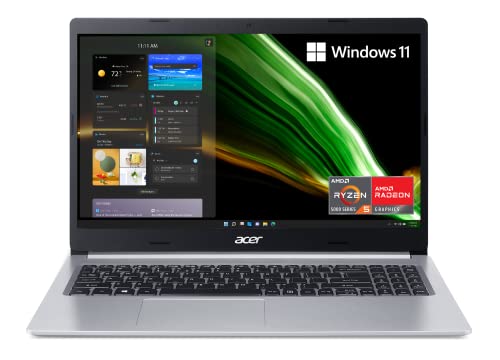
The Acer Aspire 5 A515-45-R74Z is the entry pick for beginners who are learning music production and want a capable machine at the lowest tier in this roundup. Its AMD Ryzen 5 5500U processor has six cores and reaches a boost clock of 4.0GHz, which runs a digital audio workstation well for learning, beat making, and recording a few tracks at a time. The 15.6-inch Full HD IPS display is large enough to see a full arrangement.
The 8GB of DDR4 memory is the main compromise, and it is worth understanding before you buy. It covers a workstation, a small sample library, and a browser with a few tabs open, which is enough for learning and for finishing simple songs. It will feel tight sooner than the 16GB models if you load large libraries, so plan to freeze tracks and bounce virtual instruments to audio as projects grow. The 256GB NVMe drive loads the operating system and your workstation quickly, and an external drive covers sample libraries.
Specs
- Display: 15.6-inch Full HD IPS, 1920 by 1080 resolution
- Processor: AMD Ryzen 5 5500U, 6 cores, up to 4.0GHz
- Graphics: AMD Radeon Graphics
- Memory: 8GB DDR4
- Storage: 256GB NVMe SSD
- Connectivity: USB, USB-C, HDMI, Wi-Fi 6, Bluetooth
- Audio: Built-in speakers, headphone jack
- Operating system: Windows 11 Home
Frequently Asked Questions
How much RAM do I need for music production?
16GB of RAM is the practical floor for serious music production, because a workstation, loaded sample libraries, and a browser can fill 8GB quickly. Four laptops here ship with 16GB. The 8GB Acer works for learning and small projects, but producers who layer large libraries should choose a 16GB model.
Is a MacBook or a Windows laptop better for music production?
Both platforms run professional music software well, so the choice comes down to the workstation you prefer. MacBook Air buyers get Logic Pro, a silent fanless design, and strong battery life. Windows laptops run Ableton Live, FL Studio, Cubase, Reaper, and Pro Tools.
Do I need a dedicated graphics card for music production?
No, a dedicated graphics card is not needed for music production. Audio work depends on the processor, memory, and storage speed, not on graphics power. Every laptop here uses integrated graphics, which handles plugin interfaces and a second display without any trouble.
How important is a quiet laptop for recording?
A quiet laptop matters a great deal when you record in the same room as the machine, because fan noise can bleed into microphone recordings. The fanless MacBook Air is silent by design and is the best choice for recording quiet sources. The Windows laptops here stay quiet during light tracking and spin their fans up mainly during heavy mixing.
Conclusion
The best budget laptop for music production is the one that matches how and where you record. The MacBook Air with the M4 chip leads this roundup because it is silent, fast, and portable, with 16GB of memory and a sharp display. The ASUS Zenbook 14 OLED is the best Windows alternative, with a vivid touchscreen, a fast sixteen-core processor, and a 1TB drive for large libraries. The Samsung Galaxy Book4 gives you the biggest screen and a full keyboard at a mid-range tier, the Dell Inspiron 14 is the most portable Windows pick, and the Acer Aspire 5 is the honest entry point for beginners. Pick the platform and screen size that fit your workflow, and spend the money you save on an audio interface and headphones.









