We independently review everything we recommend. When you buy through our links, we may earn a commission. As an Amazon Associate we earn from qualifying purchases.
Best Budget Cable Modems to Stop Paying Rental Fees
Compare the best budget cable modems for Xfinity, Spectrum and Cox, with channel counts, speed tiers and compatibility checks explained simply.
Renting a modem from your cable provider is one of the quietest recurring charges in home internet. Buying your own modem ends that fee, and the hardware usually pays for itself in well under two years of avoided rental. The catch is compatibility: a modem must match your provider and your speed tier. The five models below cover the tiers most households actually have.
As an Amazon Associate, we earn from qualifying purchases.
Quick answer
The Netgear CM500 is the budget default for speed tiers up to the mid hundreds of megabits. The ARRIS SURFboard SB6183 adds channel headroom, the Netgear CM1000 brings DOCSIS 3.1 for gigabit plans, the ARRIS SURFboard SB8200 is the long-life flagship alternative, and the Motorola MB8611 matches it with a faster 2.5 gigabit network port for future upgrades.
The CM500 is the modem most households should start with. It is a DOCSIS 3.0 unit with 16 downstream and 4 upstream channels, a combination rated for cable internet tiers up to roughly 300 megabits per second, which covers the entry and mid-level plans sold by Xfinity, Spectrum and Cox. Netgear lists the CM500 as certified across those major providers, and setup follows the usual pattern: connect the coax line, connect a router, then activate through the provider app or a quick call. There is a single gigabit Ethernet port on the back, because this is a modem only, so a separate Wi-Fi router is required. That separation is actually an advantage for many homes, since the router can be upgraded later without touching the modem. The compact vertical design vents heat passively and has clear status lights on the front, which makes troubleshooting a dropped connection much easier at a glance. Buyers on faster gigabit plans should look further down this list, but for the most common household tiers the CM500 removes the rental fee for the least money while still leaving generous headroom above a basic plan.
The SB6183 comes from ARRIS, the maker of the SURFboard line that cable technicians have installed for years, and it remains a dependable DOCSIS 3.0 choice. Like the CM500 it bonds 16 downstream and 4 upstream channels, suiting internet plans up to the mid hundreds of megabits, and it is approved for use with Xfinity, Spectrum and Cox services. Where it earns its place is stability: the SB6183 has a long track record in always-on home networks, a straightforward browser-based status page that shows channel signal levels for anyone who likes to diagnose line issues, and a compact white chassis that runs cool on a shelf. It is a modem only, with one gigabit Ethernet port, so pair it with whatever router suits your home. The front panel lights report power, downstream, upstream and online status separately, which helps distinguish a provider outage from a home wiring problem in seconds. For buyers whose plan sits in the most common speed bands and who value a proven, set-and-forget unit from the industry’s longest-running modem brand, the SB6183 is a safe, inexpensive way to stop paying rental fees.
The CM1000 is the step into DOCSIS 3.1, the newer standard that gigabit cable plans require. It combines DOCSIS 3.1 channels with 32 downstream and 8 upstream DOCSIS 3.0 channels, so it works at full speed on gigabit tiers from Xfinity, Spectrum and Cox while remaining compatible with slower plans if you downgrade later. That flexibility makes it the natural pick for anyone whose provider keeps raising speeds: the modem will not be the bottleneck when a plan upgrade arrives. It is again a modem-only design with a single gigabit Ethernet port, ready to feed a mesh Wi-Fi system or a gaming router of your choice. Netgear builds the CM1000 in a sturdy vertical chassis with front status lighting and a power switch, a small convenience many modems omit. Activation follows the standard provider process, and the unit supports IPv6 and the channel bonding features providers use to manage congested neighbourhoods. If your current plan is already in gigabit territory, or priced close enough that an upgrade is likely within the modem’s life, the CM1000 is the budget-conscious way to buy DOCSIS 3.1 once.
The SB8200 is the flagship of the SURFboard line and a favourite for demanding home networks. It is a DOCSIS 3.1 modem with 32 by 8 DOCSIS 3.0 channel support, approved for gigabit-class plans on Xfinity, Spectrum and Cox. The detail that sets it apart is on the back: two gigabit Ethernet ports. Most homes will use one, but the second supports link aggregation with a compatible router to feed connections faster than a single gigabit port allows, and it can serve certain multi-line setups. Inside, generous memory and a capable chipset keep the modem responsive when a household full of streams, calls and game downloads competes for bandwidth. The status page gives detailed signal and event logging, which advanced users and support technicians appreciate when chasing intermittent line faults. Physically it is a compact, well-vented unit with clear front indicators. Buyers who expect to keep a modem through several plan changes, or who run a serious home office where downtime is expensive, will find the SB8200 the most future-ready ARRIS option that still counts as a budget purchase compared with years of rental charges.
The MB8611, from Motorola’s licensed home networking line, is a DOCSIS 3.1 modem built for gigabit and multi-gig households. Its standout feature is a 2.5 gigabit Ethernet port, which removes the single-gigabit ceiling found on most modems: pair it with a router that has a matching fast port and the connection between modem and router stops being the limit as providers push plans past one gigabit. It supports 32 by 8 DOCSIS 3.0 channels alongside DOCSIS 3.1, and it is certified for Xfinity, Spectrum and Cox gigabit services. Motorola includes a useful detail in the box, a quick-start guide that walks through provider activation clearly, and the modem’s status interface reports signal levels per channel for troubleshooting. The design is a plain, well-ventilated black tower that disappears into a networking shelf. Like the others here it is a modem only, so budget for a router if your current setup is a rented combined gateway. For households on the fastest cable tiers, especially anyone paying for speeds above one gigabit or expecting to, the MB8611 is the most forward-looking budget modem in this group.
How to choose
Match the modem to your provider first: confirm the model appears on your provider’s approved list for your exact plan, because an unlisted modem cannot be activated. Then match the standard to your speed tier. DOCSIS 3.0 models with 16 by 4 channels suit plans up to the mid hundreds of megabits, while gigabit plans need DOCSIS 3.1. Remember that every modem here is a modem only, so you need a separate Wi-Fi router unless you already own one. Consider the Ethernet port if you pay for speeds above one gigabit, and keep the receipt and the modem’s MAC address label handy for activation. Finally, think about lifespan: a DOCSIS 3.1 model costs more today but survives plan upgrades that would force a second purchase.
Who should skip
Skip buying a modem if your provider includes the gateway in your plan price with no separate rental line, since there is no fee to eliminate. Skip it if you use the provider’s bundled phone service, which often requires their gateway. Fibre and DSL customers should skip this entire category, because cable modems cannot connect to those networks. Renters moving within a year may also prefer to keep renting rather than buy hardware for a short stay. And if your plan is already above the tiers these modems support, look at higher-end multi-gig models instead.
Frequently Asked Questions
Will any of these modems work with my provider?
They are built for the three largest cable providers, Xfinity, Spectrum and Cox, and each model appears on those providers’ approved lists for suitable speed tiers. Smaller regional cable companies often support the same hardware, but check the provider’s own approved modem list for your plan before ordering, because activation is refused for unlisted models.
What is the difference between DOCSIS 3.0 and DOCSIS 3.1?
DOCSIS 3.1 is the newer cable standard and is required for gigabit-tier plans, using additional spectrum and more efficient modulation. DOCSIS 3.0 modems remain fine for plans up to the mid hundreds of megabits. Providers are steadily moving capacity to 3.1, so a 3.1 modem is the longer-lived purchase even if your current plan is slower.
Do I still need a router with one of these modems?
Yes. Every modem in this roundup is a modem only: it converts the cable signal to a single Ethernet connection and provides no Wi-Fi. Connect it to a router or mesh system you already own, or budget for one. This separation is deliberate, since it lets you upgrade Wi-Fi standards later without replacing the modem.
How does activation work after I buy a modem?
Connect the coax cable and power, attach your router, then open the provider’s app or activation page from a connected device, or call the provider and read out the modem’s MAC address from its label. Activation usually completes in minutes. Afterwards, return the rented gateway promptly and keep the return receipt to stop the rental charge cleanly.
Final verdict
The Netgear CM500 is the right buy for the most common speed tiers, and the ARRIS SB6183 matches it with a long stability record. Households on gigabit plans should choose between the Netgear CM1000, the ARRIS SB8200 with its dual ports, and the Motorola MB8611 with its 2.5 gigabit port for plans beyond gigabit. Any of the five ends the rental fee; the correct choice is simply the one matched to your provider and tier.
E
Emubox Editorial Team
We compare specs, materials and verified owner reviews before a product earns a spot. Rankings are never paid.
Affiliate disclosure. As an Amazon Associate we earn from qualifying purchases at no extra cost to you. Prices accurate as of the date shown.
Best 2mm 70 cm portable antennas compared: telescopic radio antennas near 70 cm, with connectors, bands and collapsed sizes explained before you buy today.
Find the best thermostat setting for winter and summer, with energy-saving setbacks, humidity tips, and smart schedules for a comfortable home year-round.
The best affordable business computer monitors balance sharp text, eye comfort and lasting value. Compare four reliable office displays built for long workdays.
Looking for the best inexpensive HD TVs non smart? Compare five genuinely non-smart HD televisions with tuners, HDMI inputs and simple setup for any small room.

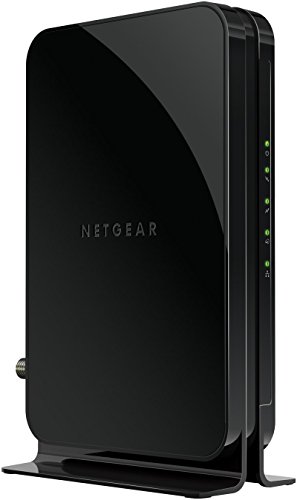 Netgear CM500 Cable Modem
 ARRIS SURFboard SB6183 Cable Modem
 Netgear CM1000 Cable Modem
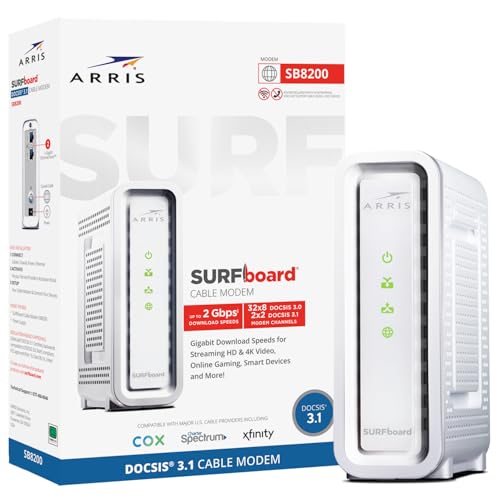 ARRIS SURFboard SB8200 Cable Modem
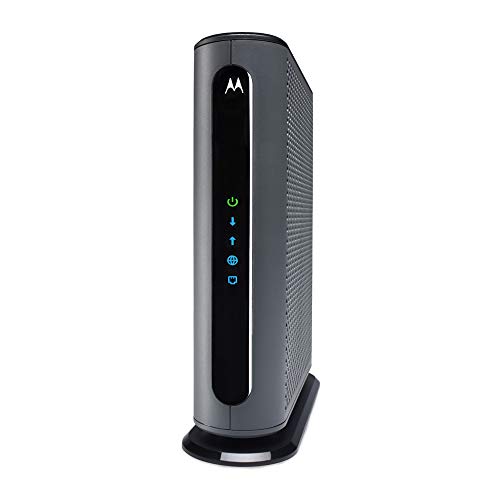 Motorola MB8611 Cable Modem









