We independently review everything we recommend. When you buy through our links, we may earn a commission. As an Amazon Associate we earn from qualifying purchases.
Best Budget Streaming Stick: 5 Picks for Every TV 2026
Compare the best budget streaming sticks for 4K and HD TVs. Five affordable sticks, the specs that matter, and clear tips for choosing the right one.
As an Amazon Associate, we earn from qualifying purchases.
The best budget streaming stick for most homes is the Amazon Fire TV Stick 4K, because it pairs full 4K Ultra HD with Dolby Vision and Dolby Atmos at a mid-range tier. The Roku Streaming Stick 4K is the strongest choice for viewers who want the simplest home screen and the longest Wi-Fi reach. The Chromecast with Google TV (HD) and the Roku Streaming Stick HD cover smaller and older TVs at the lowest tier, and the Fire TV Stick 4K Max suits buyers who want more storage and the fastest wireless connection here. A streaming stick plugs into an HDMI port, hides behind the TV, and turns almost any television into a smart TV.
Start with the television. A 4K TV deserves a 4K stick, because a 1080p stick cannot show 4K detail even when the TV supports it. An older HD television, a bedroom TV, or a small kitchen TV works well with a 1080p stick instead.
Next, compare picture and sound support. Dolby Vision and HDR10+ add brighter highlights and richer color on compatible TVs, while Dolby Atmos adds depth to sound on compatible soundbars and home theater systems. Wireless performance matters too: a stick sits behind the TV, often far from the router, so dual-band Wi-Fi and a long-range receiver help keep streams smooth. Match the platform to the household: Fire TV fits Alexa homes, Roku fits viewers who want a plain grid of apps, and Google TV fits homes that cast from Android phones.
The Amazon Fire TV Stick 4K is the best budget streaming stick for most buyers, because it covers the full 4K feature set at a mid-range tier. It streams in 4K Ultra HD at up to 60 frames per second, with Dolby Vision, HDR10, HDR10+, and HLG support for compatible TVs, plus Dolby Atmos and 7.1 surround sound for compatible audio setups. The quad-core 1.7 GHz processor and 8 GB of storage keep the home screen responsive and leave room for the major streaming apps.
Setup takes minutes: plug the stick into an HDMI port, connect power, and sign in. The included Alexa Voice Remote (3rd Gen) controls TV power and volume on compatible sets, searches by voice, and jumps to favorite apps with preset buttons.
Specs
Resolution: 4K Ultra HD up to 60 fps, plus 1080p and 720p
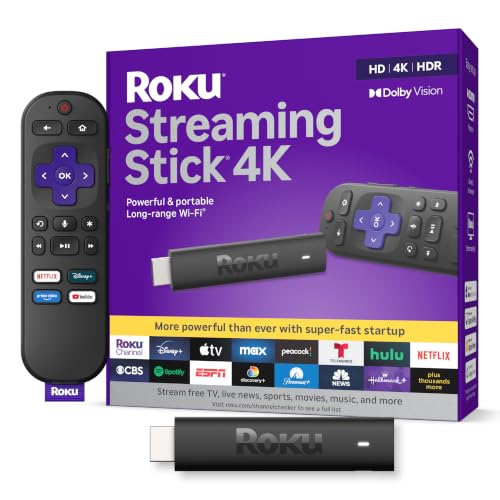
The Roku Streaming Stick 4K is the best budget streaming stick for viewers who want the simplest interface and the strongest wireless reach. It streams in 4K with Dolby Vision and HDR10+, and its redesigned long-range Wi-Fi receiver uses dual-band MIMO Wi-Fi to hold a connection in rooms far from the router. The stick hides behind the TV and plugs straight into an HDMI port, so setup stays simple and the living room stays tidy.
The included voice remote controls TV power, volume, and mute, and it searches by voice across installed channels. The stick works with Siri, Alexa, and Hey Google for voice control, and it supports Apple AirPlay and HomeKit for casting and smart home use. It suits households that value a calm, simple menu and a reliable connection in a distant bedroom.
Specs
Resolution: 4K up to 60 fps, plus 1080p with upscaling from 720p
HDR formats: Dolby Vision, HDR10, HDR10+, HLG
Audio: Digital stereo over HDMI, DTS Digital Surround pass-through
Wi-Fi: 802.11ac dual-band MIMO Wi-Fi with long-range receiver
Remote: Voice remote with TV power, volume, and mute buttons
Voice assistants: Siri, Alexa, Hey Google
Casting: Apple AirPlay and HomeKit compatible
Ports: HDMI 2.0b, USB for power and long-range Wi-Fi receiver
Model: 3820R2; Size: 3.7 in x 0.80 in x 0.45 in; Weight: 0.90 ounces
The Amazon Fire TV Stick 4K Max (2nd Gen) is the premium pick in this roundup, and it is the stick to choose when storage and wireless speed matter most. It doubles the storage of the standard Fire TV Stick 4K to 16 GB, so it holds more apps and games before space runs short. A quad-core 2.0 GHz processor drives faster app starts and smoother navigation, and tri-band Wi-Fi 6E across 2.4, 5, and 6 GHz bands keeps streams steady on crowded home networks.
The Max adds the Fire TV Ambient Experience, which turns the TV into a display for art and photography when the stick is idle. The Alexa Voice Remote Enhanced adds quick access to live TV and more preset app buttons. Fire OS 8 runs the familiar Fire TV home screen with profiles, recommendations, and voice search.
The Chromecast with Google TV (HD) is the best budget streaming stick for a spare TV or a household that already uses Google services. It streams in up to 1080p HDR at 60 frames per second, which fits HD televisions, bedroom TVs, and older sets that never made the jump to 4K. The included voice remote searches with Google Assistant and controls TV power and volume.
Casting is the standout feature here. Viewers can send video, music, and photos from a phone, tablet, or laptop straight to the TV, which suits households that browse on a phone and watch on the big screen. This stick suits a Google household, a second TV, or a guest room where 1080p is enough.
Specs
Resolution: Up to 1080p HDR, 60 fps
HDR formats: HDR10, HDR10+, Dolby Vision, HLG
Audio: Dolby Digital, Dolby Digital Plus, Dolby Atmos
Operating system: Google TV
Voice control: Google Assistant voice remote
Casting: Chromecast built-in for casting from phone, tablet, or laptop
The Roku Streaming Stick HD (2025) is the simplest and most affordable Roku stick in this roundup, and it is the right pick for an HD television that needs a modern streaming platform. It streams in HD with the same Roku home screen found on the 4K model, so navigation stays plain and familiar. The included Roku Voice Remote searches by voice and controls TV power and volume, which removes the need for a second remote on the coffee table.
Model 3840R launched in April 2025 as the entry point to the current Roku stick range, sitting below the 4K Streaming Stick Plus. This stick suits a bedroom TV, a kitchen TV, a dorm room, or a guest room where HD resolution is enough.
Specs
Resolution: HD 1080p
Platform: Roku OS with free and live TV
Remote: Roku Voice Remote with TV power and volume controls
Voice control: Voice search through the remote
Casting: Roku mobile app with private listening
Ports: HDMI output, USB for power
Model: 3840R
Date first available: April 23, 2025
Tier: Budget
Budget, Mid-Range, and Premium Tiers Compared
The two budget sticks, the Chromecast with Google TV (HD) and the Roku Streaming Stick HD, cover HD televisions at the lowest tier. The Chromecast leans on Google Assistant and phone casting, while the Roku leans on the plain Roku grid and free live TV. The mid-range sticks, the Amazon Fire TV Stick 4K and the Roku Streaming Stick 4K, add full 4K resolution with Dolby Vision and HDR10+. The Fire TV stick adds Dolby Atmos and the Alexa ecosystem, while the Roku stick adds the long-range Wi-Fi receiver and the simplest menu in this group. Most buyers with a 4K TV land here.
Stick
Resolution
Storage
Wi-Fi
Tier
Amazon Fire TV Stick 4K
4K Ultra HD
8 GB
Dual-band Wi-Fi
Mid-range
Roku Streaming Stick 4K
4K
Not listed
Dual-band MIMO with long-range receiver
Mid-range
Amazon Fire TV Stick 4K Max (2nd Gen)
4K Ultra HD
16 GB
Tri-band Wi-Fi 6E
Premium
Chromecast with Google TV (HD)
1080p HDR
Not listed
Dual-band Wi-Fi
Budget
Roku Streaming Stick HD (2025)
HD 1080p
Not listed
Wi-Fi
Budget
Frequently Asked Questions
What is the best budget streaming stick for a 4K TV?
The Amazon Fire TV Stick 4K is the best budget streaming stick for most 4K TVs, because it covers 4K Ultra HD, Dolby Vision, HDR10+, and Dolby Atmos at a mid-range tier. The Roku Streaming Stick 4K is the closest alternative, with the same 4K and Dolby Vision support plus a long-range Wi-Fi receiver and a simpler home screen.
Do I need a 4K streaming stick for an HD TV?
No, a 4K streaming stick is not needed for an HD TV, since a 1080p panel cannot show 4K detail. The Chromecast with Google TV (HD) and the Roku Streaming Stick HD both fit HD televisions well and sit in the budget tier.
What Wi-Fi speed does a budget streaming stick need?
A budget streaming stick needs a steady Wi-Fi connection more than a headline speed figure. A 4K stream uses far less bandwidth than a typical home broadband plan provides, so the connection quality between the router and the stick matters most.
Can a streaming stick replace a smart TV?
Yes, a streaming stick can replace the built-in smart platform of a television, and it often runs faster than the software on an older smart TV. The stick plugs into an HDMI port and provides its own home screen, apps, and voice search, so the TV only needs to show the HDMI input.
Conclusion
The best budget streaming stick depends on the television it plugs into and the household around it. The Amazon Fire TV Stick 4K leads this roundup for most 4K TV owners, with full HDR support, Dolby Atmos, and Alexa voice control at a mid-range tier. The Roku Streaming Stick 4K is the best pick for viewers who want the simplest menu and the strongest wireless reach. For HD televisions, the Chromecast with Google TV (HD) fits Google households and frequent casters, and the Roku Streaming Stick HD fits viewers who want the plainest Roku experience at the lowest tier. Match the stick to the TV resolution first, then to the voice assistant and the Wi-Fi setup at home.
E
Emubox Editorial Team
We compare specs, materials and verified owner reviews before a product earns a spot. Rankings are never paid.
Affiliate disclosure. As an Amazon Associate we earn from qualifying purchases at no extra cost to you. Prices accurate as of the date shown.
Best 2mm 70 cm portable antennas compared: telescopic radio antennas near 70 cm, with connectors, bands and collapsed sizes explained before you buy today.
Find the best thermostat setting for winter and summer, with energy-saving setbacks, humidity tips, and smart schedules for a comfortable home year-round.
The best affordable business computer monitors balance sharp text, eye comfort and lasting value. Compare four reliable office displays built for long workdays.
Looking for the best inexpensive HD TVs non smart? Compare five genuinely non-smart HD televisions with tuners, HDMI inputs and simple setup for any small room.

 1. Amazon Fire TV Stick 4K
 2. Roku Streaming Stick 4K
 3. Amazon Fire TV Stick 4K Max (2nd Gen)
 4. Chromecast with Google TV (HD)
 5. Roku Streaming Stick HD (2025)









