We independently review everything we recommend. When you buy through our links, we may earn a commission. As an Amazon Associate we earn from qualifying purchases.
Best Budget Keyboard Covers for MacBook and Laptops
Compare the best budget keyboard covers for MacBook Pro and Air, from clear silicone skins to shortcut-printed covers that guard against spills and dust.
Compare the best budget keyboard covers for MacBook Pro and Air, from clear silicone skins to shortcut-printed covers that guard against spills and dust.
⭐ Key Takeaways
Quick answer: Our top pick is CaseBuy Keyboard Cover for MacBook Air and MacBook Pro, Black, with XSKN Logic Pro Shortcuts Keyboard Cover for MacBook Pro and Air as a strong alternative.
One spilled coffee can turn a laptop keyboard into a repair bill, and even without accidents, crumbs, dust, and skin oil slowly work their way between the keys. A keyboard cover skin is the cheapest insurance in the laptop world: a thin molded sheet that sits over the keys, seals out debris, and peels off for washing. The five budget picks below focus on MacBook Pro and Air models, where fit matters most.
As an Amazon Associate, we earn from qualifying purchases.
Quick answer
For current M-series MacBooks, the CaseBuy cover is the safest budget pick because it is molded for the 2021 to 2025 Pro and Air models with Touch ID. Choose the XSKN cover if you want Logic Pro shortcuts printed on the keys, and the iBenzer Macaron if your MacBook is an older pre-2020 model that newer covers no longer fit.
CaseBuy Keyboard Cover for MacBook Air and MacBook Pro, Black
Top Pick
CaseBuy Keyboard Cover for MacBook Air and MacBook Pro, Black
CaseBuy molds this silicone cover for the recent Apple lineup: MacBook Pro 14 and 16 inch models with M1 through M5 Pro and Max chips, and MacBook Air 13.6 and 15 inch models with M2, M3, and M4 chips, all with the Touch ID layout. That breadth makes it the default choice for anyone who bought a MacBook in the last few years and does not want to decode model numbers for an hour.
The silicone is individually molded to each key, so the cover stays registered while typing and seals the gaps where crumbs and liquid would otherwise enter. It is waterproof and washable with soapy water, then air-dries back to a like-new feel. The black finish hides wear and matches space gray and midnight machines neatly. Two cautions apply: it fits US layout keyboards only, not EU layouts, and any cover adds a slightly softer key feel that fast touch-typists notice at first. For spill, dust, and oil protection on a current MacBook at a budget price, this is the cover to buy first.
XSKN Logic Pro Shortcuts Keyboard Cover for MacBook Pro and Air
Runner-Up
XSKN Logic Pro Shortcuts Keyboard Cover for MacBook Pro and Air
XSKN prints the keyboard with Logic Pro shortcuts, turning the cover into a learning tool as well as a protector. It fits the same modern machines as the CaseBuy, MacBook Pro 14.2 and 16.2 inch models with Touch ID and MacBook Air 13.6 and 15.3 inch models from the M1 through M4 generations, in US layout. Every key carries its Logic Pro function in color-coded print, which genuinely speeds up the first months with the software.
The silicone skin is molded per key, waterproof, and washable, so the protection side of the bargain is not sacrificed for the printing. XSKN sells a whole shortcuts family, including Final Cut Pro and plain language editions, so editors can match the cover to their main application. Printed legends are the trade-off for anyone who never opens Logic Pro: the extra text looks busy compared with a plain skin, and heavy use will eventually wear any printed surface. For music producers learning the program, though, no other budget cover doubles as a cheat sheet taped permanently to the keyboard.
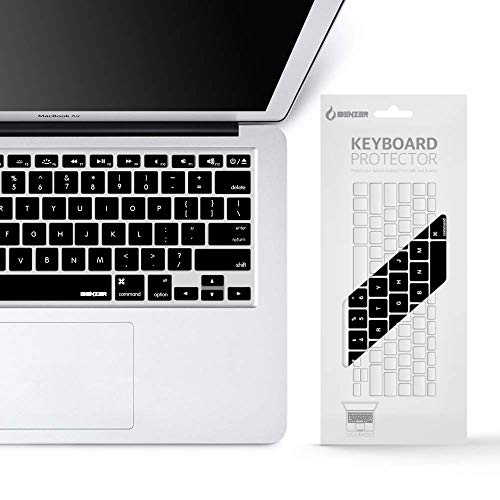
iBenzer Macaron Series Keyboard Cover for MacBook Pro, Black
iBenzer Macaron Series Keyboard Cover for MacBook Pro, Black
The iBenzer Macaron cover serves the older machines that current covers have abandoned: MacBook Pro 13, 15, and 17 inch models with or without Retina displays, the MacBook Air 13 inch, and the Apple wireless keyboard for iMac. Owners of these laptops struggle to find fresh accessories, so a molded silicone skin still in production for them is genuinely useful.
The soft silicone is precision-cut for those layouts, flexible enough to roll for storage, and washable when it picks up grime. It guards against the usual spills, crumbs, and dust, and the black colorway keeps a veteran machine looking tidy. The important check is layout and generation: this cover predates the Touch Bar and Touch ID designs, so it will not fit any MacBook from 2016 onward with those features, and it is made for US keyboards. Thickness is a touch more noticeable than the newest ultra-thin skins. If your MacBook is a pre-2016 model that still earns its keep, this is one of the few budget covers actually shaped for it.
MOSISO Keyboard Cover for MacBook Pro 13 Inch, Black
MOSISO Keyboard Cover for MacBook Pro 13 Inch, Black
MOSISO’s cover targets the Touch Bar generation: MacBook Pro 13 inch models from 2020 to 2023, including the M1 and M2 A2338 plus the A2289 and A2251, and the 16 inch A2141, all with Touch ID. That is a large installed base of machines whose owners still need protection but are often overlooked by covers aimed only at the newest releases.
The silicone skin is molded to the low-profile keys, waterproof, and removable for washing, and it keeps dust and crumbs out of the scissor mechanisms that are expensive to service. MOSISO offers this design in a wide range of colors and prints beyond the black version listed here, which makes it the fun pick for anyone who wants the keyboard to match a case or desk theme. As with every Touch Bar-era cover, confirm your exact model number from the underside of the machine before ordering, because the 13 inch Pro changed layouts several times. For a Touch Bar MacBook Pro that still does daily duty, this is the budget cover cut precisely for it.
ProElife Ultra Thin Keyboard Cover for MacBook Pro 13 Inch, 2020
ProElife Ultra Thin Keyboard Cover for MacBook Pro 13 Inch, 2020
ProElife specializes in thinness: this cover is an ultra-thin skin for the 2020 and later MacBook Pro 13 inch, molded to sit as close to the bare keys as a protective layer can. The thinner the silicone, the less it changes key travel and sound, which is why touch-typists who dislike the damped feel of standard covers gravitate to this style.
Despite the slim profile, it still seals the key gaps against liquid, dust, and crumbs, and it lifts off for a wash under the tap. ProElife has a long track record in MacBook covers, including Touch Bar editions, so the mold accuracy is well established. The compromise is durability: ultra-thin skins stretch and tear sooner than thicker ones if they are peeled off carelessly every day, and they offer slightly less cushioning against a direct splash. Fit is specific to the 2020-generation 13 inch Pro layout, so check the model list carefully. If you want protection you can almost forget is there, this is the budget skin that changes the typing feel the least.
How to choose
Fit is everything with keyboard covers, and it starts with the model number printed on the underside of your MacBook. Match that number, the screen size, the chip generation, and the keyboard layout, because US and EU layouts differ and a cover molded for one will misalign on the other. A cover for the wrong generation may look close but will lift at the corners and muffle keys.
Then choose a thickness. Standard silicone gives the best spill protection and durability, while ultra-thin skins preserve the original typing feel at the cost of some toughness. Printed shortcut covers add real value if you use the featured application daily, and plain covers look cleaner if you do not. Finally, consider your habits: if the laptop eats at cafes and shared desks, waterproofing and washability matter most. If it never leaves a clean home office, the thinnest comfortable skin is enough. Every cover here is removable, so there is no permanent commitment either way.
Who should skip
Skip a keyboard cover if you cannot confirm your exact MacBook model and layout, because a poor fit is worse than no cover. Gamers and competitive typists who rely on precise key feel may also prefer bare keys. And if your laptop is a Windows machine, skip this MacBook-focused list and shop covers molded for your specific model instead.
Frequently asked questions
Do keyboard covers slow down typing?
They change the feel more than the speed. A standard silicone skin adds a soft layer that takes a few days to get used to, while ultra-thin covers are barely noticeable. Most people return to their usual speed within a week. If the cover shifts or lifts, though, it is the wrong size, not a feel problem.
Can I close my MacBook with the cover on?
The covers here are thin enough that the lid closes normally, and many people leave them in place. To be safe, some users remove the skin before closing, since screen clearance on modern MacBooks is tight and a thick cover could press against the display. Follow your laptop maker’s guidance if in doubt.
How do I clean a silicone keyboard cover?
Peel it off, wash it in warm water with a little soap, rinse, and let it air-dry completely before putting it back. Avoid heat and harsh cleaners, which can warp or discolor silicone. A clean cover also types better, because grit trapped underneath is what makes keys feel crunchy.
Will a keyboard cover protect against a big spill?
It buys you time rather than making the laptop waterproof. The molded skin seals the key gaps, so a splash beads on the surface instead of running straight inside. Power down, remove the cover, and dry everything promptly. A flood that reaches the ports or vents can still do damage.
Final verdict
Buy the CaseBuy cover for any recent M-series MacBook, the XSKN if Logic Pro shortcuts would earn their keep, and the iBenzer Macaron for older pre-Touch Bar machines. The MOSISO fits the Touch Bar generation precisely, and the ProElife is the thinnest feel-preserving option. Whichever you choose, confirm the model number first and the fit will take care of itself.
E
Emubox Editorial Team
We compare specs, materials and verified owner reviews before a product earns a spot. Rankings are never paid.
Affiliate disclosure. As an Amazon Associate we earn from qualifying purchases at no extra cost to you. Prices accurate as of the date shown.
Best 2mm 70 cm portable antennas compared: telescopic radio antennas near 70 cm, with connectors, bands and collapsed sizes explained before you buy today.
Find the best thermostat setting for winter and summer, with energy-saving setbacks, humidity tips, and smart schedules for a comfortable home year-round.
The best affordable business computer monitors balance sharp text, eye comfort and lasting value. Compare four reliable office displays built for long workdays.
Looking for the best inexpensive HD TVs non smart? Compare five genuinely non-smart HD televisions with tuners, HDMI inputs and simple setup for any small room.

 CaseBuy Keyboard Cover for MacBook Air and MacBook Pro, Black
 XSKN Logic Pro Shortcuts Keyboard Cover for MacBook Pro and Air
 iBenzer Macaron Series Keyboard Cover for MacBook Pro, Black
 MOSISO Keyboard Cover for MacBook Pro 13 Inch, Black
 ProElife Ultra Thin Keyboard Cover for MacBook Pro 13 Inch, 2020









