We independently review everything we recommend. When you buy through our links, we may earn a commission. As an Amazon Associate we earn from qualifying purchases.
Best Budget Cable Clips for a Tidy Desk: 5 Top Picks
Compare the best budget cable clips for desks, from mixed-size adhesive sets to clear wall clips and magnetic holders that keep every cord in reach.
Compare the best budget cable clips for desks, from mixed-size adhesive sets to clear wall clips and magnetic holders that keep every cord in reach.
⭐ Key Takeaways
Quick answer: Our top pick is OHill Desk Cable Management Cord Organizer, 16 Pack, Black, with Shintop Cable Clips, 6 Pack, Black as a strong alternative.
Loose charging cables sliding off the desk are a small daily annoyance that adds up, and a full cable management overhaul is not always necessary to fix it. A few adhesive cable clips along the desk edge keep phone chargers, USB leads, and headphone cables parked exactly where your hand expects them. The five budget sets below cover the main styles, from mixed-size silicone holders to clear wall clips and magnetic designs.
As an Amazon Associate, we earn from qualifying purchases.
Quick answer
The OHill 16 pack is the best starting point for most desks because it mixes single, double, triple, and five-slot holders in one box, covering everything from a lone phone cable to a full charging row. Pick the TidyHelper clear clips for walls and visible runs, and the Costop magnetic clips if you constantly plug and unplug the same cable.
OHill Desk Cable Management Cord Organizer, 16 Pack, Black
Top Pick
OHill Desk Cable Management Cord Organizer, 16 Pack, Black
The OHill set is the most versatile box in this roundup: sixteen silicone holders in a mix of single, double, triple, and five-slot sizes, each with a self-adhesive pad on the back. That variety matters because a desk rarely has one cable problem. A five-slot holder can anchor the whole charging lineup behind a monitor, while single clips guide a lone cable down a desk leg.
The flexible silicone grips cables without pinching them, and cords can be pressed in or pulled out one-handed, which keeps the daily plug-in routine quick. The adhesive holds well on smooth wood, laminate, glass, and painted metal, though it struggles on textured or dusty surfaces, so a quick wipe before sticking makes a real difference. Black blends into most desk setups, and the same set is also sold in white for lighter furniture. Sixteen pieces is enough for a desk, a nightstand, and a spare run in the car. If you only buy one cable clip set, this mixed box solves the widest range of small routing jobs for the least money.
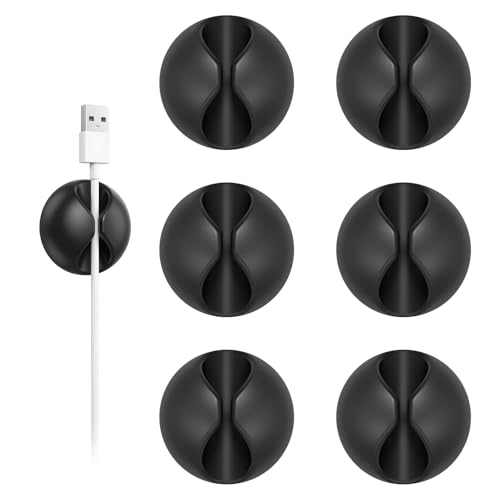
Shintop takes the simpler route with six identical single-cable holders, each a soft silicone clip with an adhesive base. There are no multi-slot bars here, which is exactly the appeal for minimal desks: one clip per cable, placed precisely where that cable should live. A single clip beside the keyboard for a charging lead, one on the nightstand, one by the sofa, and the spares go in a drawer.
The silicone body flexes to accept common charging and USB cables, holding them upright so the connector does not slide onto the floor when unplugged. The adhesive backing sticks to most smooth surfaces and the low-profile shape stays out of sight along a desk edge. Six pieces is a modest count, so large setups will burn through the pack quickly, and thick braided or heavy-duty power cables can overwhelm the small slot. Shintop also sells white and multi-color versions plus larger counts under the same line, which makes restocking easy. For a focused fix on a few problem cables rather than a whole-desk reorganization, this small pack is the budget pick that wastes nothing.
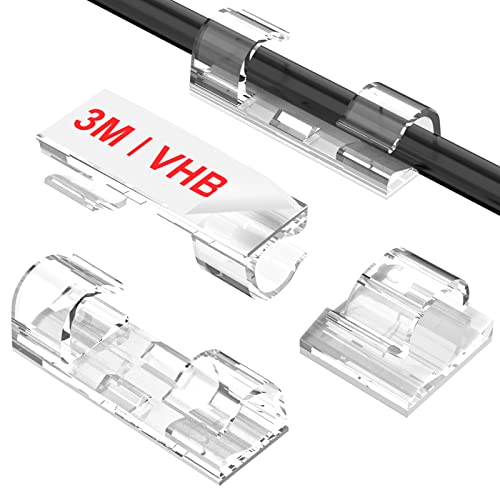
Where the silicone holders above are desk-edge tools, the TidyHelper clips are built for routing runs: forty clear self-adhesive clips sized for individual cables along walls, baseboards, and the underside of desks. The transparent body nearly disappears against light walls and white furniture, which makes this the set to choose for visible cable paths, television setups, and holiday light strings that need to look tidy rather than hidden.
Each clip opens to accept the cable and closes to hold it, so runs can be adjusted without peeling anything off. Forty pieces covers a long wall route or several shorter ones, and the medium size suits common charging leads, Ethernet cables, and lamp cords. The adhesive is the deciding factor: it grips smooth painted walls and wood well, but rental walls deserve caution because removal can pull paint, and rough or crumbling surfaces will not hold. These are single-cable clips, so thick power strips and bundled looms are beyond them. For long, neat, nearly invisible cable runs around a room, this big clear pack is the most economical option here.
The Znben twelve-pack sits between the tiny Shintop set and the OHill mixed box: a dozen adhesive cord holders aimed at desks, home offices, cars, and nightstands. The holders use a spring-style clip design that opens to take the cable and closes over it, giving a firmer grip than open silicone slots. That matters for cables that get tugged often, like a phone charger pulled across the desk several times a day.
The adhesive pads are sized generously for the clip body, helping the holders stay put on vertical surfaces such as the side of a desk or a dashboard. Twelve pieces is a sensible count for one main workstation plus a bedside spot. The firmer clip action is slightly less forgiving of very thick cables, and like all adhesive organizers, the hold depends on a clean, smooth mounting surface. Color choice is limited compared with the bigger brands, so matching unusual furniture is harder. For a single-desk tidy-up with clips that grip positively and stay where they are stuck, this mid-size pack is a solid budget middle ground.
Costop replaces the fixed slot with a magnet: each of the nine holders has an adhesive base and a small magnetic clip that opens, takes the cable, and snaps shut in about a second. That one-handed snap is the real advantage for the cable you grab most often, since there is no threading or forcing a cord through a tight silicone channel. The clip fits cables up to roughly 0.3 inches in diameter, which covers most phone, tablet, and USB charging leads.
Because the clip detaches magnetically from its base, you can lift the whole holder to reroute a cable and set it back without disturbing the adhesive. The bases stick to desks, nightstands, and car consoles, and the compact size keeps them discreet. Nine pieces is fewer than the big routing packs, and chunky braided cables or stiff power cords exceed the clip’s capacity. The magnetic design also costs a little more per piece than plain silicone. For a bedside or desk-edge charging spot where one cable is constantly in motion, though, the snap-on convenience is worth it.
How to choose
Count your cables first, then match the format. Mixed-size sets like the OHill box suit a desk with several different cable types, single clips suit a few problem cords, and large clear packs suit long wall or baseboard runs. Magnetic clips earn their place only where a cable is grabbed and replaced many times a day.
Check cable diameter before ordering. Slim charging leads fit almost everything here, but thick braided cables, heavy power cords, and stiff monitor leads can pop out of small silicone slots. Then think about the surface: adhesive clips need smooth, clean, non-porous surfaces, and they may damage delicate paint or wallpaper on removal. Renters should test one clip in a hidden spot first. Finally, plan placement before sticking anything down, because adhesive pads are effectively single-position. Dry-fit the route with the cables in place, mark the spots, and only then peel and press.
Who should skip
Skip adhesive cable clips if your cables are heavy power bricks, thick surge-protector looms, or braided leads that already strain small holders; a cable tray or sleeve handles those better. Anyone with freshly painted or delicate walls should also skip adhesive mounting and use a desk-edge clamp design instead, since removal can lift the finish.
Frequently asked questions
Do adhesive cable clips damage desks or walls?
On smooth sealed wood, laminate, and glass they usually remove cleanly, especially if warmed and peeled slowly. Painted drywall and wallpaper are riskier, because the adhesive can pull the finish. Test one clip somewhere hidden, and consider command-style removable strips for delicate surfaces instead.
How many clips do I need for one desk?
A typical desk needs six to ten clips: two or three along the back edge for charging cables, a couple to guide cables down a leg, and one or two at the nightstand or side table. Mixed packs cover this in one box, while single-clip packs may need a second purchase.
Can cable clips hold thick or braided cables?
Only up to a point. Slim and standard charging cables sit securely in most holders here, but very thick braided leads and power cords can force small silicone slots open. For those, choose the largest multi-slot holders, magnetic clips within their diameter limit, or a different format such as a cable sleeve.
Why do my adhesive clips keep falling off?
The usual causes are dust, texture, or weight. Adhesive needs a clean, smooth surface, so wipe the spot and let it dry before pressing the clip firmly for half a minute. Vertical runs of heavy cable also peel clips over time; add more clips so each one carries less load.
Final verdict
The OHill 16 pack is the easiest recommendation for a first cable tidy-up, thanks to its mixed sizes. Shintop covers minimal single-cable fixes, TidyHelper handles long visible runs, Znben grips everyday desk cables firmly, and Costop’s magnetic snap design wins for the one cable you reach for constantly. Match the format to the job and any of these sets will civilize a messy desk.
E
Emubox Editorial Team
We compare specs, materials and verified owner reviews before a product earns a spot. Rankings are never paid.
Affiliate disclosure. As an Amazon Associate we earn from qualifying purchases at no extra cost to you. Prices accurate as of the date shown.
Best 2mm 70 cm portable antennas compared: telescopic radio antennas near 70 cm, with connectors, bands and collapsed sizes explained before you buy today.
Find the best thermostat setting for winter and summer, with energy-saving setbacks, humidity tips, and smart schedules for a comfortable home year-round.
The best affordable business computer monitors balance sharp text, eye comfort and lasting value. Compare four reliable office displays built for long workdays.
Looking for the best inexpensive HD TVs non smart? Compare five genuinely non-smart HD televisions with tuners, HDMI inputs and simple setup for any small room.

 OHill Desk Cable Management Cord Organizer, 16 Pack, Black
 Shintop Cable Clips, 6 Pack, Black
 TidyHelper Adhesive Cable Clips, Clear, 40 Pcs
 Znben Cable Clips, 12 Pack
 Costop Magnetic Cable Clips, 9 Pack









