We independently review everything we recommend. When you buy through our links, we may earn a commission. As an Amazon Associate we earn from qualifying purchases.
Best Budget USB Bluetooth Adapters for Windows PCs
Compare the best budget USB Bluetooth adapters for Windows PCs, from nano dongles for laptops to long-range adapters with antennas for desktops.
Plenty of desktops, and a surprising number of older laptops, have no Bluetooth at all, which only becomes a problem the day you try to pair a wireless controller, headset, or keyboard. A USB Bluetooth adapter solves it for very little money: plug it in, pair your devices, and forget it exists. The catch is that these tiny dongles differ in Bluetooth version, range, and how many devices they handle at once. This guide compares five budget adapters, from nano models that disappear into a laptop port to long-range versions with real antennas for desktops across the room from your gear.
As an Amazon Associate, we earn from qualifying purchases.
Quick answer
The TP-Link UB500 is the best default choice, a nano adapter on the current Bluetooth standard that disappears into any USB port. The Ugreen 5.3 adapter is the plug-and-play alternative, the Asus USB-BT500 suits older Windows and Linux systems, the TP-Link UB500 Plus adds an antenna for range, and the Hakimonoe BT09 reaches farthest for across-the-room desktops.
The UB500 is the adapter most people should buy. It is a nano-sized dongle that sits nearly flush in a USB port, so it can live permanently in a laptop or a front panel port without snagging on anything. TP-Link has kept the model current over its life, and the latest version runs Bluetooth 5.4 with EDR and BLE support, pairing with headsets, controllers, keyboards, mice, speakers, and phones, with support for up to seven devices connected at once. On Windows 11, 10, and 8.1 it is plug and play with no driver hunt; Windows 7 needs a driver download from TP-Link’s site. Backward compatibility covers older Bluetooth devices going back generations, so an aging wireless headset still pairs. Range is the standard short-range class, which in practice means the same room as the PC, and that is all a desk setup asks for. The one caution is physical: on a desktop tower under a desk, the tiny body sits close to a big metal case, so a front port or a short USB extension cable gives the radio a clearer path. For everyone else, the UB500 is the set-and-forget answer.
The USB-BT500 is Asus’s nano adapter, and its appeal is breadth of compatibility. It runs Bluetooth 5.0, which is a generation behind the newest adapters here, but still fully supports the headsets, controllers, keyboards, and mice that make up nearly all real-world use, with data rates up to 3 Mbps and connections for up to seven devices. The reason to pick it over newer rivals is operating system support: alongside Windows 10 and 8.1, Asus supports Windows 7 and Linux, which makes the BT500 a useful fix for an older machine or a Linux box that the newer plug-and-play adapters leave out. It is nano-sized like the UB500, so it can stay in a laptop full time. Asus also publishes its drivers and support documentation through its regular support site, which some buyers prefer over smaller brands. The trade-offs are the older Bluetooth version, meaning slightly less efficient connections with modern low-energy accessories, and standard nano-adapter range. If your PC is recent and runs Windows 11, the newer adapters here make more sense, but for mixed fleets of older systems the BT500’s compatibility list is the widest in this roundup.
The Ugreen adapter is the straightforward modern alternative to the big networking brands. It runs Bluetooth 5.3 with EDR, pairs with up to five devices simultaneously, and is aimed squarely at current Windows PCs: on Windows 11, 10, and 8.1 it installs itself with no driver work at all. That focus is also its limitation, because Windows 7, Linux, and macOS are not supported, so check your system before choosing it. The dongle is a compact low-profile design that sits close to the port, suited to laptops and front panels, and an LED indicator shows pairing and activity status, a small touch that nano adapters often skip and that helps when troubleshooting a connection. Transfer speeds are rated at 2 Mbps, in line with this class of adapter and plenty for audio streaming, file transfers from a phone, and input devices. Ugreen’s accessory build quality is consistently tidy, with a snug USB connector that does not wobble in the port. For a Windows 10 or 11 machine that simply needs Bluetooth for a controller, headset, and keyboard, this adapter does the job with zero setup friction.
TP-Link USB Bluetooth Adapter (UB500 Plus)
The UB500 Plus takes the UB500 formula and fixes its one weakness: range. Instead of a nano body, it uses a slightly larger housing with a high-gain adjustable antenna that can be angled for the best signal, which makes a real difference when the PC sits under a desk, behind a monitor, or across the room from a headset or controller. It runs Bluetooth 5.3 with EDR and BLE and connects multiple devices at once, covering the usual mix of audio, input, and game controllers. Support covers Windows 11, 10, 8.1, and 7, with plug-and-play setup on the newer versions and a downloadable driver for Windows 7. The antenna is also a help in crowded wireless environments, where a stronger radio link holds a headset connection steady instead of stuttering when you turn away from the desk. The trade-off is size: this is a desktop adapter, not one you leave in a laptop bag, and the antenna needs a little clearance behind the case. For desktop owners who have watched a nano adapter drop their controller mid-game, the UB500 Plus is the natural upgrade and still firmly in budget territory.
The Hakimonoe BT09 is built for distance above all else. It uses a Bluetooth 5.4 radio with a Class 1 transmitter and an external high-gain antenna, and the maker rates its open-area range at up to 150 meters, many times what a nano adapter manages. Real walls and furniture cut that figure down substantially, but the margin still translates into a headset that keeps playing when you walk to the kitchen, or a controller that stays connected to a living-room PC from the sofa. It is plug and play on Windows 11, 10, and 8.1, supports Windows 7 with a driver, and unusually for this class it also supports Linux, which broadens its appeal for media-center builds. Data rates reach 3 Mbps with EDR, and it pairs with the standard range of headsets, speakers, keyboards, mice, printers, and controllers. The hardware is a larger stick-style dongle, clearly meant for a desktop’s rear or front port rather than a laptop. Buyers who only need desk-range Bluetooth are paying for reach they will not use, but for a PC that serves a whole room, the BT09 is the strongest tool here.
How to choose
Begin with why you need Bluetooth. For a keyboard, mouse, and headset at a desk, any nano adapter here is enough, and the newest Bluetooth version your system supports is the tiebreaker: 5.3 and 5.4 adapters handle modern low-energy accessories more efficiently and hold more simultaneous connections. Range is the second decision. Nano adapters are short-range by design and struggle when the PC is under a desk or in another corner, so if your controller or headset drops out, choose an antenna model like the UB500 Plus or the Hakimonoe BT09 rather than a more expensive nano dongle. Third, check operating system support carefully, because it varies more than any other spec: some adapters are Windows 10 and 11 only, while the Asus and Hakimonoe models add Linux, and Windows 7 support sometimes needs a manual driver. Finally, remember that one adapter serves all your devices at once, so you do not need a separate dongle per peripheral, and that game controllers, headsets, and phones all share the same connection pool.
Who should skip
Skip an adapter if your PC already has Bluetooth built in, which includes most laptops from the last decade and many recent motherboards; check your system settings before buying a duplicate. Skip these Windows-focused adapters if your machine runs macOS, since most of them do not support it and Apple’s own Bluetooth is built into every Mac anyway. Skip the long-range models if your devices never leave your desk, because you would pay for antenna hardware that changes nothing at two meters. And skip Bluetooth entirely for competitive gaming input if you already own a controller with a dedicated 2.4 GHz wireless dongle, which offers lower latency than any Bluetooth connection.
Frequently Asked Questions
Can one USB Bluetooth adapter connect several devices at once?
Yes. The adapters in this guide support multiple simultaneous connections, typically five to seven devices, so a keyboard, mouse, headset, and controller can all stay paired to one dongle. Audio is the practical limit: you can pair several headsets, but Windows sends sound to one output device at a time, so only one plays audio at once.
Why does my Bluetooth adapter have poor range on my desktop?
The usual cause is placement, not the adapter itself. A nano dongle plugged into the back of a metal tower under a desk is shielded by the case and furniture. Moving it to a front USB port, using a short USB extension cable, or switching to an antenna model such as the UB500 Plus usually fixes dropouts without changing anything else in the setup.
Do I need to install drivers for a USB Bluetooth adapter?
On Windows 11, 10, and 8.1, most adapters here install automatically as soon as they are plugged in. Windows 7 generally needs a driver from the maker’s website, and Linux support depends on the model, with the Asus USB-BT500 and Hakimonoe BT09 listing it explicitly. If an adapter is not recognized, checking the maker’s support page for your exact model is the first step.
Will a Bluetooth adapter work for a game controller?
Yes, modern controllers from Xbox, PlayStation, and Nintendo pair over Bluetooth and work with all five adapters here. Keep in mind that Bluetooth adds a small amount of input latency compared with a wired connection or a controller’s own 2.4 GHz dongle, which matters in fast competitive games but is unnoticeable in most single-player and casual play.
Final verdict
Most buyers should get the TP-Link UB500 and stop thinking about it: it is tiny, current, and effortless on modern Windows. The Ugreen adapter is the equal alternative for Windows 10 and 11, the Asus USB-BT500 covers older Windows and Linux machines, and when range is the problem, the antenna-equipped UB500 Plus and the long-range Hakimonoe BT09 solve it properly. Pick based on your operating system and how far your devices roam, and any of the five will give a Bluetooth-less PC a new lease of life.
E
Emubox Editorial Team
We compare specs, materials and verified owner reviews before a product earns a spot. Rankings are never paid.
Affiliate disclosure. As an Amazon Associate we earn from qualifying purchases at no extra cost to you. Prices accurate as of the date shown.
Best 2mm 70 cm portable antennas compared: telescopic radio antennas near 70 cm, with connectors, bands and collapsed sizes explained before you buy today.
Find the best thermostat setting for winter and summer, with energy-saving setbacks, humidity tips, and smart schedules for a comfortable home year-round.
The best affordable business computer monitors balance sharp text, eye comfort and lasting value. Compare four reliable office displays built for long workdays.
Looking for the best inexpensive HD TVs non smart? Compare five genuinely non-smart HD televisions with tuners, HDMI inputs and simple setup for any small room.

 TP-Link USB Bluetooth Adapter (UB500)
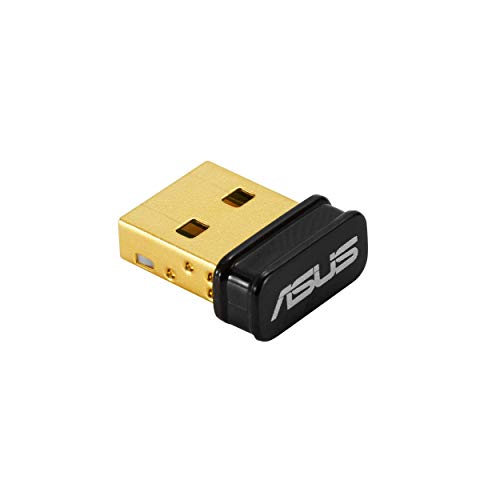 Asus USB-BT500 Bluetooth 5.0 USB Adapter
 Ugreen USB Bluetooth 5.3 Adapter for PC
 Hakimonoe Long Range Bluetooth 5.4 Adapter for PC









