We independently review everything we recommend. When you buy through our links, we may earn a commission. As an Amazon Associate we earn from qualifying purchases.
Best Budget Stream Decks for Streamers and Desk Setups
Compare the best budget stream decks, from the Elgato Stream Deck Mini to the Fifine AmpliGame D6, with key counts, software notes and setup guidance.
Compare the best budget stream decks, from the Elgato Stream Deck Mini to the Fifine AmpliGame D6, with key counts, software notes and setup guidance.
⭐ Key Takeaways
Quick answer: Our top pick is Fifine AmpliGame Stream Controller with 15 Macro Keys – D6, with Elgato Stream Deck Mini – Live Content Creation Controller with 6 Customizable… as a strong alternative.
A stream deck puts scene switches, mute toggles, sound clips and app shortcuts on physical keys, so a stream or a busy workday runs from one small pad instead of a tangle of keyboard shortcuts. The good news is that the format no longer starts at flagship prices. The five decks below range from a compact six-key starter pad to a full 15-key controller with dials, and every one of them works with the major streaming and meeting apps.
As an Amazon Associate, we earn from qualifying purchases.
Quick answer
The Fifine AmpliGame D6 is the best budget stream deck for most people, with 15 LCD macro keys and its own plugin-ready software at an entry-level price. The Elgato Stream Deck Mini is the safer starter pick, with the deepest plugin library in a six-key pad. The Elgato Stream Deck MK.2 and Razer Stream Controller are step-up options, and the Elgato Scissor Keys suits heavy typists.
Fifine AmpliGame Stream Controller with 15 Macro Keys – D6
Top Pick
Fifine AmpliGame Stream Controller with 15 Macro Keys – D6
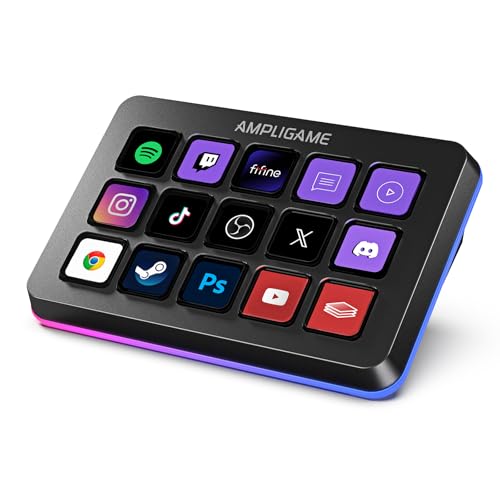
The AmpliGame D6 is the deck that changed what budget means in this category. It packs 15 customizable LCD macro keys into a compact pad, matching the key count of controllers that cost far more, and each key shows its own icon so scene switches, chat commands and media controls stay readable at a glance. Fifine’s Control Deck software handles the setup, with a plugin library covering OBS Studio, Streamlabs, Twitch, YouTube and Discord actions.
The keys trigger single actions or chained macros, so one press can switch a scene, unmute a microphone and post a chat message together. An RGB light ring with several modes runs around the base, which suits gaming desks, and the deck connects over USB with cables for both connector styles in the box. Windows support is the focus, and the listing notes it is designed for PCs and laptops rather than consoles.
The trade-offs are ecosystem depth and polish. The plugin store is smaller than Elgato’s marketplace, and the software feels less refined than the market leader’s. For a first deck, or a second pad dedicated to one app, those compromises are easy to accept at this price.
Elgato Stream Deck Mini – Live Content Creation Controller with 6 Customizable LCD Keys
Runner-Up
Elgato Stream Deck Mini – Live Content Creation Controller with 6 Customizable LCD Keys
The Stream Deck Mini is the smallest way into the most mature stream deck ecosystem. Six LCD keys sit in a compact two-row grid, and each one can hold a single action, a folder of actions or a multi-action sequence, so the real capacity is far larger than the key count suggests. The keys are the same bright, crisp LCD type used on the bigger Elgato decks.
Elgato’s Stream Deck software is the reason to buy here. The marketplace offers a deep library of free plugins for OBS Studio, Streamlabs, Twitch, YouTube, Zoom, Teams, PowerPoint, Philips Hue lighting and hundreds of other apps, and profiles can switch automatically when a program comes to the front. A meeting user can fill the six keys with mute, camera, screen share and leave-call controls and never touch the mouse.
The fixed USB cable keeps the design simple, and the pad is light enough to travel in a laptop bag. Six keys will feel tight for complex productions with many scenes, though folders soften that limit. As a starter deck or a dedicated meeting controller, it remains the easiest recommendation in the Elgato line.
Elgato Stream Deck MK.2 – Studio Controller with 15 Macro Keys
Elgato Stream Deck MK.2 – Studio Controller with 15 Macro Keys
The Stream Deck MK.2 is the reference design in this category: 15 LCD keys in a three-by-five grid, a detachable USB-C cable and interchangeable faceplates that let the deck match a desk theme. It is the step-up pick for streamers who outgrow six keys and want room for scenes, sources, audio controls and social posts on one surface.
The software experience matches the Mini’s, with the same marketplace, smart profiles and multi-action support, so moving up from the Mini means keeping every layout already built. The MK.2 also works as a general productivity pad: launch apps, paste text blocks, control smart lights and run shortcuts in editing software, all from keys that show exactly what they do.
Build quality is a clear step above the budget decks, with a solid stand angle and keys that feel consistent across the grid. The price is the highest of the Elgato LCD models here, which is why it sits in the step-up slot rather than the budget lead. For a growing channel or a creator who also edits video daily, it is the deck most likely to stay on the desk for years.
Razer Stream Controller – All-in-One Keypad for Streaming with 12 Haptic Switchblade Keys and 6 Tactile Analog Dials
Razer Stream Controller – All-in-One Keypad for Streaming with 12 Haptic Switchblade Keys and 6 Tactile Analog Dials
Razer’s Stream Controller takes a different route from the LCD-key crowd. Twelve haptic switchblade keys with small displays handle scene and action triggers, while six tactile analog dials give physical control over audio levels, lighting or brush sizes, flanked by eight programmable buttons. The layout is built on Loupedeck’s software platform, which Razer licenses for this device.
That software leans toward creators who mix streaming with editing. Native integrations cover OBS Studio and Streamlabs alongside tools like Photoshop and Premiere-style workflows, and the dials map naturally to volume, zoom and timeline scrubbing. The front panel shows levels and selected functions on its own screen sections, reducing the need to look back at the monitor.
It is the most expensive controller in this roundup and the learning curve is steeper than Elgato’s drag-and-drop approach. The dials, though, do something no key-only deck can: fine, eyes-free adjustment mid-stream. Streamers who ride audio levels constantly, or editors who want one surface for both jobs, are the audience. Everyone else is better served by the simpler decks above.
The Stream Deck Scissor Keys is Elgato’s answer for people who live in meetings and office apps as much as in streaming software. It keeps the 15-key LCD layout of the MK.2 generation and pairs it with a design aimed at daily workflow control: Zoom, Teams, PowerPoint and Office shortcuts are the headline use cases, with USB-C connection for modern laptops.
Under the surface it runs the same Stream Deck software, so the full plugin marketplace, smart profiles and multi-actions all carry over. A knowledge worker can build a profile for video calls, another for spreadsheets and a third for streaming, and let the deck switch between them automatically as apps open. The scissor-key framing also suits desks where a gaming look is out of place.
Against the standard MK.2, the choice comes down to styling and the workflow focus in the box; the core macro experience is shared. Against the Mini, it trades compactness for two and a half times the keys. Buyers who want one deck for the workday and the evening stream, and who prefer a professional finish, will find this the most balanced Elgato option here.
How to choose
Start with key count. Six keys suit meeting controls or a simple stream with a handful of scenes, especially since folders stack extra actions under one key. Fifteen keys fit growing channels and heavy app users. Next, weigh the software: Elgato’s marketplace is the deepest, Fifine’s covers the streaming essentials for less, and Razer’s dial-based layout serves audio and editing work. Check operating system support before ordering, since some decks focus on Windows while others support Mac equally. Connection type matters on modern laptops, where USB-C saves an adapter. Finally, think about what sits beside the deck: a small pad leaves room for a control surface and a microphone arm on a crowded desk.
Who should skip
Skip a stream deck entirely if keyboard shortcuts already cover the workflow and the desk is short on space; a deck earns its footprint only when it is pressed many times a day. Gamers who only want game macros are better served by a macro keypad or keyboard software. Anyone needing motorized faders or broadcast-grade audio control should look at dedicated audio mixers instead. And if the main goal is controlling a console stream without a PC in the chain, none of these USB computer controllers is the right tool.
Frequently Asked Questions
Do budget stream decks work with OBS Studio and Streamlabs?
Yes. Every deck in this roundup supports OBS Studio and Streamlabs, either through official plugins or the maker’s own software. Scene switching, source toggles, mute controls and chat actions are the standard building blocks, and most setups take only a few minutes of dragging actions onto keys before the first stream.
Can a stream deck be used for work apps instead of streaming?
Absolutely. The same macro keys that switch scenes can mute a Zoom or Teams call, share a screen, launch apps, paste saved text and control smart lights. Elgato’s smart profiles even swap layouts automatically when a work app comes to the front, so one small pad can serve meetings all day and streaming at night.
How many keys does a beginner actually need?
Six keys are enough for a starter setup with a few scenes, a mute toggle and a sound clip or two, because folders let one key open a whole second layer of actions. Fifteen keys become worthwhile once scene counts grow or the deck doubles as a work controller for meetings, editing and app launching.
Do these decks need a subscription or extra software fees?
No subscription is required. The setup software from Elgato, Fifine and Razer is a free download, and the core plugin libraries are free as well. Some third-party plugin makers charge for advanced packs, but the essential streaming, meeting and productivity actions cost nothing beyond the hardware itself.
Final verdict
The Fifine AmpliGame D6 leads on value, giving 15 LCD keys and capable software at the lowest cost of entry. The Elgato Stream Deck Mini is the compact, low-risk way into the strongest plugin ecosystem, while the MK.2 and Scissor Keys models add keys and refinement for growing setups. The Razer Stream Controller stands apart with its dials for audio-focused creators. Pick by key count and software first, and any of the five will tidy up a stream or a workday.
E
Emubox Editorial Team
We compare specs, materials and verified owner reviews before a product earns a spot. Rankings are never paid.
Affiliate disclosure. As an Amazon Associate we earn from qualifying purchases at no extra cost to you. Prices accurate as of the date shown.
Best 2mm 70 cm portable antennas compared: telescopic radio antennas near 70 cm, with connectors, bands and collapsed sizes explained before you buy today.
Find the best thermostat setting for winter and summer, with energy-saving setbacks, humidity tips, and smart schedules for a comfortable home year-round.
The best affordable business computer monitors balance sharp text, eye comfort and lasting value. Compare four reliable office displays built for long workdays.
Looking for the best inexpensive HD TVs non smart? Compare five genuinely non-smart HD televisions with tuners, HDMI inputs and simple setup for any small room.


 Fifine AmpliGame Stream Controller with 15 Macro Keys – D6
 Elgato Stream Deck MK.2 – Studio Controller with 15 Macro Keys
 Razer Stream Controller – All-in-One Keypad for Streaming with 12 Haptic Switchblade Keys and 6 Tactile Analog Dials
 Elgato Stream Deck Scissor Keys – Workflow Controller with Customizable Macro Keys









