We independently review everything we recommend. When you buy through our links, we may earn a commission. As an Amazon Associate we earn from qualifying purchases.
Best Budget Internal Hard Drive: 5 Picks for Your PC
Looking for a cheap internal hard drive? We compare 5 budget HDDs for desktop PCs, with capacities, speeds, cache sizes, and warranties explained.
The Seagate BarraCuda 2TB ST2000DM008 is the best budget internal hard drive for most desktop PC owners. It spins at 7200 RPM, carries a 256 MB cache, and offers 2 TB of room for games, photos, and documents. The WD Blue 2TB WD20EZBX matches it with a 7200 RPM class spindle and a 256 MB cache, while the WD Blue 2TB WD20EZRZ trades speed for quieter, cooler running. Buyers who need more room should look at the BarraCuda 4TB ST4000DM004, and the IronWolf 4TB ST4000VN006 is the pick for a PC or home server that stays on around the clock.
How to Choose a Budget Internal Hard Drive
Start with capacity. A 1 TB drive fills up fast once games and photo libraries enter the picture, so 2 TB is the sensible minimum for most desktop builds, and 4 TB suits media collections and backups. Larger drives also tend to offer better value per terabyte.
Next, check spindle speed. A 7200 RPM drive responds faster and moves large files more quickly, so it suits a games library or a drive that holds applications. A 5400 RPM drive runs quieter and cooler, which suits media storage and backups.
Cache size helps with bursts of activity. A 256 MB cache smooths out file copies and game loading better than a 64 MB cache, especially when several tasks run at once.
Recording technology matters too. Conventional magnetic recording, known as CMR, handles repeated rewriting well. Shingled magnetic recording, known as SMR, suits storage written once and read often, such as media libraries, but can slow down under heavy rewriting. Check the exact model number, because one family can contain both types.
Form factor and interface are simple to confirm. Every drive here is a 3.5-inch drive with a SATA 6 Gb/s connection, which fits standard desktop cases and motherboards. Before ordering, confirm a free 3.5-inch bay, a spare SATA power connector, and a SATA data cable. Most budget drives carry a two-year warranty, while NAS-rated drives often carry three years.
The BarraCuda 2TB is the default recommendation for a reason. Its 7200 RPM spindle and 256 MB cache give it the liveliest feel of any budget drive here, and Seagate lists sustained transfer rates up to 220 MB/s. With 2 TB on tap, it holds a games library alongside documents, photos, and video, and the standard 3.5-inch SATA design fits almost any desktop case.
This drive uses shingled magnetic recording, so it is at its best when files are written once and read often, which describes most game libraries and media collections. Buyers who rewrite large files every day should look at one of the CMR drives below instead. Seagate backs it with a two-year limited warranty.
Specs
Capacity: 2 TB
Form Factor: 3.5 inch
Interface: SATA 6 Gb/s
Rotational Speed: 7200 RPM
Cache: 256 MB
Sustained Transfer Rate: Up to 220 MB/s
Recording Technology: SMR
Warranty: 2-year limited
ASIN: B07H2RR55Q
Best for: A fast, roomy second drive for games and media in a desktop PC.
The WD Blue 2TB WD20EZBX is the closest rival to the BarraCuda. It also spins at 7200 RPM class speed and carries a 256 MB cache, and Western Digital lists transfer rates up to 215 MB/s. The 3.5-inch SATA design fits the same desktop bays, and the drive suits everyday computing, from office documents to photo libraries and game storage.
WD Blue drives are known for quiet, steady operation, and this model keeps noise and vibration low enough for a PC that sits on a desk. Like the BarraCuda 2TB, it uses shingled magnetic recording, so it suits libraries written once and read often more than constant rewriting. It carries a two-year limited warranty. Choose it if you already trust WD drives or want a matching second drive.
Specs
Capacity: 2 TB
Form Factor: 3.5 inch
Interface: SATA 6 Gb/s
Rotational Speed: 7200 RPM class
Cache: 256 MB
Transfer Rate: Up to 215 MB/s
Recording Technology: SMR
Warranty: 2-year limited
ASIN: B08VH8R94B
Best for: A fast WD second drive for everyday desktop storage and gaming.
The WD Blue 2TB WD20EZRZ is the quiet achiever of this roundup. Its 5400 RPM class spindle and 64 MB cache will not win a speed contest, but the trade is real: lower noise, lower vibration, and lower power draw. In a living-room PC or a build where an SSD runs the system, those qualities matter more than a few seconds on a file copy.
Capacity is the same 2 TB, so it holds the same games library or photo collection, just at a more relaxed pace. It uses a standard 3.5-inch SATA 6 Gb/s connection and carries the same two-year limited warranty as the rest of the WD Blue line. It is the right pick for a silent PC, a second drive for media and backups, or an older machine. Speed-focused buyers should step up to a 7200 RPM model instead.
Specs
Capacity: 2 TB
Form Factor: 3.5 inch
Interface: SATA 6 Gb/s
Rotational Speed: 5400 RPM class
Cache: 64 MB
Recording Technology: CMR
Warranty: 2-year limited
ASIN: B013QFRS2S
Best for: Quiet, cool-running bulk storage in living-room and office PCs.
Doubling capacity to 4 TB changes what a PC can hold. The BarraCuda 4TB stores a large games library, years of photos and video, and full system backups on one drive. It spins at 5400 RPM and carries a 256 MB cache, and Seagate lists sustained transfer rates up to 190 MB/s.
This is a bulk-storage specialist. It uses shingled magnetic recording, which suits media libraries, archives, and backups written once and read often. Buyers who constantly rewrite large video projects should weigh the CMR IronWolf below instead. One caution: Seagate sells this model in standard and frustration-free packaging under different listings, so match the model number ST4000DM004 before buying.
Specs
Capacity: 4 TB
Form Factor: 3.5 inch
Interface: SATA 6 Gb/s
Rotational Speed: 5400 RPM
Cache: 256 MB
Sustained Transfer Rate: Up to 190 MB/s
Recording Technology: SMR
Warranty: 2-year limited
ASIN: B07115ZSQ6
Best for: Large media libraries and backups on a single budget drive.
The IronWolf 4TB is the premium pick in this roundup, and it earns that place with durability rather than raw speed. It is a NAS-rated drive built for systems that stay on around the clock, with a workload rating of 180 TB per year and a mean time between failures rating of one million hours. It uses conventional magnetic recording, so repeated rewriting is handled without the slowdowns shingled drives can show.
Capacity is 4 TB, the spindle runs at 5400 RPM, and the drive connects over SATA 6 Gb/s in a standard 3.5-inch bay, so it installs like the other drives here. Seagate lists sustained transfer rates up to 202 MB/s, and rotational vibration sensors help it stay steady when several drives share one enclosure. The warranty runs to three years and includes Rescue Data Recovery Services, a meaningful safety net for a drive holding a photo archive or a backup.
Specs
Capacity: 4 TB
Form Factor: 3.5 inch
Interface: SATA 6 Gb/s
Rotational Speed: 5400 RPM
Cache: 64 MB as listed on Amazon
Sustained Transfer Rate: Up to 202 MB/s
Recording Technology: CMR
Workload Rating: 180 TB per year
Warranty: 3-year limited with Rescue Data Recovery Services
ASIN: B09NHV3CK9
Best for: Always-on home servers and NAS builds that need CMR reliability.
Installing and Setting Up Your New Internal Hard Drive
Installing a 3.5-inch internal hard drive is a short job on most desktop PCs. Power the machine down, switch off the power supply, and open the side panel. Slide the drive into a free 3.5-inch bay and secure it, then connect a SATA data cable to a free port on the motherboard and a SATA power connector from the power supply. Seat both connectors fully, because a loose SATA cable is the most common cause of a new drive not appearing at first boot.
Once the PC is back on, prepare the drive before use. On Windows, open Disk Management, find the new disk, initialize it if asked, and create a new simple volume with the NTFS file system. On macOS, use Disk Utility to erase the drive with a suitable format. A full format takes longer but checks the whole surface. After formatting, copy a few test files and confirm they open before moving a whole library across. Keep a backup of anything irreplaceable elsewhere, because no single hard drive should be the only copy of important files.
Frequently Asked Questions
Is a 7200 RPM hard drive worth it over a 5400 RPM drive?
Yes, for a drive that holds games or applications. A 7200 RPM drive responds faster and transfers large files more quickly. A 5400 RPM drive still suits media storage, documents, and backups, where it runs quieter and cooler.
How much capacity do I need in a budget internal hard drive?
For most desktop owners, 2 TB is the sweet spot. It holds a solid games library plus documents, photos, and video without filling up in a few months. Choose 4 TB for a large media collection, video recording, or full system backups.
Can I use a NAS hard drive like the IronWolf in a regular desktop PC?
Yes. A NAS hard drive uses the same 3.5-inch size and SATA connection as a desktop drive, so it installs and works in a normal PC. Its NAS rating means it is built for continuous operation, a bonus in a desktop that stays on all day.
Do I need an SSD as well, or can a hard drive do everything?
A hard drive can do everything, but pairing it with an SSD gives a better result. Put the operating system and everyday programs on the SSD, and use the hard drive for games, media, documents, and backups.
Conclusion
The best budget internal hard drive for most desktop owners is the Seagate BarraCuda 2TB ST2000DM008, because its 7200 RPM spindle, 256 MB cache, and 2 TB of room cover games, media, and everyday files. The WD Blue 2TB WD20EZBX is the closest alternative for buyers who prefer Western Digital, while the WD20EZRZ suits quiet living-room and office PCs. Buyers who need more room should step up to the BarraCuda 4TB, and anyone running a home server around the clock should choose the CMR IronWolf 4TB with its three-year warranty. Pick capacity first, match speed to use, and check the model number before ordering.
E
Emubox Editorial Team
We compare specs, materials and verified owner reviews before a product earns a spot. Rankings are never paid.
Affiliate disclosure. As an Amazon Associate we earn from qualifying purchases at no extra cost to you. Prices accurate as of the date shown.
Best 2mm 70 cm portable antennas compared: telescopic radio antennas near 70 cm, with connectors, bands and collapsed sizes explained before you buy today.
Find the best thermostat setting for winter and summer, with energy-saving setbacks, humidity tips, and smart schedules for a comfortable home year-round.
The best affordable business computer monitors balance sharp text, eye comfort and lasting value. Compare four reliable office displays built for long workdays.
Looking for the best inexpensive HD TVs non smart? Compare five genuinely non-smart HD televisions with tuners, HDMI inputs and simple setup for any small room.

 Seagate BarraCuda 2TB ST2000DM008
 Western Digital WD Blue 2TB WD20EZBX
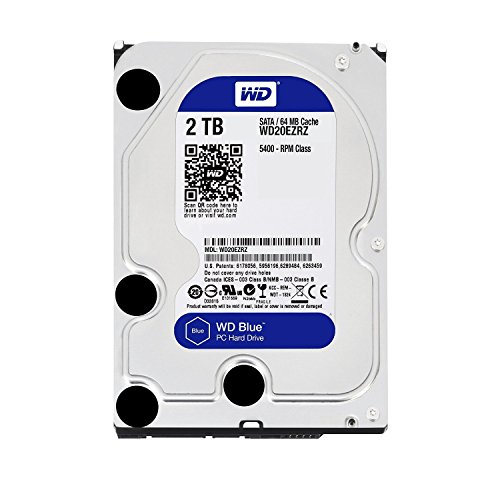 Western Digital WD Blue 2TB WD20EZRZ
 Seagate BarraCuda 4TB ST4000DM004
 Seagate IronWolf 4TB ST4000VN006









