We independently review everything we recommend. When you buy through our links, we may earn a commission. As an Amazon Associate we earn from qualifying purchases.
Best Budget USB Wi-Fi Adapters for Desktops and Laptops
Compare five budget USB Wi-Fi adapters with dual-band AC600 to AC1300 speeds and nano or high-gain antennas for Windows desktops, laptops and Linux PCs.
BrosTrend Linux WiFi Adapter for Ubuntu, Mint, Debian, Lubuntu, Xubuntu, Mate, Zorin, PureOS, Raspberry Pi 2+, Windows 11/10, 1200Mbps, 5GHz/2.4GHz, Long Range 2 x 5dBi External Antennas, USB 3.0
Compare five budget USB Wi-Fi adapters with dual-band AC600 to AC1300 speeds and nano or high-gain antennas for Windows desktops, laptops and Linux PCs.
⭐ Key Takeaways
Quick answer: Our top pick is TP-Link AC1300 USB WiFi Adapter (Archer T3U) – 2.4G/5G Dual Band Wireless…, with TP-Link USB WiFi Adapter for Desktop PC, AC1300 USB 3.0 Wireless Dual Band… as a strong alternative.
Plenty of desktop PCs still ship without Wi-Fi, and plenty of older laptops are stuck with slow or failing wireless cards. A USB Wi-Fi adapter solves both problems in minutes: plug it in, install the driver, and the computer joins a modern dual-band network without opening the case or running a cable across the room.
Budget adapters split into two camps. Tiny nano dongles disappear into a laptop’s USB port and travel well, while larger adapters with high-gain antennas pull in weaker signals for desktops in back rooms. This guide compares five proven options from AC600 to AC1300.
As an Amazon Associate, we earn from qualifying purchases.
Quick answer
The TP-Link Archer T3U is the budget USB Wi-Fi adapter most people should buy: it delivers dual-band AC1300 speed over USB 3.0 in a compact body that suits desktops and laptops alike. If your PC sits far from the router and signal strength is the problem, choose the high-gain Archer T3U Plus instead.
TP-Link AC1300 USB WiFi Adapter (Archer T3U) – 2.4G/5G Dual Band Wireless Network Adapter for PC Desktop, MU-MIMO WiFi Dongle, USB 3.0
Top Pick
TP-Link AC1300 USB WiFi Adapter (Archer T3U) – 2.4G/5G Dual Band Wireless Network Adapter for PC Desktop, MU-MIMO WiFi Dongle, USB 3.0
The Archer T3U is the balanced default in this category. It is an AC1300 adapter, rated for up to 867 Mbps on the 5 GHz band and 400 Mbps on 2.4 GHz, and it connects over USB 3.0 so the port itself does not bottleneck the faster band. MU-MIMO support helps it hold speed on busy networks with a compatible router. The body is a compact mini dongle with an internal antenna: bigger than a nano, small enough to leave plugged into a laptop or tuck behind a desktop. Drivers cover Windows 11 back through XP, plus older Mac OS X versions.
The internal antenna is the main compromise. In the same room as the router, performance is strong, but through several walls a high-gain model will hold a steadier connection. Mac support also stops at older OS X releases, so recent Mac owners should look elsewhere. For the typical job, adding fast dual-band Wi-Fi to a Windows desktop or reviving an aging laptop, the T3U hits the best balance of speed, size and simplicity in this guide, and its USB 3.0 connection gives it headroom that USB 2.0 rivals lack.
TP-Link USB WiFi Adapter for Desktop PC, AC1300 USB 3.0 Wireless Dual Band Network Adapter with High Gain Antenna (Archer T3U Plus), MU-MIMO
Runner-Up
TP-Link USB WiFi Adapter for Desktop PC, AC1300 USB 3.0 Wireless Dual Band Network Adapter with High Gain Antenna (Archer T3U Plus), MU-MIMO
The Archer T3U Plus takes the same AC1300 chipset as the T3U and adds the thing weak-signal setups need most: a high-gain external antenna. The antenna adjusts and rotates so you can aim it for the best reception, and it makes a real difference in back bedrooms, basements and offices separated from the router by several walls. Speeds match the T3U at up to 867 Mbps on 5 GHz and 400 Mbps on 2.4 GHz, with MU-MIMO and USB 3.0, and Windows and older Mac OS support is the same story.
The trade-off is size. With the antenna up, this is a desktop adapter, not something to leave hanging out of a laptop in a bag, and it can crowd neighboring USB ports on a cramped rear panel. It also cannot create signal where none exists: if your router’s coverage is the real problem, a mesh node or a relocated router helps more. But when the network is fine and one PC simply has a weak radio or a bad position, the T3U Plus is the strongest budget fix here, and the antenna folds down when you need to move the machine.
TP-Link Nano AC600 USB WiFi Adapter (Archer T2U Nano) – 2.4G/5G Dual Band Wireless Network Adapter for PC Desktop, Travel Size
TP-Link Nano AC600 USB WiFi Adapter (Archer T2U Nano) – 2.4G/5G Dual Band Wireless Network Adapter for PC Desktop, Travel Size
The Archer T2U Nano is built around one idea: disappear. The nano body sits almost flush with a laptop’s side, so it can stay plugged in permanently, in a bag, on a train, anywhere, without snagging or snapping off. Despite the size it is a proper dual-band AC600 adapter, rated for up to 433 Mbps on 5 GHz and 200 Mbps on 2.4 GHz, which is plenty for browsing, email, documents and standard video calls. It connects over USB 2.0, supports Windows 11 through XP and older Mac OS X versions, and setup is a quick driver install.
Physics sets the limits. A tiny internal antenna cannot match the range of the high-gain models, and AC600 speeds cap large downloads well below the AC1300 adapters. The USB 2.0 interface is fine at these speeds but leaves no headroom. None of that matters for the intended job: giving an older laptop modern dual-band Wi-Fi, replacing a failed internal card, or keeping a spare in a travel kit. For light-duty machines, the T2U Nano is the cheapest, neatest solution in this guide, provided the router is not at the far end of a large house.
The Archer T2U Plus pairs the modest AC600 speed class with a proper 5dBi high-gain antenna, and that combination makes sense for a specific buyer: a desktop PC that sits far from the router but does not need top speeds. The antenna rotates for the best angle, and at up to 433 Mbps on 5 GHz and 200 Mbps on 2.4 GHz, the adapter handles streaming, browsing and office work comfortably once it has a clean signal to work with. It uses USB 2.0, which is no limitation at AC600 speeds, and drivers cover Windows 11 through XP and older Mac OS X releases.
Think of it as a range fix rather than a speed upgrade. If your desktop already connects but drops out because the signal is weak, the antenna is the cure. If the signal is strong and you want faster transfers, the AC1300 models above are the better spend. The antenna makes it bulky for laptop use and can block adjacent ports. For a fixed desktop in a far room, though, it delivers the most useful thing a budget adapter can: a stable connection that stays up all day.
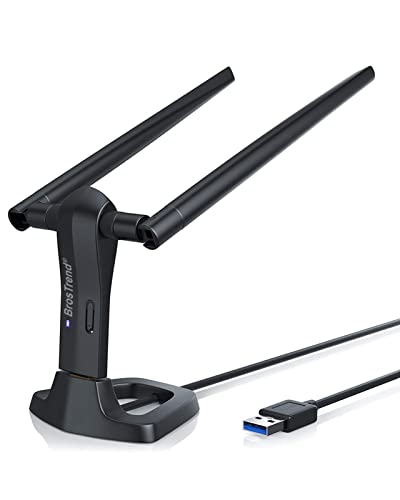
BrosTrend Linux WiFi Adapter for Ubuntu, Mint, Debian, Lubuntu, Xubuntu, Mate, Zorin, PureOS, Raspberry Pi 2+, Windows 11/10, 1200Mbps, 5GHz/2.4GHz, Long Range 2 x 5dBi External Antennas, USB 3.0
BrosTrend Linux WiFi Adapter for Ubuntu, Mint, Debian, Lubuntu, Xubuntu, Mate, Zorin, PureOS, Raspberry Pi 2+, Windows 11/10, 1200Mbps, 5GHz/2.4GHz, Long Range 2 x 5dBi External Antennas, USB 3.0
The BrosTrend AC3L exists for the buyers the big brands underserve: Linux users. It supports a long list of distributions, including Ubuntu, Mint, Debian, Kali and Raspbian, plus Raspberry Pi boards, and the maker maintains drivers and installation guidance for them, which is exactly where generic adapters usually fall apart. Hardware is strong for the class: AC1200 dual-band speeds up to 867 Mbps on 5 GHz and 300 Mbps on 2.4 GHz, two 5dBi external antennas for long range, a USB 3.0 connection, and a five-foot USB extension cable in the box so you can position the adapter for the best signal. Windows 11 and 10 are supported too.
The compromises are real. There is no Mac support, the twin antennas make it a desktop-only device, and some Linux kernels need a manual driver install rather than true plug and play, so a little terminal confidence helps. The adapter is also larger and more utilitarian than the TP-Link designs. For a Linux workstation, a media PC or a Raspberry Pi project that needs dependable Wi-Fi, though, no other adapter in this guide comes close, and the extension cable is a thoughtful inclusion for signal hunting.
How to choose
Start with the speed class. AC600 adapters are enough for browsing, email and video calls. AC1200 and AC1300 models add headroom for streaming, large downloads and local network transfers, and they pair better with modern routers.
Antenna choice matters as much as speed. Nano and mini adapters with internal antennas are neat and portable but have the shortest range. A high-gain external antenna is the single best upgrade for a desktop in a far room, and an extension cable or cradle that lets you position the adapter helps almost as much.
Check the interface and the drivers. USB 3.0 is worth having on AC1200 and faster adapters, while USB 2.0 is no bottleneck at AC600. Confirm your operating system is on the support list before buying, especially for Mac and Linux machines, where driver support varies far more than on Windows. Wide adapters can also block neighboring USB ports, which an extension cable solves.
Who should skip
Skip a USB adapter if your computer’s problem is actually the router: one adapter cannot fix dead zones across a whole home, where a mesh system or a better-placed router is the real answer. Skip nano dongles for a desktop that lives far from the router, since range is their weakest point. And if your laptop’s internal card is failing under warranty, get it repaired instead of masking the fault with a dongle.
FAQ
Will a USB Wi-Fi adapter work with my router?
Yes, in almost every case. USB adapters follow the standard Wi-Fi generations, and an AC adapter connects happily to older N routers and newer AX routers alike, running at the fastest speed both sides support. Dual-band adapters can use either the 2.4 GHz or 5 GHz network your router broadcasts, and setup only needs your Wi-Fi password.
Is AC600 fast enough, or do I need AC1300?
For browsing, email, video calls and HD streaming on one machine, AC600 is enough, especially on the 5 GHz band. Choose AC1200 or AC1300 if you download large files, transfer data across your home network, stream in 4K, or share the connection with a busy household. Your internet plan still sets the ceiling for anything online.
Why is my connection still slow with a new adapter?
Position is the usual culprit. A dongle plugged into the back of a metal desktop case, facing a wall, gets a poor signal whatever its rating. Move the adapter to a front port, use an extension cable to raise it, or switch to a high-gain antenna model. Also check you are on the right band: 5 GHz for speed, 2.4 GHz for range.
Do USB Wi-Fi adapters work on Linux?
Some do, many do not, and support depends on the chipset and your kernel version. Adapters sold specifically for Linux, like the BrosTrend in this guide, ship with maintained drivers for popular distributions and Raspberry Pi boards. Before buying any other adapter for Linux, check the chipset against your distribution’s documentation, because a bargain dongle with no driver is no bargain.
Final verdict
Most buyers should start with the Archer T3U: fast, compact and simple. The T3U Plus answers weak signals on a desktop, the T2U Nano is the neat travel option, and the T2U Plus fixes far-room desktops that need stability more than speed. Linux users should go straight to the BrosTrend AC3L. Match the adapter to your signal problem first and your speed ambitions second.
E
Emubox Editorial Team
We compare specs, materials and verified owner reviews before a product earns a spot. Rankings are never paid.
Affiliate disclosure. As an Amazon Associate we earn from qualifying purchases at no extra cost to you. Prices accurate as of the date shown.
Best 2mm 70 cm portable antennas compared: telescopic radio antennas near 70 cm, with connectors, bands and collapsed sizes explained before you buy today.
Find the best thermostat setting for winter and summer, with energy-saving setbacks, humidity tips, and smart schedules for a comfortable home year-round.
The best affordable business computer monitors balance sharp text, eye comfort and lasting value. Compare four reliable office displays built for long workdays.
Looking for the best inexpensive HD TVs non smart? Compare five genuinely non-smart HD televisions with tuners, HDMI inputs and simple setup for any small room.




 BrosTrend Linux WiFi Adapter for Ubuntu, Mint, Debian, Lubuntu, Xubuntu, Mate, Zorin, PureOS, Raspberry Pi 2+, Windows 11/10, 1200Mbps, 5GHz/2.4GHz, Long Range 2 x 5dBi External Antennas, USB 3.0









