Our Short List of 3
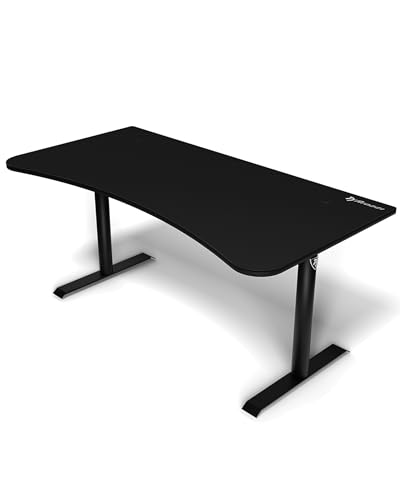
- Very deep 32.3-inch surface with room for monitors, keyboard and mouse
- Full-surface washable microfiber mouse pad included
- Three cutouts for cable management and monitor mounts
- Height-adjustable steel legs with a 176-pound load capacity

- Huge 72-inch wing-shaped surface with dual-motor sit-stand adjustment
- 220-pound load capacity with four height presets and anti-collision
- Retractable, rotating keyboard tray and LED monitor shelves
- Carbon-fiber textured surface that resists water and heat

- 63-inch reversible L shape that fits either corner
- Five-tier bookshelf and included CPU stand keep gear organized
- Built-in charging station with 2 AC outlets and 2 USB ports
- RGB LED strip with app and remote control
All 4 Picks at a Glance
| Product | Specs | Action |
|---|---|---|
| Arozzi Arena |
| Check price on Amazon |
| EUREKA ERGONOMIC Aero 72 |
| Check price on Amazon |
| SEDETA 63-Inch L-Shaped Gaming Desk |
| Check price on Amazon |
 MOTPK U-Shaped Gaming Desk |
| Check price on Amazon |
Key takeaways
- Find the best big gaming desks for triple monitors, full PC towers and sprawling setups. Compare 60 to 72 inch desks with specs, pros and cons.
A cramped desk ruins a good gaming setup faster than any hardware bottleneck. When the monitor barely fits, the keyboard hangs off the edge and the PC tower ends up on the floor, every session feels like a compromise. The best big gaming desks solve that problem with a simple idea: give your gear room to breathe. With 60 inches or more of width, a large gaming desk holds two or three monitors, a full-size keyboard, a spacious mouse area, speakers and a headset stand, all at once, without forcing you to stack things on top of each other.
This guide focuses on genuinely large desks, from 60 inches up to 72 inches wide, that are built with gaming in mind: sturdy frames that hold heavy monitor arms and PC towers, cable management that keeps a multi-device setup tidy, and surfaces deep enough for low-sensitivity mouse movement.
At a Glance
| Product | Best for | Key spec |
|---|---|---|
| Arozzi Arena | Triple-monitor setups and a full-surface mouse pad | 63 in wide, 32.3 in deep, 176 lb capacity |
| EUREKA ERGONOMIC Aero 72 | Sit-stand gaming and studio-style stations | 72 in wide, 29.5 to 48 in height range, 220 lb capacity |
| SEDETA 63-Inch L-Shaped Gaming Desk | Corner setups with storage and built-in power | 63 in L shape, 2 AC outlets, 2 USB ports |
| MOTPK U-Shaped Gaming Desk | Wrapping around a three-sided workstation | 60 in wide, 300 lb capacity, U-shaped desktop |
How to Choose a Big Gaming Desk
Size comes first, and it is worth measuring twice. A desk listed at 63 or 72 inches wide sounds generous, but the depth matters just as much. A surface around 30 inches deep or more leaves room for a monitor at a comfortable viewing distance, a full-size keyboard and a mouse pad with real sweep room, while a shallow 24-inch desk can leave your elbows hanging off the front edge. Measure the wall or corner where the desk will live, leave clearance for your chair to roll back, and check the door swing if the room is tight.
Weight capacity is the second factor, and it separates real gaming desks from decorative ones. A big desk often carries two or three monitors on arms, a desktop tower, speakers, a microphone arm and assorted peripherals, and that load adds up quickly. Look for a stated capacity of at least 150 pounds for a standard multi-monitor setup, and more if a liquid-cooled tower or a large ultrawide monitor will sit on the surface. Steel frames and thick desktops resist wobble during intense play, which matters when a shaky surface makes a monitor arm tremble at the wrong moment.
Height adjustment is the third decision. Fixed-height desks are simpler and often sturdier, which suits a single dedicated gaming spot. Electric sit-stand desks, like the 72-inch model below, let you switch between sitting and standing during long sessions, and they help households where people of different heights share one setup. If you choose an adjustable desk, check the height range against your chair and monitor height, and look for memory presets so you are not re-adjusting every time.
Cable management is easy to overlook and painful to fix later. A big desk invites more gear, and more gear means more cables. Built-in cutouts, an under-desk basket or tray, and a power strip mounted to the desk keep cables off the floor and away from your feet. Desks with built-in AC outlets and USB ports reduce the need for a separate power strip entirely, which is a genuine quality-of-life upgrade for a battlestation with a PC, two monitors, a console and a phone charger.
Shape and layout come next. A straight rectangular desk is the most flexible and the easiest to place against any wall. An L-shaped desk turns a corner into a two-zone workspace, with one side for gaming and the other for a laptop, homework or streaming controls. A U-shaped desk wraps around you and puts a third surface within arm’s reach, which suits streamers and creators who juggle a main monitor, a secondary display and a control deck. The trade-off is floor space, since L and U shapes commit you to a corner.
Finally, consider the surface itself. A full-surface mouse pad, like the one on the Arozzi Arena, removes the need to buy a separate desk mat and gives consistent glide across the whole desktop. A carbon-fiber texture looks the part and resists scratches, while a smooth laminate is easier to wipe clean. LED lighting is a nice touch for atmosphere, but treat it as a bonus rather than a deciding factor, since a good desk should earn its place on size, strength and layout first.
Product Reviews
Arozzi Arena
- Very deep 32.3-inch surface with room for monitors, keyboard and mouse
- Full-surface washable microfiber mouse pad included
- Three cutouts for cable management and monitor mounts
- Height-adjustable steel legs with a 176-pound load capacity
The Arozzi Arena has been a staple of large gaming desks for years, and its appeal is easy to understand: it is a wide, deep, no-nonsense surface built around the way people actually play. The desktop measures 63 inches wide and 32.3 inches deep, giving about 14 square feet of usable space, which is enough for three large monitors side by side with room left over for a keyboard, a headset stand and a drink. The depth is the standout number here, since 32 inches of depth lets you push monitors back to a comfortable distance and still keep a full-size keyboard and a large mouse area in front of you.
The most distinctive feature is the full-surface mouse pad. The entire desktop is covered with a microfiber pad that sits on an MDF board, and it is water-resistant, washable and held in place by an anti-slip rubber bottom. That means there is no separate desk mat to slide around, and the mouse glides the same way anywhere on the surface. Three cutouts in the desktop serve double duty: they route cables down to a mesh basket mounted under the desk, and they accept monitor mounts, so clamp-style arms can attach without eating into the edges of the surface.
The steel legs are height adjustable by up to about 4 inches, taking the desk from roughly 28 to 32 inches high, which covers most standard gaming chairs. The desk is rated for about 176 pounds of load and weighs around 86 pounds itself, which speaks to the sturdiness of the frame.
Pros:
Cons:
EUREKA ERGONOMIC Aero 72
- Huge 72-inch wing-shaped surface with dual-motor sit-stand adjustment
- 220-pound load capacity with four height presets and anti-collision
- Retractable, rotating keyboard tray and LED monitor shelves
- Carbon-fiber textured surface that resists water and heat
The EUREKA ERGONOMIC Aero 72 is the largest desk in this guide, and it takes a different approach from the rest: instead of a flat rectangle, it uses a wing-shaped desktop that curves toward the user. The surface is 72 inches wide and about 23.6 inches deep, with the wings creating extra space at the sides for a streaming deck, a tablet or a notebook. The shape gives more forearm support than a straight edge, which is noticeable during long sessions, and it makes the desk easy to fit into a corner despite its size.
A dual-motor lifting system moves the surface from 29.5 inches up to 48 inches, with up to four programmable height presets and anti-collision protection that stops the desk if it meets an obstacle. The desk is rated for 220 pounds, which is enough for a heavy tower, multiple monitors and accessories. A retractable keyboard tray slides out, rotates and tilts, which frees up desktop space and helps with wrist position, while convertible LED shelves add a monitor riser with lighting.
Pros:
Cons:
SEDETA 63-Inch L-Shaped Gaming Desk
- 63-inch reversible L shape that fits either corner
- Five-tier bookshelf and included CPU stand keep gear organized
- Built-in charging station with 2 AC outlets and 2 USB ports
- RGB LED strip with app and remote control
The SEDETA 63-Inch L-Shaped Gaming Desk is built for corners. The L layout turns an otherwise awkward corner into a full workstation, with 63 inches of surface spread across two legs that can hold two monitors, two desktop towers and a laptop at the same time. The desk is reversible, so the longer leg can sit on the left or the right depending on the room, and a five-tier bookshelf mounts on either side to match. That flexibility makes it one of the easiest big desks to fit into a real room.
Storage is where this desk pulls ahead of the straight desks in the guide. The five-tier shelf keeps books, games, a console or a printer off the main surface, and an included CPU stand lifts the tower off the floor and out of the dust. A built-in charging station with two AC outlets and two USB ports powers up to four devices directly from the desktop, which cuts down on power strips and cable clutter. An RGB LED strip runs along the desk with tens of thousands of colors and multiple modes, controlled through an app and a remote, with a music-sync mode for atmosphere.The trade-offs are the fixed height and the lack of a stated weight capacity for the desktop and shelves, so heavy monitor arms and very large towers deserve a careful check before you commit. The particleboard-class desktop is a standard construction for this style of desk, and the corner footprint needs genuine wall space on both sides.
Pros:
Cons:
MOTPK U-Shaped Gaming Desk
- U-shaped desktop adds extra usable surface on both sides
- 300-pound load capacity, the highest in this guide
- Large monitor stand, two storage shelves and a headphone hook
- Built-in power station with 3 AC outlets and 2 USB ports
The MOTPK U-Shaped Gaming Desk wraps around the user, which is the most immersive layout in this guide. The U-shaped desktop measures about 60 inches wide and 27.5 inches deep, with two side wings that add roughly 14 percent more usable surface than a straight desk of the same width. That extra surface is ideal for a three-monitor arrangement, a laptop beside the main display, or a streaming setup where a control deck and a second screen need to stay within reach without crowding the keyboard.
The desk is rated for up to 300 pounds, which is the highest capacity in this guide, and the metal frame supports that load across the three desktop panels. A large monitor stand raises the displays to a more comfortable eye level and frees space underneath for a keyboard or a notebook. Two storage shelves hold consoles, books or peripherals, and a built-in power station with three AC outlets and two USB ports keeps phones, headsets and other devices charging from the desk itself. The LED strip offers ten colors and twenty dynamic modes, and a solid iron headphone hook keeps a headset off the surface.
Pros:
Cons:
Comparison: Which Big Gaming Desk Fits You
The four desks in this guide solve the same problem in different ways, so the right choice depends on your room and your setup rather than a single winner. If your priority is a deep, simple surface for a triple-monitor rig, the Arozzi Arena is the most straightforward pick: its 32-inch depth and full-surface mouse pad are hard to beat for a classic battlestation. If you want to stand during long sessions or share the desk with someone of a different height, the EUREKA ERGONOMIC Aero 72 is the only sit-stand option here, and its 72-inch wing-shaped surface is the largest in the guide.
For a corner room, the choice is between the SEDETA L-shaped desk and the MOTPK U-shaped desk. The SEDETA is the better fit when storage matters most, thanks to its five-tier bookshelf and CPU stand, and its reversible layout adapts to either corner. The MOTPK wins on raw capacity and wraparound space, with a 300-pound rating and a U shape that keeps a third display or a control deck close at hand.
FAQ
What size counts as a big gaming desk?
A desk around 60 inches wide or more is generally considered big in the gaming desk category, with 63 to 72 inches being the sweet spot for two or three monitors. Depth matters too: look for at least 24 inches, and 30 inches or more if you use a large mouse pad or a low-sensitivity mouse setup.
How many monitors fit on a 63-inch gaming desk?
A 63-inch desk comfortably holds two large monitors side by side, and three monitors if they are 24 to 27 inches each and mounted on arms or a shared stand.
Do I need a sit-stand gaming desk?
A sit-stand desk is not essential, but it helps during long sessions by letting you change posture without leaving your setup. It is most useful if you game and work at the same desk, or if people of different heights share the station. A fixed-height desk is usually sturdier and simpler, so it suits a dedicated single-user gaming spot.### Are L-shaped and U-shaped desks better than straight desks?
Neither shape is universally better. L-shaped and U-shaped desks use corners efficiently and give you extra surface within arm’s reach, which suits streamers and multi-device setups. Straight desks are more flexible, easier to move and simpler to place against any wall, which suits a room that may change layout later.
How much weight should a big gaming desk hold?
For a multi-monitor setup with a desktop tower, look for a stated capacity of at least 150 pounds. Desks in this guide range from about 176 to 300 pounds, which covers most gaming hardware.
How do I keep cables tidy on a large desk?
Use the desk’s built-in cable cutouts and under-desk basket or tray, and route cables from the monitors and PC through them before plugging anything in. Desks with built-in AC outlets and USB ports reduce the number of power strips, and a monitor arm with cable routing keeps display cables off the surface entirely.## Conclusion
A big gaming desk is one of the most practical upgrades a gaming setup can get, because it removes the daily friction of a cramped surface. The Arozzi Arena suits a deep triple-monitor rig, the EUREKA ERGONOMIC Aero 72 suits sit-stand gamers and streamers who need the largest surface, the SEDETA L-shaped desk suits corner rooms that need storage and built-in power, and the MOTPK U-shaped desk suits a wraparound workstation with a heavy load. Measure your room, count your monitors, check the weight capacity, and choose the shape that matches how you actually play. The right desk disappears into the background and lets the games take center stage.
Disclosure: As an Amazon Associate, we earn from qualifying purchases.