
Our Short List of 3
All 5 Picks at a Glance
| Product | Specs | Action |
|---|---|---|
 Logitech K400 Plus Wireless Touch TV Keyboard | Check price on Amazon | |
 Logitech K600 TV Keyboard with Integrated Touchpad and D-Pad | Check price on Amazon | |
 Microsoft All-in-One Media Keyboard | Check price on Amazon | |
 Rii i8+ Mini Wireless Keyboard with Touchpad | Check price on Amazon | |
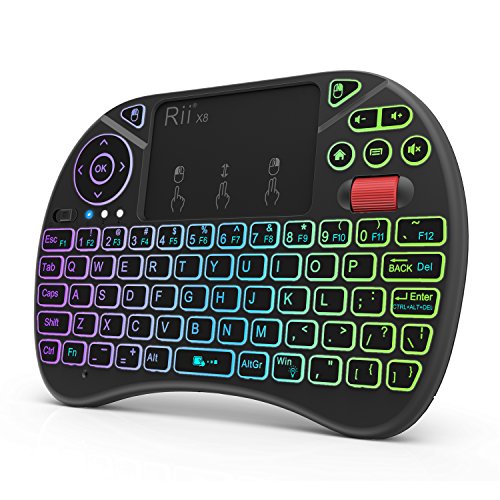 Rii X8 Mini Wireless Keyboard with Touchpad | Check price on Amazon |
Key takeaways
- Five wireless keyboards with built-in touchpads for controlling a smart TV, streaming box or HTPC from the couch, compared on range, layout and battery.
Typing a password or search term with a TV remote is slow, and a separate mouse has nowhere to run on a couch cushion. A keyboard with a built-in touchpad solves both problems in one lap-friendly board: QWERTY keys for text entry, a trackpad for the cursor, and media keys for playback. The five picks split into two camps. The Logitech K400 Plus, Logitech K600 TV and Microsoft All-in-One Media Keyboard are full-size boards for people who type often, while the Rii i8+ and Rii X8 are handheld mini keyboards that work more like an oversized remote. All five connect wirelessly and need no software beyond pairing or a spare USB port.
As an Amazon Associate, we earn from qualifying purchases.
Quick answer
The Logitech K400 Plus is the touchpad keyboard most living rooms should start with: a full QWERTY layout, a 3.5-inch touchpad and a 10-metre Unifying receiver connection. Smart TV owners who switch between devices should look at the Logitech K600 TV, while the handheld Rii i8+ and Rii X8 suit anyone who wants a remote-sized board with a backlight.
Logitech K400 Plus Wireless Touch TV Keyboard
The K400 Plus (model 920-007119) is the default recommendation in this category because it asks so little of the buyer. Plug the included Logitech Unifying receiver into a USB port on a PC, mini PC or streaming box and the board works immediately, with no pairing menus and no Bluetooth requirement. The trade-off is that there is no Bluetooth at all, so a device without a free USB-A port cannot use it.
The layout pairs a compact QWERTY deck with a 3.5-inch touchpad on the right, complete with left and right click buttons, plus a second left-click button on the top-left corner so you can click with one thumb while steering with the other. Media hot keys and volume controls sit along the top, the keys are quiet, and Logitech rates the switches for 5 million keystrokes. Two pre-installed AA batteries deliver up to 18 months of use, helped by a physical on/off switch, and the 10-metre (33-foot) range covers most living rooms. At roughly 14 inches wide and 390 grams, it is light enough to pass around the sofa. Compatibility covers Windows 7 and later, Android 7 and later, and Chrome OS. There is no backlight, the main reason to look at the backlit Rii models below instead.
Logitech K600 TV Keyboard with Integrated Touchpad and D-Pad
The K600 TV (model 920-008822) is the one pick here designed to talk to a smart TV directly rather than to a computer plugged into one. Alongside the Unifying receiver it adds Bluetooth, and Easy-Switch keys let it jump between up to three paired devices, so one board can serve a TV, a laptop and a phone. Before buying, check your set against the supported list: full smart TV control covers Samsung Tizen, LG webOS and Sony Bravia Android TV models from 2016 onward, plus Windows, macOS, iOS, Android and Chrome OS devices.
Its circular precision touchpad sits above a D-pad, a pairing that makes sense on TV grid menus, where the D-pad steps through tiles and the touchpad handles free cursor movement in a browser. Dedicated media and navigation keys include Home and Search shortcuts, and the round chiclet keys are easy to find by feel. Range is a generous 15 metres (49 feet), and two pre-installed AAA batteries are rated for up to 12 months. At about 367 mm wide and 500 grams, it feels closer to a slim desktop keyboard than a remote. Like the K400 Plus it has no backlight, and the smart TV features only wake up on supported sets, so owners of older TVs will use it as a plain PC keyboard.
Microsoft All-in-One Media Keyboard
Microsoft’s All-in-One Media Keyboard (model N9Z-00001) is the typist’s option of the three full-size boards. The keys are spaced like a regular desktop keyboard, and the integrated multi-touch trackpad supports gestures such as swiping and pinch-to-zoom rather than simple pointing alone. A dedicated mouse button on the left edge lets your left thumb click while your right hand works the pad, and the top row carries volume controls plus three customizable media hotkeys for your most-used apps or services.
Two details set it apart from the Logitech boards. The 2.4 GHz USB transceiver link is protected with AES 128-bit encryption, which matters if you type passwords on a shared machine, and the keyboard is spill-resistant, a useful trait for something that lives next to drinks on a coffee table. Microsoft rates the range at 30 feet, and the board runs on two AAA batteries. The catch is platform focus: it is designed for Windows, with the listing centred on Windows PCs and media setups, so smart TV and mobile support is narrower than the K600’s. If your living-room screen is driven by a Windows PC and you value typing comfort and an encrypted link over TV-native tricks, this is the board to pick.
Rii i8+ Mini Wireless Keyboard with Touchpad
The Rii i8+ shrinks the whole idea down to remote size. This handheld board packs 92 keys into a game-controller-style shell, with a central touchpad whose sensitivity (DPI) can be adjusted, and it connects over 2.4 GHz through a small USB receiver. Because it behaves like a standard USB keyboard and mouse, the listing rates it for PCs and laptops, smart TVs, Android TV boxes, Raspberry Pi boards and game consoles, which makes it a natural fit for the streaming boxes this site covers.
An LED backlight makes the legends readable in a dark room, something neither full-size Logitech here offers, and the built-in rechargeable lithium-ion battery charges over USB instead of asking for spare cells. Multimedia keys handle volume and playback. The compromises are about size: the keys are fine for search terms, URLs and passwords, but nobody will write an email on them comfortably, and the small touchpad means long scrolling sessions take several swipes. Treat the i8+ as a remote replacement that happens to type, not as a keyboard that happens to be small, and it makes sense as a second controller kept on the coffee table.
Rii X8 Mini Wireless Keyboard with Touchpad
The Rii X8 takes the handheld formula and adds the two things the i8+ lacks: a physical scroll wheel and a 7-colour RGB backlight. The scroll wheel, worked with a thumb, is the fastest way to move through long streaming menus and web pages on a board this size, and it sits alongside the touchpad, left and right mouse buttons, multimedia keys and PC gaming control keys. The touchpad supports multi-finger gestures: a single-finger tap clicks, a two-finger tap right-clicks, a two-finger drag scrolls, and Fn plus Space adjusts touchpad speed.
Connection is 2.4 GHz wireless through a USB receiver, and the internal battery is rechargeable, so the board is ready for Android TV boxes, PCs, Macs and streaming devices such as the Nvidia Shield named in its listing. The RGB backlight cycles through seven colours and makes the board easy to read in a dark room, though leaving it lit shortens the time between charges. As with the i8+, the small keys suit short bursts of typing rather than documents, and choosing between the two Rii boards comes down to the simpler i8+ versus this model’s wheel and lighting. For menu-heavy streaming use, the wheel usually wins.
How to choose
Start with the connection. A USB receiver board works with almost anything that has a USB port, including most Android TV boxes and mini PCs, and needs no pairing; Bluetooth only helps if your device has no free port or you also want to type on a phone or tablet. Next, decide whether the keyboard must drive the TV itself: only the K600 TV here offers native smart TV control on supported Samsung, LG and Sony sets, while the rest assume a computer or box feeds the screen. Touchpad size matters more than key count for couch use, so frequent cursor work favours the full-size boards, while a backlight favours the Rii pair in dark rooms. Battery style is a lifestyle choice: AA and AAA boards run for many months and revive instantly with fresh cells, while the rechargeable Rii boards need a cable every so often but never a battery drawer. One maintenance note for Unifying receiver owners: Logitech publishes a firmware updater for its receivers, and running it once at setup keeps an older receiver patched. Finally, if you type passwords on a shared machine, the Microsoft board’s AES encryption is a real differentiator.
Who should skip
Skip this whole category if your living-room typing is long-form: email, documents and chat are better served by a proper desk keyboard and a separate mouse on a lap desk. Skip the handheld Rii boards if you plan to type more than a few lines at a time. Skip receiver-only models if your streaming device has no free USB port, and skip the K600 TV if your television is not on its supported list, because its headline features will stay dormant. Anyone who mainly watches through apps that accept no text or cursor input beyond a remote will also gain little here.
Frequently asked questions
Do touchpad keyboards work with smart TVs or only with PCs?
Both, with a caveat. Any of these boards will drive a PC, mini PC or Android TV box connected to the TV, because the host sees a standard keyboard and mouse. Direct control of the television itself is narrower: the Logitech K600 TV supports specified Samsung, LG and Sony models from 2016 onward, while other TVs may accept basic typing without the shortcut keys working.
Is Bluetooth or a USB receiver better for a couch keyboard?
A USB receiver is simpler and more universal: plug it in and the keyboard works, even in a BIOS screen or a recovery menu. Bluetooth removes the dongle and frees the port, which suits phones, tablets and port-starved streaming sticks, but pairing can be fiddly and some TVs restrict what Bluetooth keyboards may do. Boards like the K600 TV that offer both give you a fallback for every device.
How long do the batteries last in a touchpad keyboard?
It varies by power source. Logitech rates the K400 Plus at up to 18 months on two AA batteries and the K600 TV at up to 12 months on two AAA batteries, with on/off switches stretching things further. The rechargeable Rii boards trade that set-and-forget life for convenience, needing a USB top-up after days to weeks of use depending on how much the backlight runs.
Can a touchpad keyboard replace a mouse for everyday PC work?
For navigation, browsing and media control, yes: the full-size boards here have touchpads large enough for all-day pointing, and the Microsoft pad adds multi-touch gestures. For precise work such as photo editing, spreadsheets with tiny cells or fast-paced gaming, a real mouse is still faster and more accurate, so treat the touchpad as a couch solution rather than a desk replacement.
Final verdict
For most people, the Logitech K400 Plus remains the easiest recommendation: simple, long-lived on a pair of AA batteries and comfortable for typing and pointing alike. Choose the Logitech K600 TV if your television is on its supported list and you switch between several devices, and the Microsoft All-in-One if typing feel and an encrypted link matter most. Keep a Rii i8+ or X8 by the remote if your streaming box only needs short searches and menu control, with the X8’s scroll wheel and RGB backlight earning it the nod for menu-heavy use.
Product and ASIN Reference
| Product | ASIN |
|---|---|
| Logitech K400 Plus Wireless Touch TV Keyboard | B014EUQOGK |
| Logitech K600 TV Keyboard with Integrated Touchpad and D-Pad | B07C6LXYHL |
| Microsoft All-in-One Media Keyboard | B00IICMUWS |
| Rii i8+ Mini Wireless Keyboard with Touchpad | B00Z81U3YY |
| Rii X8 Mini Wireless Keyboard with Touchpad | B07D2BG6R5 |









